Unlock a world of possibilities! Login now and discover the exclusive benefits awaiting you.

Announcements
Talend Cloud AWS EU Scheduled Outage: Starting Tues 26 May 21:00 CEST with expected completion Wed 27 May 01:00 CEST
- Qlik Community
- :
- Forums
- :
- Analytics & AI
- :
- Products & Topics
- :
- Visualization and Usability
- :
- Hide zeros columns on Combo Chart
Options
- Subscribe to RSS Feed
- Mark Topic as New
- Mark Topic as Read
- Float this Topic for Current User
- Bookmark
- Subscribe
- Mute
- Printer Friendly Page
Turn on suggestions
Auto-suggest helps you quickly narrow down your search results by suggesting possible matches as you type.
Showing results for

 micheledenardi
Specialist II
2020-03-04
04:16 AM
- Mark as New
- Bookmark
- Subscribe
- Mute
- Subscribe to RSS Feed
- Permalink
- Report Inappropriate Content
Hide zeros columns on Combo Chart
I have a combo chart where the value of one measure is null for some years, while the other measure is not null (see 2018 and 2019 below).
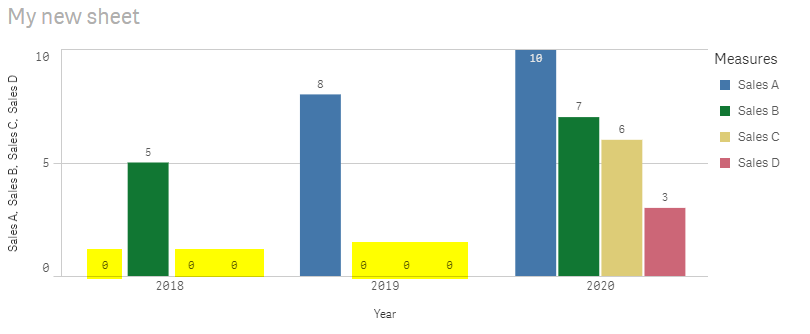
Is there a trick to hide zeros columns (space highlighted in yellow) on combo chart ?
The flag "Include zero values" is already removed but nothing change...
Attached you can find also the source qvf
Michele De Nardi
If a post helps to resolve your issue, please accept it as a Solution.
If a post helps to resolve your issue, please accept it as a Solution.
3,971 Views
- « Previous Replies
-
- 1
- 2
- Next Replies »
10 Replies

 Clever_Anjos
Support
2020-03-04
06:25 AM
- Mark as New
- Bookmark
- Subscribe
- Mute
- Subscribe to RSS Feed
- Permalink
- Report Inappropriate Content
Hi Michelle,
Your requirement cannot be fit using the current version of the combo chart.
"Supress zeros" would hide all 2018 for example if all sales regions were empty/zero.
591 Views

- « Previous Replies
-
- 1
- 2
- Next Replies »