Unlock a world of possibilities! Login now and discover the exclusive benefits awaiting you.

- Qlik Community
- :
- Forums
- :
- Analytics & AI
- :
- Products & Topics
- :
- Visualization and Usability
- :
- How do I write a nested if then statement for coun...
- Subscribe to RSS Feed
- Mark Topic as New
- Mark Topic as Read
- Float this Topic for Current User
- Bookmark
- Subscribe
- Mute
- Printer Friendly Page

 scheibercamo
- Mark as New
- Bookmark
- Subscribe
- Mute
- Subscribe to RSS Feed
- Permalink
- Report Inappropriate Content
How do I write a nested if then statement for count?
Currently I have a rather manual process to ultimately determine the count of a KPI under specific conditions, which works for only two fields (in this case, Master Retarget and Master Age Band):
count(distinct(if([Master Retarget]='Yes' AND [Master Age Band]='Due > 90 Days',[Master ID])))
+
count(distinct(if([Master Retarget]='Yes' AND [Master Age Band]='Due 31 - 60 Days',[Master ID])))
+
count(distinct(if([Master Retarget]='Yes' AND [Master Age Band]='Due 0 - 30 Days',[Master ID])))
+
count(distinct(if([Master Retarget]='Yes' AND [Master Age Band]='Due 61 - 90 Days',[Master ID])))
I want to add a third field [Issue Source] under which I only want the count for 'Regulation' and 'Testing' named items to appear in the final Count.
Ultimately what I want to state is "X number of 'Regulation' and 'Testing' Master IDs were 'Retargeted' and 'Due' at this point in time. "
Accepted Solutions

 swuehl
- Mark as New
- Bookmark
- Subscribe
- Mute
- Subscribe to RSS Feed
- Permalink
- Report Inappropriate Content
Why do you need to use several aggregations? Could it happen that a Master ID appears in more than one Master Age Band and you need to aggregate the distinct count of all the bands?
If not, I would assume that something like
=count(distinct
if([Master Retarget]='Yes' AND
Match([Master Age Band],'Due > 90 Days','Due 31 - 60 Days','Due 0 - 30 Days','Due 61 - 90 Days')
,[Master ID]))
could do the same?
And how does your data model look like?
You could consider using set analysis to filter your records set:
=Count(
{<[Master Retarget] = {'Yes'},
[Master Age Band] = {'Due > 90 Days','Due 31 - 60 Days','Due 0 - 30 Days','Due 61 - 90 Days'} >}
DISTINCT [Master ID])
If you need to add another condition, just add it like
=Count(
{<[Master Retarget] = {'Yes'},
[Master Age Band] = {'Due > 90 Days','Due 31 - 60 Days','Due 0 - 30 Days','Due 61 - 90 Days'},
[Issue Source] = {'Regulation','Testing'} >}
DISTINCT [Master ID])
swuehl
- Mark as New
- Bookmark
- Subscribe
- Mute
- Subscribe to RSS Feed
- Permalink
- Report Inappropriate Content
Why do you need to use several aggregations? Could it happen that a Master ID appears in more than one Master Age Band and you need to aggregate the distinct count of all the bands?
If not, I would assume that something like
=count(distinct
if([Master Retarget]='Yes' AND
Match([Master Age Band],'Due > 90 Days','Due 31 - 60 Days','Due 0 - 30 Days','Due 61 - 90 Days')
,[Master ID]))
could do the same?
And how does your data model look like?
You could consider using set analysis to filter your records set:
=Count(
{<[Master Retarget] = {'Yes'},
[Master Age Band] = {'Due > 90 Days','Due 31 - 60 Days','Due 0 - 30 Days','Due 61 - 90 Days'} >}
DISTINCT [Master ID])
If you need to add another condition, just add it like
=Count(
{<[Master Retarget] = {'Yes'},
[Master Age Band] = {'Due > 90 Days','Due 31 - 60 Days','Due 0 - 30 Days','Due 61 - 90 Days'},
[Issue Source] = {'Regulation','Testing'} >}
DISTINCT [Master ID])
scheibercamo
- Mark as New
- Bookmark
- Subscribe
- Mute
- Subscribe to RSS Feed
- Permalink
- Report Inappropriate Content
This does almost exactly what I needed it to do, thank you so much!
However, it doesn't show "subtotals" of a row-by-row breakdown when I add it as a measurement in a straight table:
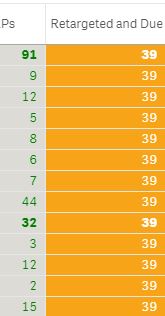
The column to the left is how I want the total of 39 broken across each "group"....
This is what the formula in the column next to it looks like:
count(distinct{<[Issue Source]={'Regulation','Testing'}>}[Master ID])
Do you know why I can't get a row-by-row breakdown?
swuehl
- Mark as New
- Bookmark
- Subscribe
- Mute
- Subscribe to RSS Feed
- Permalink
- Report Inappropriate Content
Well, that's hard to tell without knowing your data, model and context (dimensions etc).
