Unlock a world of possibilities! Login now and discover the exclusive benefits awaiting you.

- Qlik Community
- :
- Forums
- :
- Analytics & AI
- :
- Products & Topics
- :
- Visualization and Usability
- :
- Re: How do i create a count KPI?
- Subscribe to RSS Feed
- Mark Topic as New
- Mark Topic as Read
- Float this Topic for Current User
- Bookmark
- Subscribe
- Mute
- Printer Friendly Page

- Mark as New
- Bookmark
- Subscribe
- Mute
- Subscribe to RSS Feed
- Permalink
- Report Inappropriate Content
How do i create a count KPI?
Hey guys!
In my table there are two collums ( Journal ID and Journal ID Line number)
What i want to create is a KPI or something similar, that displays how many Journal IDs there are, that have more than 3 Line Numbers.
Unfortunately the values of the Line Numbers in the dataset are not correct. However, I can use the Count function in the table to show how many Line numbers each Jounal ID has.
Is there any possibility I can 'count the count' ?
With kind regards,
Lukas

Accepted Solutions

 kaushiknsolanki
- Mark as New
- Bookmark
- Subscribe
- Mute
- Subscribe to RSS Feed
- Permalink
- Report Inappropriate Content
Try this.
Count({<JournalID = {"=Count([JournalID Line Num])>3"}>}JournalID)
Regards,
Kaushik Solanki

 vvira1316
- Mark as New
- Bookmark
- Subscribe
- Mute
- Subscribe to RSS Feed
- Permalink
- Report Inappropriate Content
Hi,
Will you be able to share your sample data file?
Count(distinct [Journal ID]) should give you count of Different Journal IDs and for
Journal IDs with more than 3 lines will be possible with Set Analysis and variable that will count lines number by Journal ID and using that variable to check it will be >= 3 for Journal IDs of the table
BR
- Mark as New
- Bookmark
- Subscribe
- Mute
- Subscribe to RSS Feed
- Permalink
- Report Inappropriate Content
Hey, thank you for the fast Reply 
The ideo to use set Analysis makes sense to me, however, i am not sure about how to implement it (im quite new to Qlik). Do you have any suggestions?
Here is the data.
 Chanty4u
- Mark as New
- Bookmark
- Subscribe
- Mute
- Subscribe to RSS Feed
- Permalink
- Report Inappropriate Content
Try this
=count({<[JournalID Line Num]={">3"}>}distinct Journal'ID)
kaushiknsolanki
- Mark as New
- Bookmark
- Subscribe
- Mute
- Subscribe to RSS Feed
- Permalink
- Report Inappropriate Content
Try this.
Count({<JournalID = {"=Count([JournalID Line Num])>3"}>}JournalID)
Regards,
Kaushik Solanki
vvira1316
- Mark as New
- Bookmark
- Subscribe
- Mute
- Subscribe to RSS Feed
- Permalink
- Report Inappropriate Content
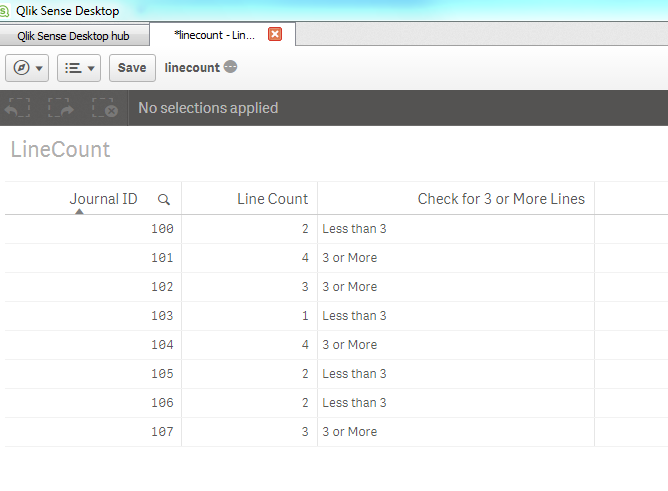
=Count({<[Journal ID]>}[Line Number])
=If(Count({<[Journal ID]>}[Line Number]) >= 3, '3 or More', 'Less than 3')
vvira1316
- Mark as New
- Bookmark
- Subscribe
- Mute
- Subscribe to RSS Feed
- Permalink
- Report Inappropriate Content
LOAD
"Journal ID",
"Journal ID Line No"
FROM [lib://DataConnect/Test9.xlsx]
(ooxml, embedded labels, table is Tabelle1);