Unlock a world of possibilities! Login now and discover the exclusive benefits awaiting you.

- Qlik Community
- :
- Forums
- :
- Analytics & AI
- :
- Products & Topics
- :
- Visualization and Usability
- :
- Re: How to assign null values to a dimension
- Subscribe to RSS Feed
- Mark Topic as New
- Mark Topic as Read
- Float this Topic for Current User
- Bookmark
- Subscribe
- Mute
- Printer Friendly Page

 FilippoValli
- Mark as New
- Bookmark
- Subscribe
- Mute
- Subscribe to RSS Feed
- Permalink
- Report Inappropriate Content
How to assign null values to a dimension
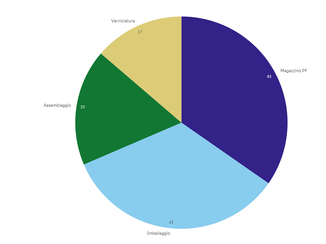

I'm trying to find a way to solve a problem I encountered during the creation of my dashboard. I'll try to explain the situation at my best.
I have a dataset composed by two separate tables, one collecting Measures of devices(each device has it's one id code called Mu_Device), and one called Multimetri containing the devices information and hierarchical information aswell. The tabels are linked with a unique key (device's id code).
Immagine i have two devices "D1" and "D2" measuring energy consumpsion on the same power grid but two diffrent levels, one measuring the total and the other only a part of the network, so that D1=D2+k where k is the energy consuption that I need to calculate. Easy right? k=D1-D2
Currently due to herarchical classification the value of k is displayed in the correct "herarchical category " altough labled as Null
How can I create a new Multimetri row having k as value? NOTE: measure values are not contained in the same table.
I will attach some example data:
Multimetri table:
| Mu_Descr_Device | Mu_Load | Mu_Tipo_Vettore | Mu_Gateway | Mu_Device | NodeId | ParentId |
| GENERAL_POD | Forza Motrice+Luci | Elettrico | 10.41.26.0 | 0 | 0 | |
| Assemblaggio | Forza Motrice+Luci | Elettrico | 10.41.26.23 | 4 | 1 | 0 |
| Illuminazione Verniciatura | Luci | Elettrico | 10.41.26.19 | 22 | 2 | 3 |
| Verniciatura | Forza Motrice+Luci | Elettrico | 10.41.26.19 | 13 | 3 | 0 |
| Illuminazione Assemblaggio | Luci | Elettrico | 10.41.26.23 | 19 | 4 | 1 |
| Illuminazione Imballaggi | Luci | Elettrico | 10.41.26.27 | 20 | 5 | 6 |
| Imballaggio | Forza Motrice+Luci | Elettrico | 10.41.26.27 | 7 | 6 | 0 |
| Illuminazione Magazzino PF | Luci | Elettrico | 10.41.26.26 | 21 | 7 | 8 |
| Magazzino PF | Forza Motrice+Luci | Elettrico | 10.41.26.26 | 14 | 8 | 0 |
Measure table:
| Mi_Device | Mi_Date | Mi_Measure |
| 13 | 01/01/2019 | 3 |
| 19 | 02/01/2019 | 4 |
| 20 | 03/01/2019 | 4 |
| 7 | 04/01/2019 | 3 |
| 21 | 05/01/2019 | 5 |
| 14 | 06/01/2019 | 3 |
| 13 | 07/01/2019 | 2 |
| 19 | 08/01/2019 | 4 |
| 20 | 09/01/2019 | 4 |
| 7 | 10/01/2019 | 4 |
| 21 | 11/01/2019 | 4 |
| 14 | 12/01/2019 | 3 |
| 13 | 13/01/2019 | 4 |
| 19 | 14/01/2019 | 6 |
| 20 | 15/01/2019 | 5 |
| 7 | 16/01/2019 | 5 |
| 21 | 17/01/2019 | 5 |
| 14 | 18/01/2019 | 6 |
| 13 | 19/01/2019 | 3 |
| 19 | 20/01/2019 | 3 |
| 20 | 21/01/2019 | 3 |
| 7 | 22/01/2019 | 5 |
| 21 | 23/01/2019 | 6 |
| 14 | 24/01/2019 | 5 |
| 13 | 25/01/2019 | 5 |
| 19 | 26/01/2019 | 5 |
| 20 | 27/01/2019 | 5 |
| 7 | 28/01/2019 | 4 |
| 21 | 29/01/2019 | 3 |
| 14 | 30/01/2019 | 3 |
Could anyone help? Thanks 🙂

 Channa
- Mark as New
- Bookmark
- Subscribe
- Mute
- Subscribe to RSS Feed
- Permalink
- Report Inappropriate Content
use left join
FilippoValli
- Mark as New
- Bookmark
- Subscribe
- Mute
- Subscribe to RSS Feed
- Permalink
- Report Inappropriate Content
Thank you for the reply, I'm sorry could you please explain? What should I do after left Join?
FilippoValli
- Mark as New
- Bookmark
- Subscribe
- Mute
- Subscribe to RSS Feed
- Permalink
- Report Inappropriate Content
I tried making a left join but for some reason it's giving me error : "There is no open data connection"
Is it because I'm loading data from an excell file? How could I adress this problem?
Attached my code:
Set dataManagerTables = '','Foglio1','Foglio1-1';
//This block renames script tables from non generated section which conflict with the names of managed tables
For each name in $(dataManagerTables)
Let index = 0;
Let currentName = name;
Let tableNumber = TableNumber(name);
Let matches = 0;
Do while not IsNull(tableNumber) or (index > 0 and matches > 0)
index = index + 1;
currentName = name & '-' & index;
tableNumber = TableNumber(currentName)
matches = Match('$(currentName)', $(dataManagerTables));
Loop
If index > 0 then
Rename Table '$(name)' to '$(currentName)';
EndIf;
Next;
Set dataManagerTables = ;
Unqualify *;
[Foglio1_ce09410f-dd83-8c66-0da8-3c5b5f99]:
Hierarchy(NodeId,ParentId,Mu_Descr_Device)LOAD
[Mu_Descr_Device],
[Mu_Load],
[Mu_Tipo_Vettore],
[Mu_Gateway],
[Mu_Device] AS [Mi_Device-Mu_Device],
[NodeId],
[ParentId]
FROM [lib://Prova/PROVA.xlsx]
(ooxml, embedded labels, table is Foglio1);
[Foglio1_bd219530-b258-4479-e695-15cbf137]:
LOAD
[Mi_Device] AS [Mi_Device-Mu_Device],
[Mi_Date],
[Mi_Measure]
FROM [lib://Prova/PROVA2.xlsx]
(ooxml, embedded labels, table is Foglio1);
RENAME TABLE [Foglio1_ce09410f-dd83-8c66-0da8-3c5b5f99] to [Foglio1];
RENAME TABLE [Foglio1_bd219530-b258-4479-e695-15cbf137] to [Foglio1-1];
[autoCalendar]:
DECLARE FIELD DEFINITION Tagged ('$date')
FIELDS
Dual(Year($1), YearStart($1)) AS [Year] Tagged ('$axis', '$year'),
Dual('Q'&Num(Ceil(Num(Month($1))/3)),Num(Ceil(NUM(Month($1))/3),00)) AS [Quarter] Tagged ('$quarter', '$cyclic'),
Dual(Year($1)&'-Q'&Num(Ceil(Num(Month($1))/3)),QuarterStart($1)) AS [YearQuarter] Tagged ('$yearquarter', '$qualified'),
Dual('Q'&Num(Ceil(Num(Month($1))/3)),QuarterStart($1)) AS [_YearQuarter] Tagged ('$yearquarter', '$hidden', '$simplified'),
Month($1) AS [Month] Tagged ('$month', '$cyclic'),
Dual(Year($1)&'-'&Month($1), monthstart($1)) AS [YearMonth] Tagged ('$axis', '$yearmonth', '$qualified'),
Dual(Month($1), monthstart($1)) AS [_YearMonth] Tagged ('$axis', '$yearmonth', '$simplified', '$hidden'),
Dual('W'&Num(Week($1),00), Num(Week($1),00)) AS [Week] Tagged ('$weeknumber', '$cyclic'),
Date(Floor($1)) AS [Date] Tagged ('$axis', '$date', '$qualified'),
Date(Floor($1), 'D') AS [_Date] Tagged ('$axis', '$date', '$hidden', '$simplified'),
If (DayNumberOfYear($1) <= DayNumberOfYear(Today()), 1, 0) AS [InYTD] ,
Year(Today())-Year($1) AS [YearsAgo] ,
If (DayNumberOfQuarter($1) <= DayNumberOfQuarter(Today()),1,0) AS [InQTD] ,
4*Year(Today())+Ceil(Month(Today())/3)-4*Year($1)-Ceil(Month($1)/3) AS [QuartersAgo] ,
Ceil(Month(Today())/3)-Ceil(Month($1)/3) AS [QuarterRelNo] ,
If(Day($1)<=Day(Today()),1,0) AS [InMTD] ,
12*Year(Today())+Month(Today())-12*Year($1)-Month($1) AS [MonthsAgo] ,
Month(Today())-Month($1) AS [MonthRelNo] ,
If(WeekDay($1)<=WeekDay(Today()),1,0) AS [InWTD] ,
(WeekStart(Today())-WeekStart($1))/7 AS [WeeksAgo] ,
Week(Today())-Week($1) AS [WeekRelNo] ;
DERIVE FIELDS FROM FIELDS [Mi_Date] USING [autoCalendar] ;
jTable:
SELECT * from Foglio1;
Left Join Select * from Foglio1-1;
