Unlock a world of possibilities! Login now and discover the exclusive benefits awaiting you.

- Qlik Community
- :
- Forums
- :
- Analytics & AI
- :
- Products & Topics
- :
- Visualization and Usability
- :
- How to calculate "Balance Due"
- Subscribe to RSS Feed
- Mark Topic as New
- Mark Topic as Read
- Float this Topic for Current User
- Bookmark
- Subscribe
- Mute
- Printer Friendly Page

 pgloc2020
- Mark as New
- Bookmark
- Subscribe
- Mute
- Subscribe to RSS Feed
- Permalink
- Report Inappropriate Content
How to calculate "Balance Due"
Hello,
I have following data-
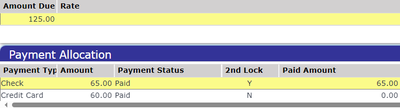
If above scenario, balance due is $60. Because the payment made by CC somehow did not go through even though status shows "Paid".
How I can calculate the "Balance Due" in Qlik?
I used the following expression but it is not working in above example. I am getting Balance Due = 0 instead of 60
IF(([PAYMENT_STATUS] = 'Paid' OR [PAYMENT_STATUS] = 'Blank') ,
SUM(TOTAL_RATE) - SUM(ALLOCATION_AMOUNT))
I also used following but not getting correct Balance due amount-
IF(([PAYMENT_STATUS] = 'Paid' OR [PAYMENT_STATUS] = 'Blank') AND [2nd_LOCK] = 'Y', SUM(TOTAL_RATE) - SUM(ALLOCATION_AMOUNT), 0 )
Please help me to correct my formula to calculate the correct "Balance Due"
I have this column in a straight table chart as a measure.
Many thanks!

.png "Former Employee") JonnyPoole
JonnyPoole
- Mark as New
- Bookmark
- Subscribe
- Mute
- Subscribe to RSS Feed
- Permalink
- Report Inappropriate Content
Its not clear to me what the field names are in your data model vs. what is in your screenshot above.
It sounds like you need to total up the amount due:
Sum( Total [AmountDue])
..and then subtract the amount paid:
-Sum(Total [AmountPaid])
So the answer would be:
=Sum( Total [AmountDue]) -Sum(Total [AmountPaid])
But that's just a guess.
