Unlock a world of possibilities! Login now and discover the exclusive benefits awaiting you.

- Qlik Community
- :
- Forums
- :
- Analytics & AI
- :
- Products & Topics
- :
- Visualization and Usability
- :
- How to combine IF condition and set analysis ?
Options
- Subscribe to RSS Feed
- Mark Topic as New
- Mark Topic as Read
- Float this Topic for Current User
- Bookmark
- Subscribe
- Mute
- Printer Friendly Page
Turn on suggestions
Auto-suggest helps you quickly narrow down your search results by suggesting possible matches as you type.
Showing results for

 claudialet
Contributor III
2019-10-31
02:10 PM
- Mark as New
- Bookmark
- Subscribe
- Mute
- Subscribe to RSS Feed
- Permalink
- Report Inappropriate Content
How to combine IF condition and set analysis ?
Here is my condition:
=count (if([Days Remaining] <0, [Title ]))
Here is my set analysis:
count ({$< [ Date.autoCalendar.InYTD]={1} ,[Date.autoCalendar.YearsAgo]={0}> } [Title ] )
If I try this :
count (if([Days Remaining] <0,
({$< [ Date.autoCalendar.InYTD]={1} ,[Date.autoCalendar.YearsAgo]={0}> } [Title ]))
This doesn't seem to work . It returns a '-' in the kpi object
1,884 Views
1 Solution
Accepted Solutions

 sunny_talwar
MVP
2019-10-31
02:33 PM
- Mark as New
- Bookmark
- Subscribe
- Mute
- Subscribe to RSS Feed
- Permalink
- Report Inappropriate Content
How about this
Count({$<[ Date.autoCalendar.InYTD] = {1}, [Date.autoCalendar.YearsAgo] = {0}, [Days Remaining] = {"<0"}>} [Title ])
3 Replies
sunny_talwar
MVP
2019-10-31
02:33 PM
- Mark as New
- Bookmark
- Subscribe
- Mute
- Subscribe to RSS Feed
- Permalink
- Report Inappropriate Content
How about this
Count({$<[ Date.autoCalendar.InYTD] = {1}, [Date.autoCalendar.YearsAgo] = {0}, [Days Remaining] = {"<0"}>} [Title ])
 y_grynechko
Creator III
2019-10-31
02:35 PM
- Mark as New
- Bookmark
- Subscribe
- Mute
- Subscribe to RSS Feed
- Permalink
- Report Inappropriate Content
Hey,
why do you want to use the if statement here?
You can just add another condition to the calculation:
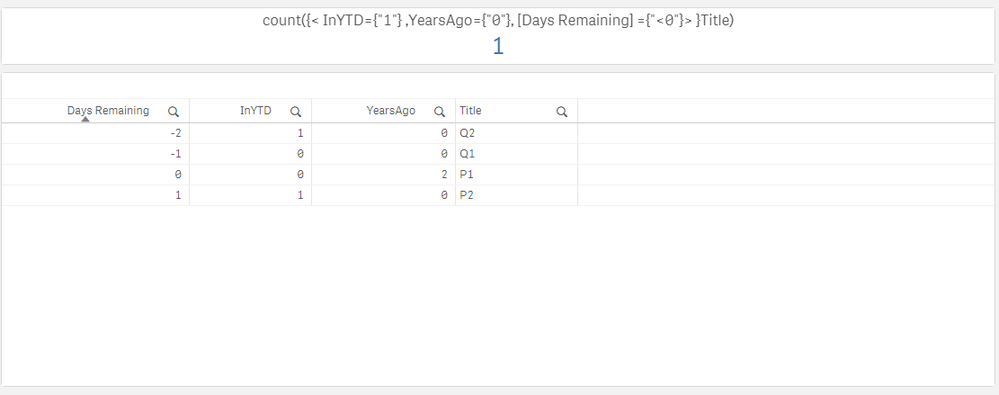
1,870 Views
claudialet
Contributor III
2019-10-31
02:47 PM
Author
- Mark as New
- Bookmark
- Subscribe
- Mute
- Subscribe to RSS Feed
- Permalink
- Report Inappropriate Content
It works Sunny ! Thank you so much.
1,862 Views
