Unlock a world of possibilities! Login now and discover the exclusive benefits awaiting you.

- Qlik Community
- :
- Forums
- :
- Analytics & AI
- :
- Products & Topics
- :
- Visualization and Usability
- :
- Re: How to convert whole time-stamp into seconds
- Subscribe to RSS Feed
- Mark Topic as New
- Mark Topic as Read
- Float this Topic for Current User
- Bookmark
- Subscribe
- Mute
- Printer Friendly Page

 vb00494773
- Mark as New
- Bookmark
- Subscribe
- Mute
- Subscribe to RSS Feed
- Permalink
- Report Inappropriate Content
How to convert whole time-stamp into seconds
Hi Guys ,
Could you please help me to covert whole timestamp into seconds
example:
| 11/14/2016 18:20:15.850 | |
| 11/14/2016 18:20:15.860 | |
| 11/14/2016 18:20:15.870 | |
| 11/14/2016 18:20:15.880 | |
| 11/14/2016 18:20:15.890 | |
| 11/14/2016 18:20:15.900 | |
| 11/14/2016 18:20:15.910 | |
| 11/14/2016 18:20:15.920 | |
| 11/14/2016 18:20:15.930 |
Thanks
Venkatesh
- « Previous Replies
-
- 1
- 2
- Next Replies »

 maxgro
- Mark as New
- Bookmark
- Subscribe
- Mute
- Subscribe to RSS Feed
- Permalink
- Report Inappropriate Content
change the format to YYYY-MM-DD hh:mm:ss.fff'
load
timestamp,
date(floor(date#(timestamp, 'YYYY-MM-DD hh:mm:ss.fff'))) as date,
frac(date#(timestamp, 'YYYY-MM-DD hh:mm:ss.fff')) as time,
frac(date#(timestamp, 'YYYY-MM-DD hh:mm:ss.fff')) * 60 * 60 * 24 as timeinsec
inline [
timestamp
2016-11-14 18:04:19.06
];

vb00494773
- Mark as New
- Bookmark
- Subscribe
- Mute
- Subscribe to RSS Feed
- Permalink
- Report Inappropriate Content
Hi Massimo,
Thnaks for the time and reply.
However i have tried the same it is not coming when i use floor , feac, date functions in qlik sense . only till date# it is working .
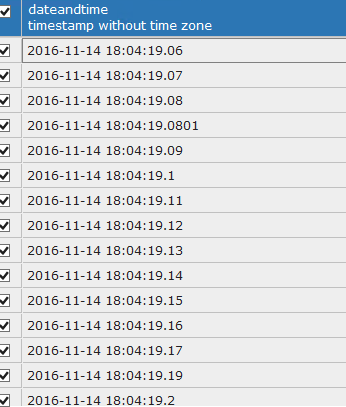
Actually my database field data type is “timestamp without time zone”.
when you take the data in inline or excel it will consider as string field . that is the reason the above functions are not working .
FYI, i am trying these all in qlik sense.
Thanks
Venkatesh
vb00494773
- Mark as New
- Bookmark
- Subscribe
- Mute
- Subscribe to RSS Feed
- Permalink
- Report Inappropriate Content
Hi Actual time stamp after loading to qlik sense look like below.
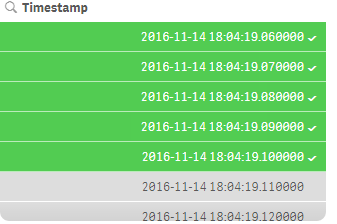
database timestamp

- « Previous Replies
-
- 1
- 2
- Next Replies »