Unlock a world of possibilities! Login now and discover the exclusive benefits awaiting you.

- Qlik Community
- :
- Forums
- :
- Analytics & AI
- :
- Products & Topics
- :
- Visualization and Usability
- :
- How to fetch multiple values from the filter using...
- Subscribe to RSS Feed
- Mark Topic as New
- Mark Topic as Read
- Float this Topic for Current User
- Bookmark
- Subscribe
- Mute
- Printer Friendly Page

 siddharthsoam
- Mark as New
- Bookmark
- Subscribe
- Mute
- Subscribe to RSS Feed
- Permalink
- Report Inappropriate Content
How to fetch multiple values from the filter using max function
Hi
I want to fetch multiple values from month filter where the month is the maximum in a quarter

for ex it should show me data of the maximum month for quarter 2 i.e. Sep, when I select Q1 and Q2 it should show me data for Sep month and June month summed up
- « Previous Replies
-
- 1
- 2
- Next Replies »
Accepted Solutions
 shraddha_g
- Mark as New
- Bookmark
- Subscribe
- Mute
- Subscribe to RSS Feed
- Permalink
- Report Inappropriate Content
PFA as required

 poojashribanger
- Mark as New
- Bookmark
- Subscribe
- Mute
- Subscribe to RSS Feed
- Permalink
- Report Inappropriate Content
Hi,
You can use this expression
max(total MonthName)
 OmarBenSalem
- Mark as New
- Bookmark
- Subscribe
- Mute
- Subscribe to RSS Feed
- Permalink
- Report Inappropriate Content
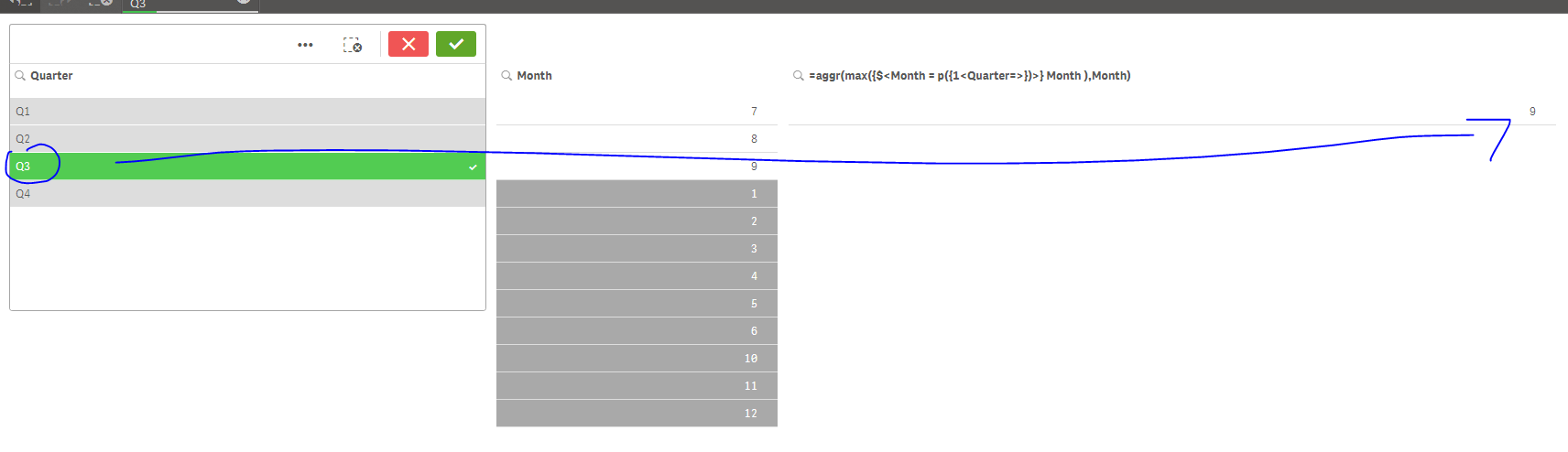
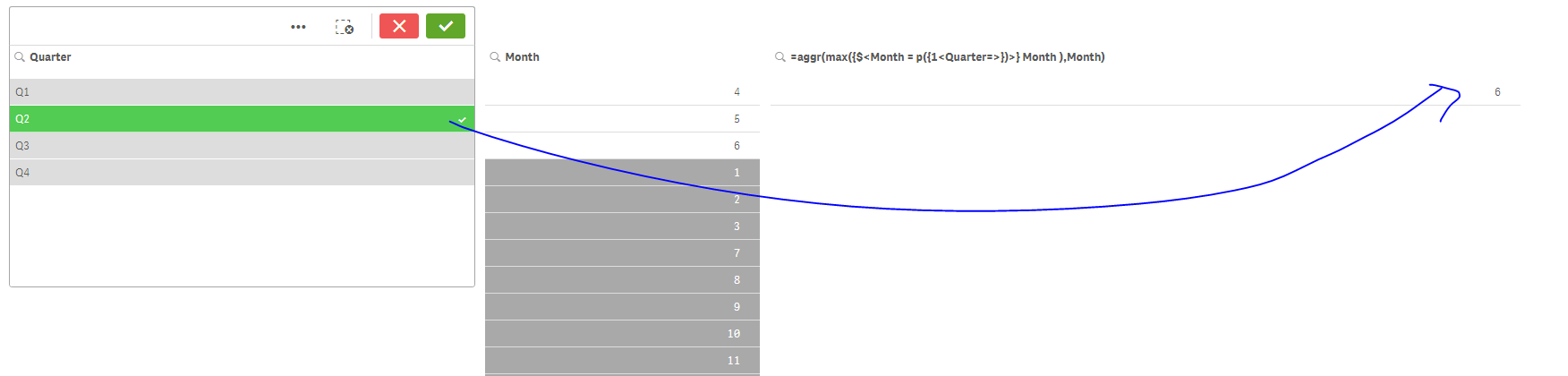
Create a new dimension as follow:
=aggr(max({$<Month = p({1<Month={"$(=max(Month))"}>})>} Month ),Month)
result:
siddharthsoam
- Mark as New
- Bookmark
- Subscribe
- Mute
- Subscribe to RSS Feed
- Permalink
- Report Inappropriate Content
Hi Omar
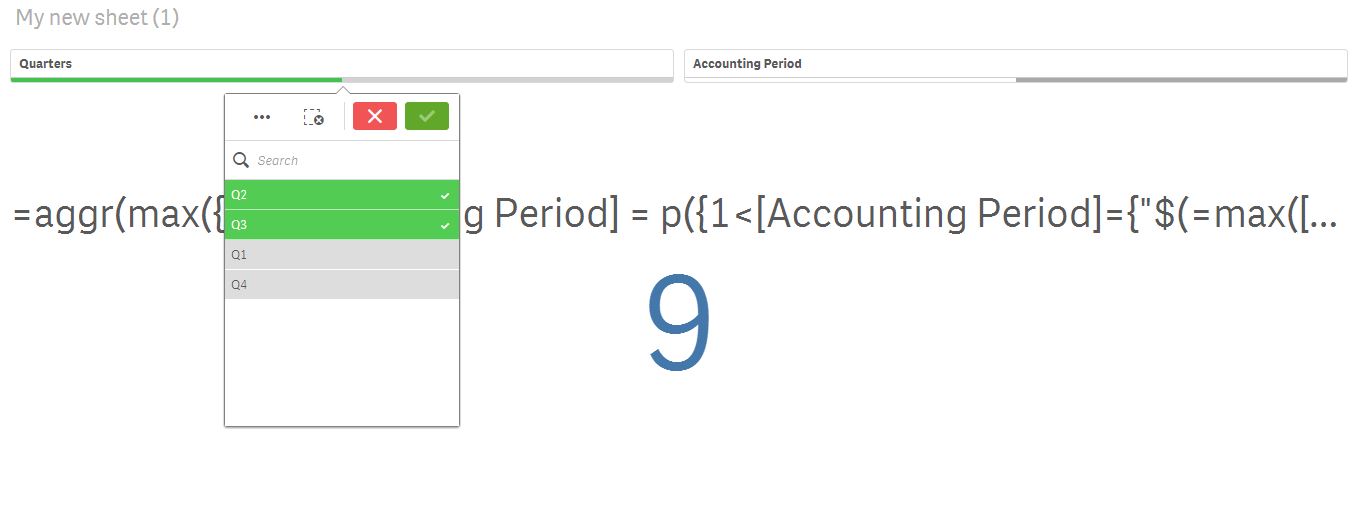
This function is returning me a single value. I want it to return me multiple values for quarter Q2 and Q3 that is 6 and 9.
Also it would be great if we take months filter not in numbers but in as text 1 for Apr and thereafter
shraddha_g
- Mark as New
- Bookmark
- Subscribe
- Mute
- Subscribe to RSS Feed
- Permalink
- Report Inappropriate Content
Please refer attached..Is this what s required?
 siddharthsoam
- Mark as New
- Bookmark
- Subscribe
- Mute
- Subscribe to RSS Feed
- Permalink
- Report Inappropriate Content
Hi Shraddha that's exactly what I want minus the year 
shraddha_g
- Mark as New
- Bookmark
- Subscribe
- Mute
- Subscribe to RSS Feed
- Permalink
- Report Inappropriate Content
PFA
 siddharthsoam
- Mark as New
- Bookmark
- Subscribe
- Mute
- Subscribe to RSS Feed
- Permalink
- Report Inappropriate Content
Hi Shraddha
I am using the following expression
Concat( distinct { <Quarters=p(Quarters)>} Month(QuarterEnd),',')
but still not able to get the desired result. Its showing nothing on the KPI. 
siddharthsoam
- Mark as New
- Bookmark
- Subscribe
- Mute
- Subscribe to RSS Feed
- Permalink
- Report Inappropriate Content
can you please share the qvf
shraddha_g
- Mark as New
- Bookmark
- Subscribe
- Mute
- Subscribe to RSS Feed
- Permalink
- Report Inappropriate Content
Do you have QuarterEnd Field Calculated in Backend?
if not,
Concat( distinct { <Quarters=p(Quarters)>} Month(QuarterEnd(DateField)),',')
At the place of DateField use your appropriate DateField

- « Previous Replies
-
- 1
- 2
- Next Replies »