Unlock a world of possibilities! Login now and discover the exclusive benefits awaiting you.

- Qlik Community
- :
- Forums
- :
- Analytics & AI
- :
- Products & Topics
- :
- Visualization and Usability
- :
- Re: How to get the last non null value
- Subscribe to RSS Feed
- Mark Topic as New
- Mark Topic as Read
- Float this Topic for Current User
- Bookmark
- Subscribe
- Mute
- Printer Friendly Page

 domibs
- Mark as New
- Bookmark
- Subscribe
- Mute
- Subscribe to RSS Feed
- Permalink
- Report Inappropriate Content
How to get the last non null value
Hi all,
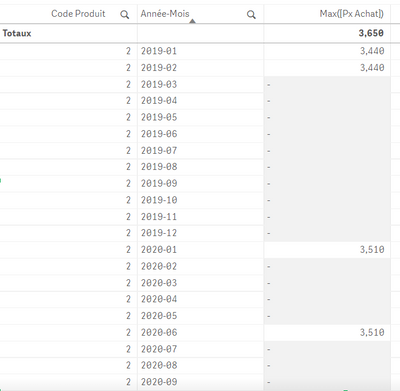
I would like to fill in empty cells with previous not null cell value.
For example, in my table where the field "Année-Mois" = 2019-03, I would like to get Max([Px Achat]) = 3,440 because the previous cell value was 3,440 and so on.
Other example, in my table where the field "Année-Mois" = 2020-02, I would like to get Max([Px Achat]) = 3,510 because the previous cell value was 3,510 and so on.
Could you please help me ?
Thank you for your advice,

 Or
Or
- Mark as New
- Bookmark
- Subscribe
- Mute
- Subscribe to RSS Feed
- Permalink
- Report Inappropriate Content
Perhaps something along the lines of:
Alt(Max(Measure),Above( Column(1)))
Not sure if this is the cleanest solution (typically things like this are filled in the script using peek(), not in the front end), but I think it should work.
domibs
- Mark as New
- Bookmark
- Subscribe
- Mute
- Subscribe to RSS Feed
- Permalink
- Report Inappropriate Content
Thank you for your reply, but unfortunately it doesn't work. Do you know why ? I still have empty cells.
 steasy
- Mark as New
- Bookmark
- Subscribe
- Mute
- Subscribe to RSS Feed
- Permalink
- Report Inappropriate Content
Maybe try to do something like this in your script:
If(IsNull(Max([Px Achat]) = -1, Previous(Max([Px Achat])), Max([Px Achat])) as NewPxAchat
...
Order By Année-Mois asc;
Or
- Mark as New
- Bookmark
- Subscribe
- Mute
- Subscribe to RSS Feed
- Permalink
- Report Inappropriate Content
I tested this on my end with sample data and it worked correctly. Unfortunately, if it does not work for you, I have no way of knowing why.
Load * INLINE [
Dim, Measure
A, 1
B,
C,
D,
E,
F,3
G,4
H,];

 ChrisFitz
- Mark as New
- Bookmark
- Subscribe
- Mute
- Subscribe to RSS Feed
- Permalink
- Report Inappropriate Content
I was needing to do just this, and found your post @domibs. And I needed to do this 'fill in the gaps with the last non-null value' in a chart, and not the script. Also, I didn't want to use MAX, as the column ('data') was up and down in value i.e. the last non-null may not be the max, so couldn't use ALT.
ABOVE is clearly the way to go, but how to keep repeating the last value until a non-null comes up again? ABOVE allows an offset, but I needed to calculate the offset every row. So, if there's a null, the offset=0; another null, offset=1 etc.
The data looks like this:
| a_date | data |
| Jan-21 | 0.44 |
| Feb-21 | 0.11 |
| Mar-21 | 0.22 |
| Apr-21 | - |
| May-21 | 0.11 |
| Jun-21 | 0.15 |
| Jul-21 | 0.22 |
| Aug-21 | - |
| Sep-21 | 0.22 |
| Oct-21 | 0.22 |
| Nov-21 | - |
| Dec-21 | - |
| Jan-22 | 0.22 |
| Feb-22 | 0.44 |
| Mar-22 | 0.44 |
| Apr-22 | - |
| May-22 | 0.44 |
So I created a column called 'one', for a null in 'data', the value of which takes itself and adds on the previous value i.e. like a dynamic accumulation
if(isnull(data),1+above("one"),0)
| a_date | data | one |
| Jan-21 | 0.44 | 0 |
| Feb-21 | 0.11 | 0 |
| Mar-21 | 0.22 | 0 |
| Apr-21 | - | 1 |
| May-21 | 0.11 | 0 |
| Jun-21 | 0.15 | 0 |
| Jul-21 | 0.22 | 0 |
| Aug-21 | - | 1 |
| Sep-21 | 0.22 | 0 |
| Oct-21 | 0.22 | 0 |
| Nov-21 | - | 1 |
| Dec-21 | - | 2 |
| Jan-22 | 0.22 | 0 |
| Feb-22 | 0.44 | 0 |
| Mar-22 | 0.44 | 0 |
| Apr-22 | - | 1 |
| May-22 | 0.44 | 0 |
and the filled-in column i.e. 'data' with repeated values in the case of a null, is
if(isnull(data),above(data,"one"),data)
| a_date | data | one | newdata |
| Jan-21 | 0.44 | 0 | 0.44 |
| Feb-21 | 0.11 | 0 | 0.11 |
| Mar-21 | 0.22 | 0 | 0.22 |
| Apr-21 | - | 1 | 0.22 |
| May-21 | 0.11 | 0 | 0.11 |
| Jun-21 | 0.15 | 0 | 0.15 |
| Jul-21 | 0.22 | 0 | 0.22 |
| Aug-21 | - | 1 | 0.22 |
| Sep-21 | 0.22 | 0 | 0.22 |
| Oct-21 | 0.22 | 0 | 0.22 |
| Nov-21 | - | 1 | 0.22 |
| Dec-21 | - | 2 | 0.22 |
| Jan-22 | 0.22 | 0 | 0.22 |
| Feb-22 | 0.44 | 0 | 0.44 |
| Mar-22 | 0.44 | 0 | 0.44 |
| Apr-22 | - | 1 | 0.44 |
The nice thing here is that the sort order of the dimension or original data doesn't matter.
