Unlock a world of possibilities! Login now and discover the exclusive benefits awaiting you.

- Qlik Community
- :
- Forums
- :
- Analytics & AI
- :
- Products & Topics
- :
- Visualization and Usability
- :
- How to link the data in Script
- Subscribe to RSS Feed
- Mark Topic as New
- Mark Topic as Read
- Float this Topic for Current User
- Bookmark
- Subscribe
- Mute
- Printer Friendly Page

 KC3
KC3
- Mark as New
- Bookmark
- Subscribe
- Mute
- Subscribe to RSS Feed
- Permalink
- Report Inappropriate Content
How to link the data in Script
Hi Qlikians,
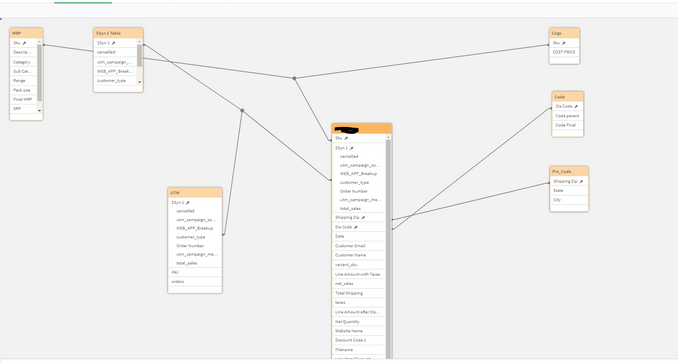
Please help to proper link my data in Script, I have 4 website in 3 of them I am getting full information, but in 1 website I have to link the data with UTM data. As I Concatenate the 4 website sale as per the below image, now how I will get the UTM data the data has been linked with order numbers with the website 4. If I am linking the data it's showing Syn error as 5-6 headers are same with Web1, Web2, Web3.
Request you to please help me to get the proper data
Attaching the Script for the same.
PFB table

 MartW
MartW
- Mark as New
- Bookmark
- Subscribe
- Mute
- Subscribe to RSS Feed
- Permalink
- Report Inappropriate Content
the best way to get rid of a sync table is to rename or remove fields in 1 of the tables.
for this i would use a qualify statment. this will qualify (prefix) the headers with the tablename for only a specific table if you use the qualify statement right.
in your case UTM.[headername]
qualify *
UNQUALIFY {link-column};
UTM:
Load
    "day",
    cancelled,
    utm_campaign_source,
    api_client_title  as WEB_APP_Breakup,
    customer_type,
    order_name as "Order Number",
    utm_campaign_medium,
    orders,
    total_sales,
    ordered_item_quantity,
    Filename() as Filename
FROM [lib:// SALE:DataFiles/UTM Source*.xlsx]
(ooxml, embedded labels, table is Sheet1);

unqualify *
Also make sure that you unqualify (see above) one of the fields so the table is still linked.
