Unlock a world of possibilities! Login now and discover the exclusive benefits awaiting you.

- Qlik Community
- :
- Forums
- :
- Analytics & AI
- :
- Products & Topics
- :
- Visualization and Usability
- :
- How to put different dimension into one column at ...
- Subscribe to RSS Feed
- Mark Topic as New
- Mark Topic as Read
- Float this Topic for Current User
- Bookmark
- Subscribe
- Mute
- Printer Friendly Page

 ivanyang25
- Mark as New
- Bookmark
- Subscribe
- Mute
- Subscribe to RSS Feed
- Permalink
- Report Inappropriate Content
How to put different dimension into one column at the same time
Dear QS Experts
I am new to Qlik Sense and I am a front end user which means I don't need to import data by script from back end side
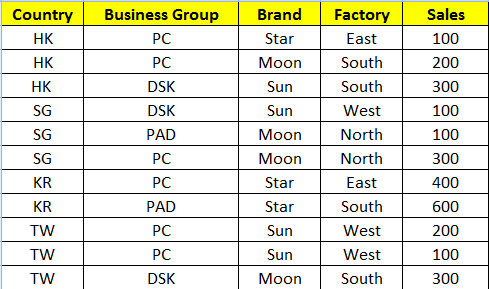
Now my raw data is as below
The result I need is as below. The indications are the dimensions I need and I need to put them all in the same pivot table at the same time so that I can show a specific table for my client as he requests
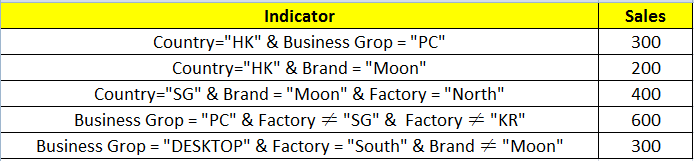
The requests are as below.
1. Use expression in master item (dimension)
2. All the indicators above should exit at the same time which means
a. I can't use bookmark for each indicator to show the data I need one by one (in each bookmark)
b. I can't use below selection to achieve each indicator by selecting them (as we can only have one result each time)

So may I know if its possible to put different fixed dimension (with expression) under one column at the same time in Qlik Sense?
If so, how can we do so?
Thank you for you advise in advance
Ivan
Best Regards
- « Previous Replies
-
- 1
- 2
- Next Replies »

 ahaahaaha
- Mark as New
- Bookmark
- Subscribe
- Mute
- Subscribe to RSS Feed
- Permalink
- Report Inappropriate Content
Was glad to help.

- « Previous Replies
-
- 1
- 2
- Next Replies »