Unlock a world of possibilities! Login now and discover the exclusive benefits awaiting you.

- Qlik Community
- :
- Forums
- :
- Analytics & AI
- :
- Products & Topics
- :
- Visualization and Usability
- :
- Hr to Days in UI
- Subscribe to RSS Feed
- Mark Topic as New
- Mark Topic as Read
- Float this Topic for Current User
- Bookmark
- Subscribe
- Mute
- Printer Friendly Page

 soniasweety
- Mark as New
- Bookmark
- Subscribe
- Mute
- Subscribe to RSS Feed
- Permalink
- Report Inappropriate Content
Hr to Days in UI
Hi all,
I want to convert the hrs into days in front end ?
how can I achieve this?
cloumnName:
Time(in hrs)
36
45
65
like that how can I achieve?
Thanks
Sonica
- « Previous Replies
-
- 1
- 2
- Next Replies »
Accepted Solutions

 sunny_talwar
- Mark as New
- Bookmark
- Subscribe
- Mute
- Subscribe to RSS Feed
- Permalink
- Report Inappropriate Content
sunny_talwar
- Mark as New
- Bookmark
- Subscribe
- Mute
- Subscribe to RSS Feed
- Permalink
- Report Inappropriate Content
May be this
Interval(Interval#(Time, 'hh'), 'D hh')
soniasweety
- Mark as New
- Bookmark
- Subscribe
- Mute
- Subscribe to RSS Feed
- Permalink
- Report Inappropriate Content
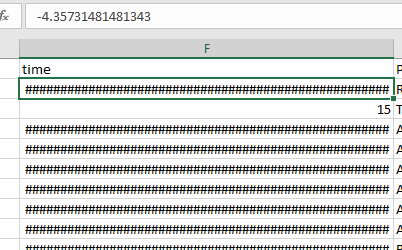 but for negative values it showing like below
sunny_talwar
- Mark as New
- Bookmark
- Subscribe
- Mute
- Subscribe to RSS Feed
- Permalink
- Report Inappropriate Content
You have negative values in Time? What would you want to see for the negative time?

 JustinDallas
- Mark as New
- Bookmark
- Subscribe
- Mute
- Subscribe to RSS Feed
- Permalink
- Report Inappropriate Content
Then use FABS to get a positive value.
Fabs(Interval(Interval#(Time, 'hh'), 'D hh'))
soniasweety
- Mark as New
- Bookmark
- Subscribe
- Mute
- Subscribe to RSS Feed
- Permalink
- Report Inappropriate Content
same -
-3
-2
-5 like that
soniasweety
- Mark as New
- Bookmark
- Subscribe
- Mute
- Subscribe to RSS Feed
- Permalink
- Report Inappropriate Content
no I want to show negative only
sunny_talwar
- Mark as New
- Bookmark
- Subscribe
- Mute
- Subscribe to RSS Feed
- Permalink
- Report Inappropriate Content
May be this
Dual(Sign(Time) & Interval(Interval#(Time, 'hh'), 'D hh'), Time)
soniasweety
- Mark as New
- Bookmark
- Subscribe
- Mute
- Subscribe to RSS Feed
- Permalink
- Report Inappropriate Content
the result is not coming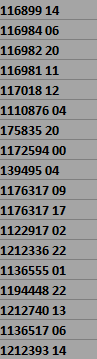

 Aurelien_Martin
- Mark as New
- Bookmark
- Subscribe
- Mute
- Subscribe to RSS Feed
- Permalink
- Report Inappropriate Content
The problem is when you export to excel.
| -56 | ############################################# |
| -24 | ############################################# |
| -12 | ############################################# |
| -5 | ############################################# |
| -3 | ############################################# |
| -2 | ############################################# |
| 36 | 36:00:00 |
| 45 | 45:00:00 |
| 65 | 65:00:00 |
When copy/past Full table it's ok (on QlikView):
| time | Interval(Interval#(time, 'hh'), 'D hh') |
| -56 | -2 08 |
| -24 | -1 00 |
| -12 | -0 12 |
| -5 | -0 05 |
| -3 | -0 03 |
| -2 | -0 02 |
| 36 | 1 12 |
| 45 | 1 21 |
| 65 | 2 17 |

- « Previous Replies
-
- 1
- 2
- Next Replies »