Unlock a world of possibilities! Login now and discover the exclusive benefits awaiting you.

- Qlik Community
- :
- Forums
- :
- Analytics & AI
- :
- Products & Topics
- :
- Visualization and Usability
- :
- Re: IF SUM Customer Flag
- Subscribe to RSS Feed
- Mark Topic as New
- Mark Topic as Read
- Float this Topic for Current User
- Bookmark
- Subscribe
- Mute
- Printer Friendly Page

 Fiorrie
- Mark as New
- Bookmark
- Subscribe
- Mute
- Subscribe to RSS Feed
- Permalink
- Report Inappropriate Content
IF SUM Customer Flag
Hi
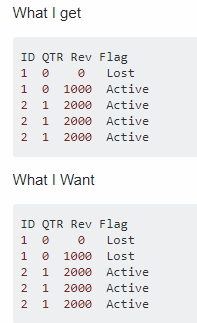
I am trying to create flag with customers lost/active. I have 4 quarters, if they did not buy in last two quarters (0, 1) I consider them lost. But I want to apply the flag lost for the whole ID despite they had revenue in remaining two quarters (2,3). Now is showing me lost for 0, 1 but active for 2, 3 in case there was revenue but should be considered as lost.
=IF(sum({$<qtr_flag={0,1}>}revenue) <> 0, 'Active','Lost')
Thanks a lot I attached sample

 JordyWegman
- Mark as New
- Bookmark
- Subscribe
- Mute
- Subscribe to RSS Feed
- Permalink
- Report Inappropriate Content
Hi,
What if you try this?
=IF(Aggr(sum({$<qtr_flag={0,1}>}revenue),Customer) <> 0, 'Active','Lost')Jordy
Climber
 lazurens
- Mark as New
- Bookmark
- Subscribe
- Mute
- Subscribe to RSS Feed
- Permalink
- Report Inappropriate Content
I have done it this way in the loading script :
Sales:
Load * INLINE [
ID, Qtr, Revenue
1, 0, 0
1, 0, 1000
2, 1, 2000
2, 1, 2000
2, 1, 2000
];

SalesTMP:
Load
RowNo() as rownumber,
*,
If(Qtr = 0, 'Lost','Active') as Flag
Resident Sales;

// Clean UP
Drop Table Sales;
Rename Table SalesTMP to Sales; Fiorrie
- Mark as New
- Bookmark
- Subscribe
- Mute
- Subscribe to RSS Feed
- Permalink
- Report Inappropriate Content
Hi Jordy
This might be working, I am just trying to figure out make it work with the flag because its either all Active or Either or Lost.
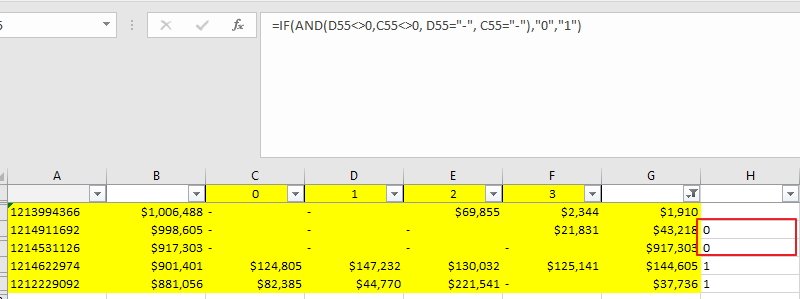
IF(Aggr(sum({$<qtr_flag={0,1}>}revenue),crm_bp_id) <> 0 AND Aggr(sum({$<qtr_flag={0,1}>}revenue),crm_bp_id) ='', 'Active','Lost')
I attach the excel formula where its working the way I want it to be working in Qlik.
Thanks for any ideas
Jana
 Fiorrie
- Mark as New
- Bookmark
- Subscribe
- Mute
- Subscribe to RSS Feed
- Permalink
- Report Inappropriate Content
Solved it 😁
IF(sum(TOTAL <crm_bp_id >{$<qtr_flag={0,1}>}revenue) <> 0, 'Active','Lost')
Thanks all for the help! Nice Day
Jana
