Unlock a world of possibilities! Login now and discover the exclusive benefits awaiting you.

- Qlik Community
- :
- Forums
- :
- Analytics & AI
- :
- Products & Topics
- :
- Visualization and Usability
- :
- Re: Input selections from filter to another field
- Subscribe to RSS Feed
- Mark Topic as New
- Mark Topic as Read
- Float this Topic for Current User
- Bookmark
- Subscribe
- Mute
- Printer Friendly Page

 User12321
- Mark as New
- Bookmark
- Subscribe
- Mute
- Subscribe to RSS Feed
- Permalink
- Report Inappropriate Content
Input selections from filter to another field
Hi,
I have fields MonthYear, Outlet, SurveyMonthYear, SurveyOutlet and Score.
I want to link filters MonthYear to SurveyMonthYear and filters Outlet to SurveyOutlet as the score only appears when a value for MonthYear filter is selected.
How can I display the score when no filter is selected? Can someone help please. Thank you.

 OmarBenSalem
- Mark as New
- Bookmark
- Subscribe
- Mute
- Subscribe to RSS Feed
- Permalink
- Report Inappropriate Content
Hello,
Try this :
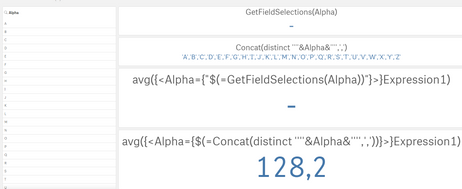
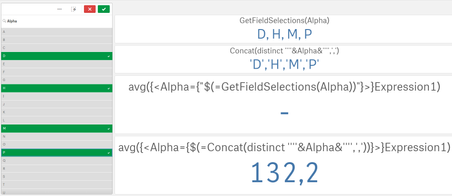
Avg({<SurveyMonthYear={$(=Concat(distinct ''''&MonthYear&'''',','))}>}Score)
per analogy :
 User12321
- Mark as New
- Bookmark
- Subscribe
- Mute
- Subscribe to RSS Feed
- Permalink
- Report Inappropriate Content
Hi @OmarBenSalem ,
When I added in Outlet, the score is wrong. Is it because some outlets do not have a score but the average considers them into the calculation? How can I resolve this?
OmarBenSalem
- Mark as New
- Bookmark
- Subscribe
- Mute
- Subscribe to RSS Feed
- Permalink
- Report Inappropriate Content
I think so yes !
try to situate these outlet in your script maybe with something like this :
if(len(trim(score))=0,0,1) as FlagScore
and add this in your expression
Avg({<SurveyMonthYear={$(=Concat(distinct ''''&MonthYear&'''',','))}, SurveyOutlet={$(=Concat(distinct ''''&Outlet&'''',','))} ,FlagScore={1}>}Score)
