Unlock a world of possibilities! Login now and discover the exclusive benefits awaiting you.

Announcements
Share your agentic AI experience, learn from others, and earn a new badge: Put Agentic AI to Work
- Qlik Community
- :
- Forums
- :
- Analytics & AI
- :
- Products & Topics
- :
- Visualization and Usability
- :
- Interval Match Help
Options
- Subscribe to RSS Feed
- Mark Topic as New
- Mark Topic as Read
- Float this Topic for Current User
- Bookmark
- Subscribe
- Mute
- Printer Friendly Page
Turn on suggestions
Auto-suggest helps you quickly narrow down your search results by suggesting possible matches as you type.
Showing results for

 h_prakash
Creator II
2019-10-17
02:49 AM
- Mark as New
- Bookmark
- Subscribe
- Mute
- Subscribe to RSS Feed
- Permalink
- Report Inappropriate Content
Interval Match Help
Hello Experts,
Need your help in the below requirement,
I have two Tables
| Project | Allocation Months | Hrs |
| 1 | Jan-18 | 10 |
| 1 | Feb-18 | 20 |
| 1 | Mar-18 | 30 |
| 1 | Apr-18 | 40 |
| 1 | May-18 | 50 |
| 1 | Jun-18 | 60 |
| 1 | Jul-18 | 70 |
| 1 | Aug-18 | 80 |
| 1 | Sep-18 | 90 |
| 1 | Jan-19 | 10 |
| 1 | Feb-19 | 30 |
| 1 | Mar-19 | 50 |
| 1 | Aug-19 | 52 |
| 1 | Dec-19 | 25 |
| Project | AllocationStart | Allocation End |
| 1 | Jan-18 | Dec-18 |
| 1 | Feb-19 | Jun-19 |
I want the result to be like this in the End table. Is there any way we can do this in Back end.
| Project | AllocationStart | Allocation End | Total Hours |
| 1 | Jan-18 | Dec-18 | 450 |
| 1 | Feb-19 | Jun-19 | 80 |
1,505 Views
1 Solution
Accepted Solutions

 Quy_Nguyen
Specialist
2019-10-17
03:19 AM
- Mark as New
- Bookmark
- Subscribe
- Mute
- Subscribe to RSS Feed
- Permalink
- Report Inappropriate Content
Try this:
Data:
LOAD
    Project,
    Date#("Allocation Months",'MMM-YY') As "Allocation Months",
    Hrs
FROM [lib://Qlik]
(html, utf8, embedded labels, table is @1);

Interval:
LOAD
    Project,
    Date#("AllocationStart",'MMM-YY') As Start,
    Date#("Allocation End",'MMM-YY') As End
FROM [lib://Qlik]
(html, utf8, embedded labels, table is @2);

_tmp:
NoConcatenate
Load *
Resident Data;
Left Join IntervalMatch ("Allocation Months", Project)
Load Start, End, Project
Resident Interval;

Drop table Data, Interval;

Final:
Load Project, Start, End, Sum(Hrs) As TotalHours
Resident _tmp
Group by Project, Start, End;

Drop table _tmp;
Result:
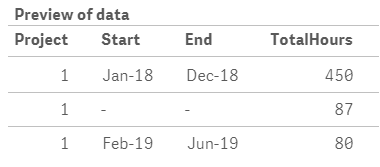
If you don't want the project with out start and end (not in the interval table), just change the Left Join to Inner Join.
I also attached a demo app for you.
1,464 Views
2 Replies
Quy_Nguyen
Specialist
2019-10-17
03:19 AM
- Mark as New
- Bookmark
- Subscribe
- Mute
- Subscribe to RSS Feed
- Permalink
- Report Inappropriate Content
Try this:
Data:
LOAD
    Project,
    Date#("Allocation Months",'MMM-YY') As "Allocation Months",
    Hrs
FROM [lib://Qlik]
(html, utf8, embedded labels, table is @1);

Interval:
LOAD
    Project,
    Date#("AllocationStart",'MMM-YY') As Start,
    Date#("Allocation End",'MMM-YY') As End
FROM [lib://Qlik]
(html, utf8, embedded labels, table is @2);

_tmp:
NoConcatenate
Load *
Resident Data;
Left Join IntervalMatch ("Allocation Months", Project)
Load Start, End, Project
Resident Interval;

Drop table Data, Interval;

Final:
Load Project, Start, End, Sum(Hrs) As TotalHours
Resident _tmp
Group by Project, Start, End;

Drop table _tmp;
Result:
If you don't want the project with out start and end (not in the interval table), just change the Left Join to Inner Join.
I also attached a demo app for you.
1,465 Views
h_prakash
Creator II
2019-10-17
10:59 AM
Author
- Mark as New
- Bookmark
- Subscribe
- Mute
- Subscribe to RSS Feed
- Permalink
- Report Inappropriate Content
Thank you it worked...!!!
1,441 Views
