Unlock a world of possibilities! Login now and discover the exclusive benefits awaiting you.

- Qlik Community
- :
- Forums
- :
- Analytics & AI
- :
- Products & Topics
- :
- Visualization and Usability
- :
- Re: Issue: Bottom 5 sales in pivot
- Subscribe to RSS Feed
- Mark Topic as New
- Mark Topic as Read
- Float this Topic for Current User
- Bookmark
- Subscribe
- Mute
- Printer Friendly Page

 priyanka08
- Mark as New
- Bookmark
- Subscribe
- Mute
- Subscribe to RSS Feed
- Permalink
- Report Inappropriate Content
Issue: Bottom 5 sales in pivot
Hi ,
i have to represent all the with bottom 5 sales in pivot table
where customer include some null and blank values & sales include negative and zero value
i have bottom 5 customers exclude customer with blank or null in customer name but negative and zero must be included
- Tags:
- Qllk
priyanka08
- Mark as New
- Bookmark
- Subscribe
- Mute
- Subscribe to RSS Feed
- Permalink
- Report Inappropriate Content
For example
customer name , sales
A,10
B,-20
C,-5
D,0
E ,-3
F,0
G,20
output should include
B,-20
C,-5
D,0
E ,-3
F,0
priyanka08
- Mark as New
- Bookmark
- Subscribe
- Mute
- Subscribe to RSS Feed
- Permalink
- Report Inappropriate Content
I used rank( total -sum (sales))
it gives the negative value but not able to capture 0 values

 sidhiq91
- Mark as New
- Bookmark
- Subscribe
- Mute
- Subscribe to RSS Feed
- Permalink
- Report Inappropriate Content
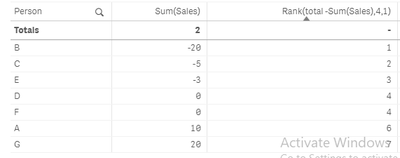
@priyanka08 Not able to understand your exact requirement though, based on my brief understanding your formula works well. Please see the screen shot below.

 MayilVahanan
- Mark as New
- Bookmark
- Subscribe
- Mute
- Subscribe to RSS Feed
- Permalink
- Report Inappropriate Content
Hi
Try like below in straight table,
Dim1: =Aggr(If(rank( total -sum (sales))<=5, rank( total -sum (sales))),[customer name])
Dim2: [customer name]
Exp: Sum(sales)
In presentation tab, uncheck the "Suppress Zero value" and try it
Please close the thread by marking correct answer & give likes if you like the post.
priyanka08
- Mark as New
- Bookmark
- Subscribe
- Mute
- Subscribe to RSS Feed
- Permalink
- Report Inappropriate Content
I have 3 dimesion,
12 value have zero values, its giving 1-12 as rank
even i am using rank( total -sum(sales),4,0)
MayilVahanan
- Mark as New
- Bookmark
- Subscribe
- Mute
- Subscribe to RSS Feed
- Permalink
- Report Inappropriate Content
For continuous ranking,
you can try like below
https://community.qlik.com/t5/QlikView-Documents/Continuous-Ranking-no-missing-Rank/ta-p/1486407
for ur case, if its one dim - customer name, try like below
Div(Index('-' & Concat(DISTINCT TOTAL Num(Aggr(Rank(-sum(sales),1,1),[customer name]), '0000'), '-', -Aggr(-sum(sales), [customer name])),Num(Rank(total Sum(-sales),1,1), '0000')), 5) + 1
Please close the thread by marking correct answer & give likes if you like the post.
