Unlock a world of possibilities! Login now and discover the exclusive benefits awaiting you.

- Qlik Community
- :
- Forums
- :
- Analytics & AI
- :
- Products & Topics
- :
- Visualization and Usability
- :
- Issue on Pivot and Selection
- Subscribe to RSS Feed
- Mark Topic as New
- Mark Topic as Read
- Float this Topic for Current User
- Bookmark
- Subscribe
- Mute
- Printer Friendly Page

 marcoyukon
- Mark as New
- Bookmark
- Subscribe
- Mute
- Subscribe to RSS Feed
- Permalink
- Report Inappropriate Content
Issue on Pivot and Selection
I have the following on a pivot table:
Rows: PaidDate.Calendar.YearMonth
Measure: PercPaid: COUNT(OrderId) / COUNT(ALL <[PaidDate.Calendar.YearMonth]> OrderId)
Column: Manufacturer
The issue I am having is:
If I SELECT only a particular Manufacturer on the pivot table, all other manufacturers are not removed from COLUMNS, and all the Measure values are change to Zero, except for the one I have selected.
What I would like to see is the only manufacturer(s) shown on COLUMNS to be the one(s) I've selected. I believe the all "ALL" modifier is doing this, but I don;t know a way to force to only show the manufacturer I selected without affecting the expression total on the Pivot Measure.
Thank you.
Accepted Solutions

 OmarBenSalem
- Mark as New
- Bookmark
- Subscribe
- Mute
- Subscribe to RSS Feed
- Permalink
- Report Inappropriate Content
OmarBenSalem
- Mark as New
- Bookmark
- Subscribe
- Mute
- Subscribe to RSS Feed
- Permalink
- Report Inappropriate Content
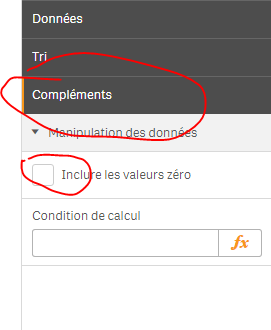
under complement, try to unheck, show null values
marcoyukon
- Mark as New
- Bookmark
- Subscribe
- Mute
- Subscribe to RSS Feed
- Permalink
- Report Inappropriate Content
Tried that, but since the values for those columns were "zero", it would not hide the columns, I even tried to update the expression with an "if " to convert the zeros to null(), but it did not hide them. I was able to resolved it by using Add-ons=>Data handling => and unchecking "include zero values".
OmarBenSalem
- Mark as New
- Bookmark
- Subscribe
- Mute
- Subscribe to RSS Feed
- Permalink
- Report Inappropriate Content
That's what I was saying; under complements=under Add-ons but in french lol
My bad.
marcoyukon
- Mark as New
- Bookmark
- Subscribe
- Mute
- Subscribe to RSS Feed
- Permalink
- Report Inappropriate Content
Thank you anyway, you led me to finding it. I knew it was a setting somewhere I was missing.
OmarBenSalem
- Mark as New
- Bookmark
- Subscribe
- Mute
- Subscribe to RSS Feed
- Permalink
- Report Inappropriate Content