Unlock a world of possibilities! Login now and discover the exclusive benefits awaiting you.

- Qlik Community
- :
- Forums
- :
- Analytics & AI
- :
- Products & Topics
- :
- Visualization and Usability
- :
- KPI Sum expression problem
- Subscribe to RSS Feed
- Mark Topic as New
- Mark Topic as Read
- Float this Topic for Current User
- Bookmark
- Subscribe
- Mute
- Printer Friendly Page

- Mark as New
- Bookmark
- Subscribe
- Mute
- Subscribe to RSS Feed
- Permalink
- Report Inappropriate Content
KPI Sum expression problem
Hi
I try to make a KPI that calculate total cost for rearing a car
The data are spreed in several spread sheets.
In sheet 1 I have
Repair no Part changed
1 Tires
2 Engine
3 Screw
4 Tires
5 Screw
In sheet 2 I have
Part changed Price
Tires 100
Engine 8100
Screw 1
Front glass 300
I tried with this expression
Sum([Price]*Count([Repair no]))
But it doesnt work, can you give me a hint whats wrong?
Thanks,
Peter

 sunny_talwar
- Mark as New
- Bookmark
- Subscribe
- Mute
- Subscribe to RSS Feed
- Permalink
- Report Inappropriate Content
You can try this
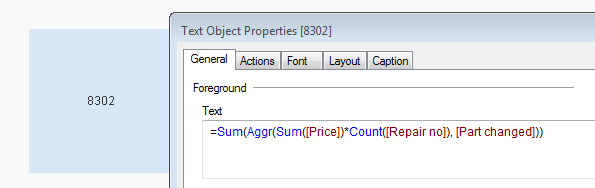
Sum(Aggr(Sum([Price])*Count([Repair no]), [Part changed]))
- Mark as New
- Bookmark
- Subscribe
- Mute
- Subscribe to RSS Feed
- Permalink
- Report Inappropriate Content
Still it doesnt calculate correct 
sunny_talwar
- Mark as New
- Bookmark
- Subscribe
- Mute
- Subscribe to RSS Feed
- Permalink
- Report Inappropriate Content
Based on the sample provided... what is the correct output?
sunny_talwar
- Mark as New
- Bookmark
- Subscribe
- Mute
- Subscribe to RSS Feed
- Permalink
- Report Inappropriate Content
Is 8302 not the right number?
- Mark as New
- Bookmark
- Subscribe
- Mute
- Subscribe to RSS Feed
- Permalink
- Report Inappropriate Content
The correct number is 8302
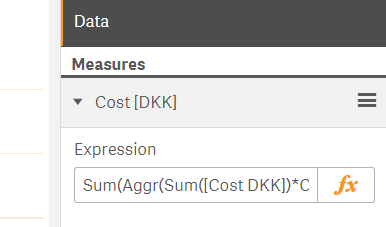
I use the KPI chart, dont we agree that expression should be entered here under Expression?
sunny_talwar
- Mark as New
- Bookmark
- Subscribe
- Mute
- Subscribe to RSS Feed
- Permalink
- Report Inappropriate Content
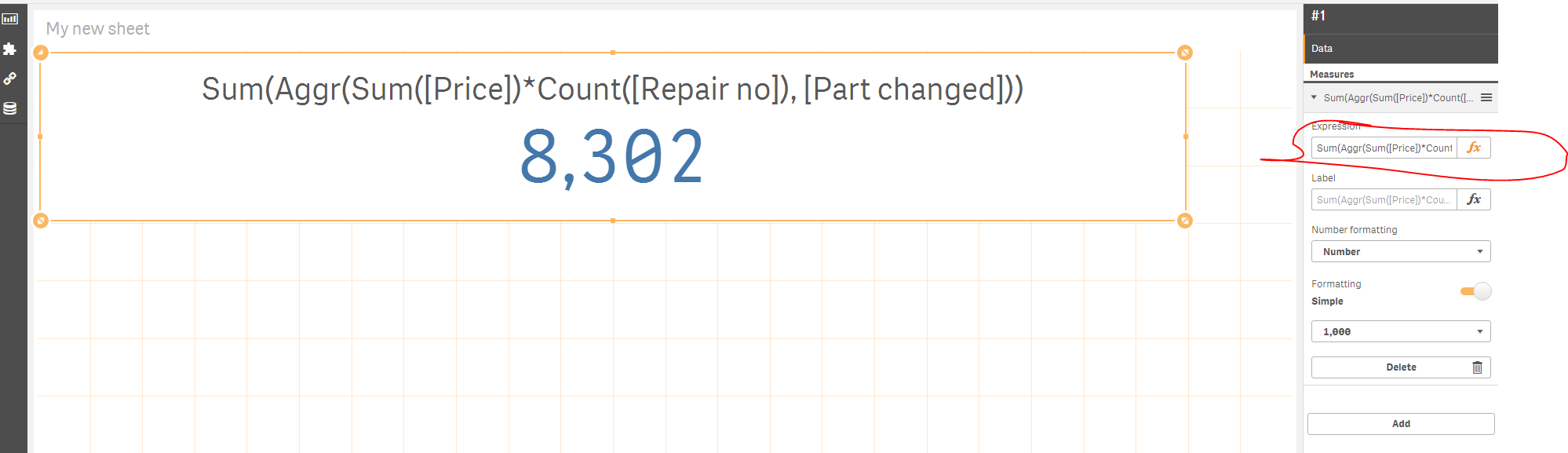
The screenshot I posted was from QlikView... here is a Qlik Sense screenshot and sample

- Mark as New
- Bookmark
- Subscribe
- Mute
- Subscribe to RSS Feed
- Permalink
- Report Inappropriate Content
Where do you enter the formula?
Did you enter it under Expression?
sunny_talwar
- Mark as New
- Bookmark
- Subscribe
- Mute
- Subscribe to RSS Feed
- Permalink
- Report Inappropriate Content
- Mark as New
- Bookmark
- Subscribe
- Mute
- Subscribe to RSS Feed
- Permalink
- Report Inappropriate Content
Super, thanks a lot... I will investigate whats wrong with mine.
thanks a lot... I will close the ticket asap I have completed the investigation.
I hope its ok
sunny_talwar
- Mark as New
- Bookmark
- Subscribe
- Mute
- Subscribe to RSS Feed
- Permalink
- Report Inappropriate Content
Sure it is 