Unlock a world of possibilities! Login now and discover the exclusive benefits awaiting you.

- Qlik Community
- :
- Forums
- :
- Analytics & AI
- :
- Products & Topics
- :
- Visualization and Usability
- :
- KPI rank
- Subscribe to RSS Feed
- Mark Topic as New
- Mark Topic as Read
- Float this Topic for Current User
- Bookmark
- Subscribe
- Mute
- Printer Friendly Page

 hadari
- Mark as New
- Bookmark
- Subscribe
- Mute
- Subscribe to RSS Feed
- Permalink
- Report Inappropriate Content
KPI rank
Hi,sales
I have ranked my stores by sum(sales) by the expression: rank(sum(sales).
I want to create a KPI that will indicate my rank store based on the name store.
for example:
If my store las Vages is ranked as 13. I want my KPI to show 13 at any time I choose this specific store.
if I just put this expression rank(sum(sales) I will always get 1 because I am filtered in this specific store..
how do I get 13 for example for the choose store?
Accepted Solutions

 ersanalkan
- Mark as New
- Bookmark
- Subscribe
- Mute
- Subscribe to RSS Feed
- Permalink
- Report Inappropriate Content
Can you share vSelectedStore definition in the variable module
Also, Can you put this variable into a text field what you see =$(vSelectedStore)&'-'&"$(vSelectedStore)"
ersanalkan
- Mark as New
- Bookmark
- Subscribe
- Mute
- Subscribe to RSS Feed
- Permalink
- Report Inappropriate Content
Hi
This code piece giving us Rank of selected BrickName by Market size in a text field.
Only({1<BrickName={"$(vSelectedBrickName)"}>} Aggr(Rank(Sum({<BrickName=,IsCurrent={'CY'},Period={'MTD'}>} MarketUnit*MarketOwnerShip)),BrickName))
Lets look to the pieces
1.
vSelectedBrickName is a variable retreives existing selection of brickname. Variable definition is below
vSelectedBrickName =GetFieldSelections(BrickName)
2.then the measure
Aggr(Rank(Sum({<BrickName=,IsCurrent={'CY'},Period={'MTD'}>} Unit*Ownership)),BrickName)
2.1 "Sum({<IsCurrent={'CY'},Period={'MTD'}>} Unit*Ownership)" this part of code is standard measure. if you do rank measure by Brick Name put neutralization code piece BrickName= into set analysis
2.2 Then put you measure into Rank then aggr
Aggr(Rank(Sum()),BrickName) finds the rank
2.3 to bring the value to measure
Only({1<BrickName={"$(vSelectedBrickName)"}>} Aggr())
if you need the same value in tabular objects following is giving the same result
Rank(Total(Sum({<IsCurrent={'CY'},Period={'$(vPeriod)'}>}MarketUnit*MarketOwnerShip)))
hadari
- Mark as New
- Bookmark
- Subscribe
- Mute
- Subscribe to RSS Feed
- Permalink
- Report Inappropriate Content
Hi! How is it relevant to my example?😊
I want to rank sales of stores.. and to remain the rank of the selected store if I choose this store by filter
ersanalkan
- Mark as New
- Bookmark
- Subscribe
- Mute
- Subscribe to RSS Feed
- Permalink
- Report Inappropriate Content
as first step
create a variable
vSelectedStoreName=GetFieldSelections([StoreName])
Measure shoul be like this
Only({1<[StoreName]={"$(vSelectedStoreName)"}>} Aggr(Rank(sum( {<[StoreName]= >} Sales)),[StoreName]))
hadari
- Mark as New
- Bookmark
- Subscribe
- Mute
- Subscribe to RSS Feed
- Permalink
- Report Inappropriate Content

It's says OK but it doesn't recognize the selected storename even though I put it in a KPI and it does recognize the name of the store:
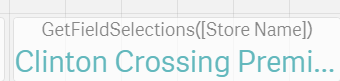
I get for this expression '-'

ersanalkan
- Mark as New
- Bookmark
- Subscribe
- Mute
- Subscribe to RSS Feed
- Permalink
- Report Inappropriate Content
Hi
StoreName and Sales should be replaced with your document's field names
hadari
- Mark as New
- Bookmark
- Subscribe
- Mute
- Subscribe to RSS Feed
- Permalink
- Report Inappropriate Content
Hi, I did replace it to my document field- sales is TotalPriceBeforeVat..
but it still not working..
hadari
- Mark as New
- Bookmark
- Subscribe
- Mute
- Subscribe to RSS Feed
- Permalink
- Report Inappropriate Content
it does work if I write specific storename:
Only({1<[Store Name]={"Clinton Crossing Premium Outlets"}>} Aggr(Rank(sum({<[Store Name]=>} TotalPriceBeforVat)), [Store Name]))
but with the variable it doesn't recognize it:
Only({1<[Store Name]={"$(vSelectedStore)"}>} Aggr(Rank(sum( {<[StoreName]= >} TotalPriceBeforVat)),[StoreName]))
see the error below:

ersanalkan
- Mark as New
- Bookmark
- Subscribe
- Mute
- Subscribe to RSS Feed
- Permalink
- Report Inappropriate Content
Can you share vSelectedStore definition in the variable module
Also, Can you put this variable into a text field what you see =$(vSelectedStore)&'-'&"$(vSelectedStore)"
