Unlock a world of possibilities! Login now and discover the exclusive benefits awaiting you.

- Qlik Community
- :
- Forums
- :
- Analytics & AI
- :
- Products & Topics
- :
- Visualization and Usability
- :
- Re: Latest Possible Month data for given Quarter a...
- Subscribe to RSS Feed
- Mark Topic as New
- Mark Topic as Read
- Float this Topic for Current User
- Bookmark
- Subscribe
- Mute
- Printer Friendly Page

 PradeepK
- Mark as New
- Bookmark
- Subscribe
- Mute
- Subscribe to RSS Feed
- Permalink
- Report Inappropriate Content
Latest Possible Month data for given Quarter and Year
Build Straight table, which always gives latest month data for provided Year-Quarter-Month / Year-Quarter /Year dimension
No Selections or filters applied
Below is an example of how it should look like -
Data Sample / Monthly value
| Year | Quarter | Month | Value |
| 2021 | 1 | 1 | 100 |
| 2021 | 1 | 2 | 120 |
| 2021 | 1 | 3 | 130 |
| 2021 | 2 | 4 | 200 |
| 2021 | 2 | 5 | 233 |
| 2021 | 2 | 6 | 245 |
| 2021 | 3 | 7 | 264 |
| 2021 | 3 | 8 | 255 |
| 2021 | 3 | 9 | 341 |
| 2021 | 4 | 10 | 556 |
| 2021 | 4 | 11 | 783 |
| 2021 | 4 | 12 | 167 |
| 2022 | 1 | 1 | 687 |
| 2022 | 1 | 2 | 476 |
Quarterly Max month data
| Year | Quarter | Value |
| 2021 | 1 | 130 |
| 2021 | 2 | 245 |
| 2021 | 3 | 341 |
| 2021 | 4 | 167 |
| 2022 | 1 | 476 |
Yearly Max month data
| Year | Value |
| 2021 | 167 |
| 2022 | 476 |
- Subscribe by Topic:
-
Chart
-
dimension
-
expression
-
Script
-
Set Analysis
-
Variables
-
Visualization
Accepted Solutions

 justISO
- Mark as New
- Bookmark
- Subscribe
- Mute
- Subscribe to RSS Feed
- Permalink
- Report Inappropriate Content
Hi, for Quarterly Max you can try:
sum(IF(Month = Aggr(NODISTINCT Max({1}Month),Quarter,Year), Value))
for Yearly Max approach the same
sum(IF(Month = Aggr(NODISTINCT Max({1}Month),Year), Value))

 RafaelBarrios
- Mark as New
- Bookmark
- Subscribe
- Mute
- Subscribe to RSS Feed
- Permalink
- Report Inappropriate Content
Hi @PradeepK
as i always try not to use aggr, mainly in large applications, i would suggest to solve it in the script.
what would I do is ordering by year, quarter and month in descending order and read comparing with previuos record to mark the maximum month for each quarter
table1:
load * inline [
Year,Quarter,Month,Value
2021,1,1,100
2021,1,2,120
2021,1,3,130
2021,2,4,200
2021,2,5,233
2021,2,6,245
2021,3,7,264
2021,3,8,255
2021,3,9,341
2021,4,10,556
2021,4,11,783
2021,4,12,167
2022,1,1,687
2022,1,2,476

];

NoConcatenate
table2:
load
Year,
Quarter,
Month,
Value,
if(Quarter<>Previous(Quarter),1) as flag_month__quarter
RESIDENT table1
order by Year,Quarter, Month desc;

drop table table1;
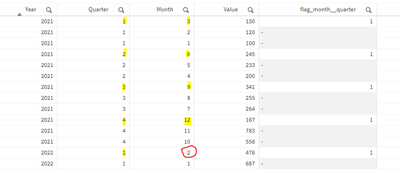
and then use the flag in your measure
sum({< flag_month__quarter={1} >}Value)
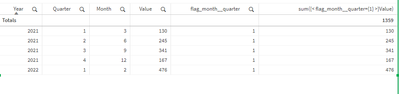
Hope this helps.
Best,
justISO
- Mark as New
- Bookmark
- Subscribe
- Mute
- Subscribe to RSS Feed
- Permalink
- Report Inappropriate Content
Hi, for Quarterly Max you can try:
sum(IF(Month = Aggr(NODISTINCT Max({1}Month),Quarter,Year), Value))
for Yearly Max approach the same
sum(IF(Month = Aggr(NODISTINCT Max({1}Month),Year), Value))
RafaelBarrios
- Mark as New
- Bookmark
- Subscribe
- Mute
- Subscribe to RSS Feed
- Permalink
- Report Inappropriate Content
Hi @PradeepK
as i always try not to use aggr, mainly in large applications, i would suggest to solve it in the script.
what would I do is ordering by year, quarter and month in descending order and read comparing with previuos record to mark the maximum month for each quarter
table1:
load * inline [
Year,Quarter,Month,Value
2021,1,1,100
2021,1,2,120
2021,1,3,130
2021,2,4,200
2021,2,5,233
2021,2,6,245
2021,3,7,264
2021,3,8,255
2021,3,9,341
2021,4,10,556
2021,4,11,783
2021,4,12,167
2022,1,1,687
2022,1,2,476

];

NoConcatenate
table2:
load
Year,
Quarter,
Month,
Value,
if(Quarter<>Previous(Quarter),1) as flag_month__quarter
RESIDENT table1
order by Year,Quarter, Month desc;

drop table table1;
and then use the flag in your measure
sum({< flag_month__quarter={1} >}Value)
Hope this helps.
Best,
PradeepK
- Mark as New
- Bookmark
- Subscribe
- Mute
- Subscribe to RSS Feed
- Permalink
- Report Inappropriate Content
Thanks @RafaelBarrios. I used the similar approach. Ended up creating Max_Month_Flag for every quarter in Calendar table.
