Unlock a world of possibilities! Login now and discover the exclusive benefits awaiting you.

- Qlik Community
- :
- Forums
- :
- Analytics & AI
- :
- Products & Topics
- :
- Visualization and Usability
- :
- List values of field A based selection of field A ...
- Subscribe to RSS Feed
- Mark Topic as New
- Mark Topic as Read
- Float this Topic for Current User
- Bookmark
- Subscribe
- Mute
- Printer Friendly Page

 rougeherring
- Mark as New
- Bookmark
- Subscribe
- Mute
- Subscribe to RSS Feed
- Permalink
- Report Inappropriate Content
List values of field A based selection of field A based on field B, indirect filter?
Qlik Sense Question
I've created an example for clarity:
I want to see in the visualization all of the fruit that are available from states that offer that fruit.
| ID | Fruit | Origin State |
| 1 | Apple | New Jersey |
| 2 | Apple | Pennsylvania |
| 3 | Apple | New York |
| 4 | Apple | California |
| 5 | Apple | Oregon |
| 6 | Pear | New Jersey |
| 7 | Pear | Pennsylvania |
| 8 | Pear | California |
| 9 | Pear | New Mexico |
| 10 | Pineapple | Florida |
| 11 | Pineapple | Texas |
| 12 | Pineapple | Georgia |
| 13 | Pineapple | South Carolina |
| 14 | Pineapple | New Mexico |
So if I select Apple, the result should be all of the fruit offered by New Jersey, Pennsylvania, New York, California, and Oregon
- Apple
- Pear
Accepted Solutions

 sunny_talwar
- Mark as New
- Bookmark
- Subscribe
- Mute
- Subscribe to RSS Feed
- Permalink
- Report Inappropriate Content
So I guess the bottom line is that to get those Fruits which are sold in the city of your selected fruit you will need to use this as your set analysis -> {<[Origin State] = p([Origin State]), Fruit>}
IT can be used in text box object like I pointed out or in straight or pivot table as needed.
I hope our suggestion will be useful for you.
Best,
Sunny
sunny_talwar
- Mark as New
- Bookmark
- Subscribe
- Mute
- Subscribe to RSS Feed
- Permalink
- Report Inappropriate Content
Try this expression:
=Concat(DISTINCT {<[Origin State] = p([Origin State]), Fruit>}Fruit, ', ')
in a text box object.
 maxgro
- Mark as New
- Bookmark
- Subscribe
- Mute
- Subscribe to RSS Feed
- Permalink
- Report Inappropriate Content
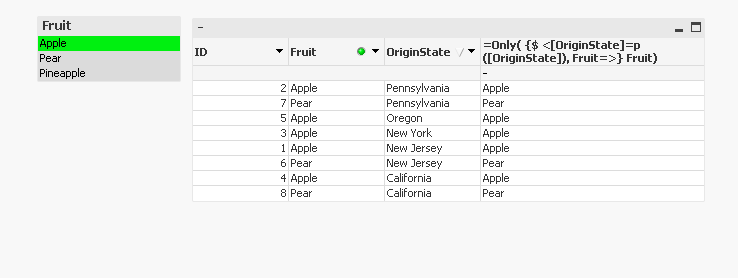
maybe a chart with 3 dims and 1 exp
=Only( {$ <[OriginState]=p([OriginState]), Fruit=>} Fruit)
sunny_talwar
- Mark as New
- Bookmark
- Subscribe
- Mute
- Subscribe to RSS Feed
- Permalink
- Report Inappropriate Content
So I guess the bottom line is that to get those Fruits which are sold in the city of your selected fruit you will need to use this as your set analysis -> {<[Origin State] = p([Origin State]), Fruit>}
IT can be used in text box object like I pointed out or in straight or pivot table as needed.
I hope our suggestion will be useful for you.
Best,
Sunny
rougeherring
- Mark as New
- Bookmark
- Subscribe
- Mute
- Subscribe to RSS Feed
- Permalink
- Report Inappropriate Content
The expression does show me a list of all of the items I am looking for.
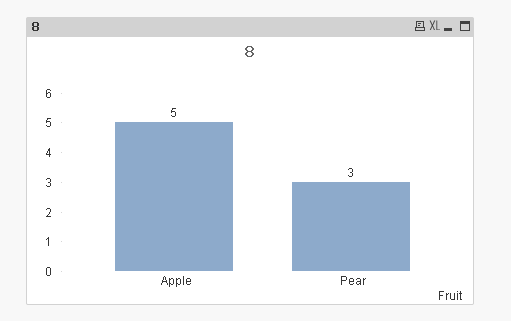
Could you show me the expression needed to show the information in a bar chart to show the count of each of the fruit?
Example: Bar should show 5 apples, 3 pears
sunny_talwar
- Mark as New
- Bookmark
- Subscribe
- Mute
- Subscribe to RSS Feed
- Permalink
- Report Inappropriate Content
Expression:
=Count({<[Origin State] = p([Origin State]), Fruit>}Fruit)
rougeherring
- Mark as New
- Bookmark
- Subscribe
- Mute
- Subscribe to RSS Feed
- Permalink
- Report Inappropriate Content
Thank you, works perfectly.
