Unlock a world of possibilities! Login now and discover the exclusive benefits awaiting you.

- Qlik Community
- :
- Forums
- :
- Analytics & AI
- :
- Products & Topics
- :
- Visualization and Usability
- :
- Re: Load just specific data
Options
- Subscribe to RSS Feed
- Mark Topic as New
- Mark Topic as Read
- Float this Topic for Current User
- Bookmark
- Subscribe
- Mute
- Printer Friendly Page
Turn on suggestions
Auto-suggest helps you quickly narrow down your search results by suggesting possible matches as you type.
Showing results for

 gwmills_fiserv
Partner - Contributor II
2019-03-11
11:01 AM
- Mark as New
- Bookmark
- Subscribe
- Mute
- Subscribe to RSS Feed
- Permalink
- Report Inappropriate Content
Load just specific data
I am creating a chart with branches as my dimension across the bottom. I want to limit the dimension to show all branches except branch 500 and branch 600. I do not wan this to be a filter, as I the user to be able to select specific branches for further details, but when the filter is cleared, I want to continue to exclude numbers 500 and 600.
- Tags:
- chart
2,797 Views
1 Solution
Accepted Solutions
 OmarBenSalem
Partner - Champion II
2019-03-11
11:06 AM
- Mark as New
- Bookmark
- Subscribe
- Mute
- Subscribe to RSS Feed
- Permalink
- Report Inappropriate Content
change ur measure from :
sum(Measure)
to
sum({<Branch-={'500','600'}>}Measure)
sum(Measure)
to
sum({<Branch-={'500','600'}>}Measure)
5 Replies
OmarBenSalem
Partner - Champion II
2019-03-11
11:06 AM
- Mark as New
- Bookmark
- Subscribe
- Mute
- Subscribe to RSS Feed
- Permalink
- Report Inappropriate Content
change ur measure from :
sum(Measure)
to
sum({<Branch-={'500','600'}>}Measure)
sum(Measure)
to
sum({<Branch-={'500','600'}>}Measure)
gwmills_fiserv
Partner - Contributor II
2019-03-11
11:50 AM
Author
- Mark as New
- Bookmark
- Subscribe
- Mute
- Subscribe to RSS Feed
- Permalink
- Report Inappropriate Content
It is not a measure, but rather the dimension across the bottom.
2,779 Views
OmarBenSalem
Partner - Champion II
2019-03-11
12:07 PM
- Mark as New
- Bookmark
- Subscribe
- Mute
- Subscribe to RSS Feed
- Permalink
- Report Inappropriate Content
an u share your chart?
Chart type?
Dimensions and measures used?
and an image maybe?
2,770 Views
gwmills_fiserv
Partner - Contributor II
2019-03-11
12:17 PM
Author
- Mark as New
- Bookmark
- Subscribe
- Mute
- Subscribe to RSS Feed
- Permalink
- Report Inappropriate Content
Sure.
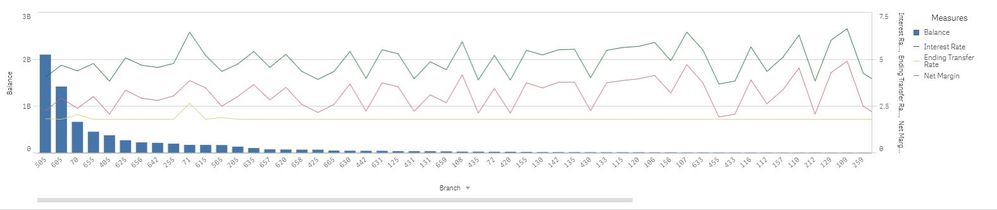
Combo Chart. Bottom is Branch, Left Side Balance, Right side Rate info.
2,764 Views
 dplr-rn
Partner - Master III
2019-03-11
01:13 PM
- Mark as New
- Bookmark
- Subscribe
- Mute
- Subscribe to RSS Feed
- Permalink
- Report Inappropriate Content
Solution mentioned by Omar will work and using set analysis (i.e. giving logic in expressions) is the best approach Unless some other restriction which we i dont know of.
Or you can use if condition on the dimension level on chart as well but i wouldn't recommend it
Or you can use if condition on the dimension level on chart as well but i wouldn't recommend it
