Unlock a world of possibilities! Login now and discover the exclusive benefits awaiting you.

- Qlik Community
- :
- Forums
- :
- Analytics & AI
- :
- Products & Topics
- :
- Visualization and Usability
- :
- Re: Loop for add month to date during two years
- Subscribe to RSS Feed
- Mark Topic as New
- Mark Topic as Read
- Float this Topic for Current User
- Bookmark
- Subscribe
- Mute
- Printer Friendly Page

 jmialoundama
- Mark as New
- Bookmark
- Subscribe
- Mute
- Subscribe to RSS Feed
- Permalink
- Report Inappropriate Content
Loop for add month to date during two years
Hi,
I'm new to creating loops
I have this data :
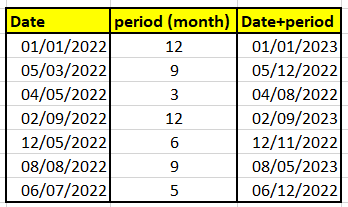
I need to create a loop in the load script to add a number of months (the "Period" column indicates the number of months to add to the date) for 2 years.
The calculation is as follows : Date + period during 2 years.
When I have all the dates for 2 years, the loop stops
Can i help me please ? Thanks in advance 🙂

 Vegar
Vegar
- Mark as New
- Bookmark
- Subscribe
- Mute
- Subscribe to RSS Feed
- Permalink
- Report Inappropriate Content
I'm not completely understanding your issue, but when reading it I get an idea of what you are trying to do. Maybe this load while will help.
Load
Dayname([Date] + iterno() - 1 ) as Date,
dayname(addmonths([Date] + iterno() - 1, Period)) as DatePeriod
Resident Source
While [Date] + iterno() - 1 < addyears([Date],2);
Qlik Community MVP
jmialoundama
- Mark as New
- Bookmark
- Subscribe
- Mute
- Subscribe to RSS Feed
- Permalink
- Report Inappropriate Content
Hi @Vegar ,
I tested the script and it generates many dates.
However, it generates all the dates of the month for me, whereas I would like it to generate only two dates (date_generate_1 and date_generate_2).
Date_generate_1 : Date + Period
Date_generate_2 : Date_generate_1 + Period
This is what I have :
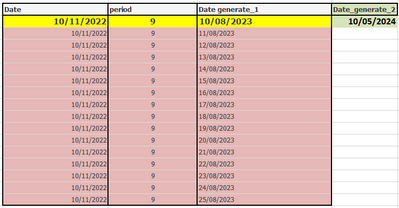
How can i do it ?
Vegar
- Mark as New
- Bookmark
- Subscribe
- Mute
- Subscribe to RSS Feed
- Permalink
- Report Inappropriate Content
I see, I missunderstood you in my first reply.
I think this is what you are looking for.
LOAD
Date,
Period,
AddMonths(Date,Period) as Date1,
AddMonths(Date,Period*2) as Date2
Inline [
Date, Period
01/01/2022,12
05/03/2022,9
04/05/2022,3
10/11/2022,9
];
> Assuming that your [Date] field is recognized as a date and not a string by your application.
Qlik Community MVP
