Unlock a world of possibilities! Login now and discover the exclusive benefits awaiting you.

- Qlik Community
- :
- Forums
- :
- Analytics & AI
- :
- Products & Topics
- :
- Visualization and Usability
- :
- Make time graph start datetime and end datetime
- Subscribe to RSS Feed
- Mark Topic as New
- Mark Topic as Read
- Float this Topic for Current User
- Bookmark
- Subscribe
- Mute
- Printer Friendly Page

 masterg_nl
- Mark as New
- Bookmark
- Subscribe
- Mute
- Subscribe to RSS Feed
- Permalink
- Report Inappropriate Content
Make time graph start datetime and end datetime
Hello,
Can someone help me with the following:
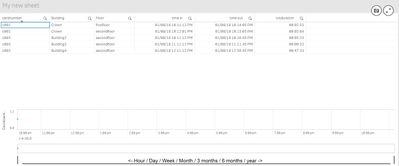
I've a table as shown. Now I want to create a graph: count the amount of cards. In a scale of Hour/day/week/month/ 3 months / 6 months / year.
example:
datetime: 01/08/18 10:11:12 PM till 01/08/18 10:14:05 => card count=2
datetime: 01/08/18 10:14:05 PM till 01/08/18 10:16:45 => card count=1
datetime: 01/08/18 10:16:45 PM till 01/08/18 11:11:12 => card count=0
.....
Regards,
Gert
Accepted Solutions

 OmarBenSalem
- Mark as New
- Bookmark
- Subscribe
- Mute
- Subscribe to RSS Feed
- Permalink
- Report Inappropriate Content
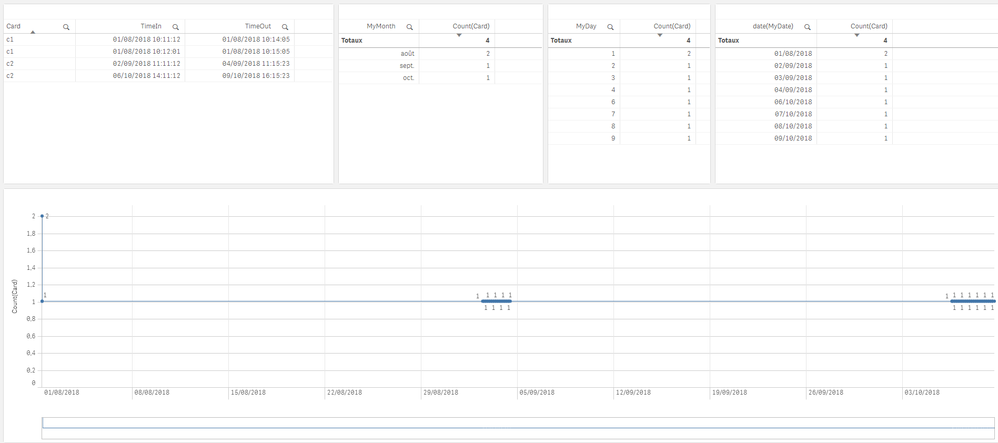
Try to implement this:
t:
load Card, Timestamp( Timestamp#(timeIn,'DD/MM/YY hh:mm:ss')) as TimeIn,Timestamp( Timestamp#(Timeout,'DD/MM/YY hh:mm:ss')) as TimeOut Inline [
Card, timeIn,Timeout
c1, 01/08/18 10:11:12, 01/08/18 10:14:05
c1, 01/08/18 10:12:01 , 01/08/18 10:15:05
c2, 02/09/18 11:11:12, 04/09/18 11:15:23
c2, 06/10/18 14:11:12, 09/10/18 16:15:23
];
MinMaxDates:
LOAD Floor(Min(TimeStamp#(TimeIn))) AS MinDate,
Floor(Max(TimeStamp#(TimeOut))) AS MaxDate
RESIDENT t;
LET vMinDate = FieldValue('MinDate', 1);
LET vMaxDate = FieldValue('MaxDate', 1);
DROP TABLE MinMaxDates;
CalendarTemp:
LOAD DayStart(TimeStamp($(vMinDate) + (RecNo()/60/60/24) + (IterNo() -1))) AS AddedDate, // Use this one as date
TimeStamp($(vMinDate) + (RecNo()/60/60/24) + (IterNo() -1)) AS AddedTimeStamp
AUTOGENERATE 86399 WHILE Num($(vMinDate) + IterNo() -1) <= Num($(vMaxDate));
Calendar:LOAD AddedTimeStamp AS MyTimeStamp,
AddedDate as MyDate,
Year(AddedTimeStamp) AS MyYear,
month(AddedTimeStamp) as MyMonth,
hour(AddedTimeStamp) as MyHour,
Day(AddedTimeStamp) as MyDay
Resident CalendarTemp ;
drop Table CalendarTemp;
//Link the field Time to the time intervals defined by the fields Start and End.
Inner Join IntervalMatch ( MyTimeStamp )
LOAD TimeIn, TimeOut
Resident t;
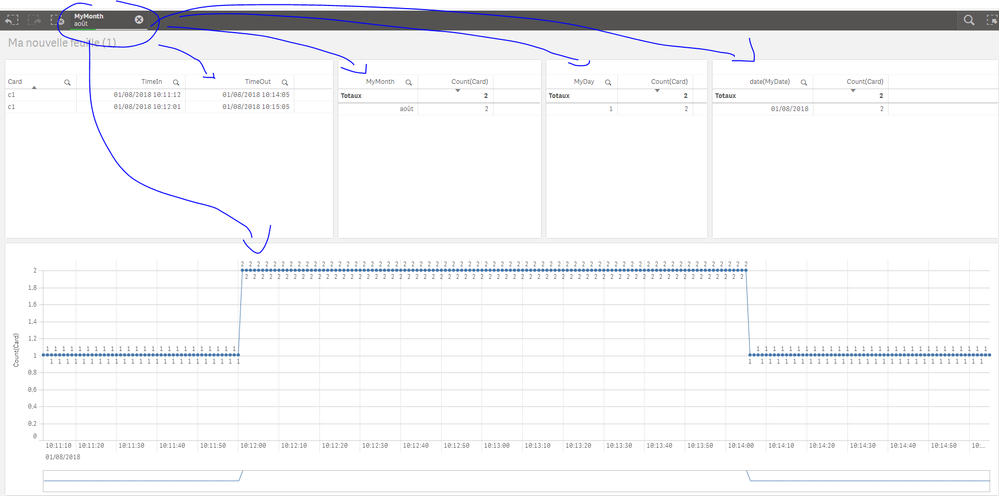
result:
 OmarBenSalem
- Mark as New
- Bookmark
- Subscribe
- Mute
- Subscribe to RSS Feed
- Permalink
- Report Inappropriate Content
Try to implement this:
t:
load Card, Timestamp( Timestamp#(timeIn,'DD/MM/YY hh:mm:ss')) as TimeIn,Timestamp( Timestamp#(Timeout,'DD/MM/YY hh:mm:ss')) as TimeOut Inline [
Card, timeIn,Timeout
c1, 01/08/18 10:11:12, 01/08/18 10:14:05
c1, 01/08/18 10:12:01 , 01/08/18 10:15:05
c2, 02/09/18 11:11:12, 04/09/18 11:15:23
c2, 06/10/18 14:11:12, 09/10/18 16:15:23
];
MinMaxDates:
LOAD Floor(Min(TimeStamp#(TimeIn))) AS MinDate,
Floor(Max(TimeStamp#(TimeOut))) AS MaxDate
RESIDENT t;
LET vMinDate = FieldValue('MinDate', 1);
LET vMaxDate = FieldValue('MaxDate', 1);
DROP TABLE MinMaxDates;
CalendarTemp:
LOAD DayStart(TimeStamp($(vMinDate) + (RecNo()/60/60/24) + (IterNo() -1))) AS AddedDate, // Use this one as date
TimeStamp($(vMinDate) + (RecNo()/60/60/24) + (IterNo() -1)) AS AddedTimeStamp
AUTOGENERATE 86399 WHILE Num($(vMinDate) + IterNo() -1) <= Num($(vMaxDate));
Calendar:LOAD AddedTimeStamp AS MyTimeStamp,
AddedDate as MyDate,
Year(AddedTimeStamp) AS MyYear,
month(AddedTimeStamp) as MyMonth,
hour(AddedTimeStamp) as MyHour,
Day(AddedTimeStamp) as MyDay
Resident CalendarTemp ;
drop Table CalendarTemp;
//Link the field Time to the time intervals defined by the fields Start and End.
Inner Join IntervalMatch ( MyTimeStamp )
LOAD TimeIn, TimeOut
Resident t;
result:
masterg_nl
- Mark as New
- Bookmark
- Subscribe
- Mute
- Subscribe to RSS Feed
- Permalink
- Report Inappropriate Content
Yes, I've tested and it works. I will analyze what you have done. many thanks!
