Unlock a world of possibilities! Login now and discover the exclusive benefits awaiting you.

Announcements
Talend Cloud AWS EU Scheduled Outage: Starting Tues 26 May 21:00 CEST with expected completion Wed 27 May 01:00 CEST
- Qlik Community
- :
- Forums
- :
- Analytics & AI
- :
- Products & Topics
- :
- Visualization and Usability
- :
- Map Object in Qlik Sense
Options
- Subscribe to RSS Feed
- Mark Topic as New
- Mark Topic as Read
- Float this Topic for Current User
- Bookmark
- Subscribe
- Mute
- Printer Friendly Page
Turn on suggestions
Auto-suggest helps you quickly narrow down your search results by suggesting possible matches as you type.
Showing results for

Not applicable
2015-05-21
01:47 AM
- Mark as New
- Bookmark
- Subscribe
- Mute
- Subscribe to RSS Feed
- Permalink
- Report Inappropriate Content
Map Object in Qlik Sense
Dear All,
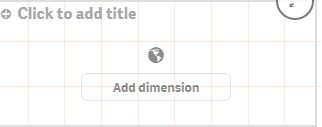
I'm new in qlik Sense. Need your help to solve my problem. I have a SQL script that represent Country wise "Order qty" and "Invoice qty". Now how can I represent this "Invoice qty" into Map in Qlik Sense. I have added Map in my qlik sense but can't add dimension. please help me...
1,164 Views
1 Reply

.png "Former Employee") JonnyPoole
JonnyPoole
Former Employee
2015-05-21
09:55 AM
- Mark as New
- Bookmark
- Subscribe
- Mute
- Subscribe to RSS Feed
- Permalink
- Report Inappropriate Content
You need to add latitude / longitude data for each country to your data load.
OR
Load a KML file depicting all countries
Here are some helpful videos to see how this is done:
https://community.qlik.com/docs/DOC-7967