Unlock a world of possibilities! Login now and discover the exclusive benefits awaiting you.

- Qlik Community
- :
- Forums
- :
- Analytics & AI
- :
- Products & Topics
- :
- Visualization and Usability
- :
- Massive??
- Subscribe to RSS Feed
- Mark Topic as New
- Mark Topic as Read
- Float this Topic for Current User
- Bookmark
- Subscribe
- Mute
- Printer Friendly Page

 sculptorlv
- Mark as New
- Bookmark
- Subscribe
- Mute
- Subscribe to RSS Feed
- Permalink
- Report Inappropriate Content
Massive??
Hello again!
I have another "situation for a junior". Hope for help and advises.
I have a sql table, like:
SQL SELECT
ID
Name
Age
etc...
FROM Table
WHERE
Name <> Name1
Name <> Name2
..
Name <> Name50
What is the best practice to define these WHERE expressions? Is it possible to make a massive of all possible "Names", which I will not take in my SQL Select? Also, it might be more comfortable to change and massive rather WHERE expressions..
- Tags:
- massive
- where clause
- « Previous Replies
-
- 1
- 2
- Next Replies »

- Mark as New
- Bookmark
- Subscribe
- Mute
- Subscribe to RSS Feed
- Permalink
- Report Inappropriate Content
Hi,
You can define all the names which you want to exclude in an excel file, and load that excel in script under one resident,
later use where not exist functionality to exclude.
sculptorlv
- Mark as New
- Bookmark
- Subscribe
- Mute
- Subscribe to RSS Feed
- Permalink
- Report Inappropriate Content
Got error:
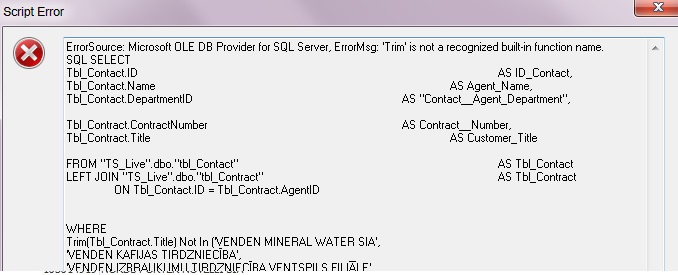

 tresB
tresB
- Mark as New
- Bookmark
- Subscribe
- Mute
- Subscribe to RSS Feed
- Permalink
- Report Inappropriate Content
WHERE
RTrim(LTrim(Tbl_Contract.Title)) Not In ($(vFriendCompnayList));
?
sculptorlv
- Mark as New
- Bookmark
- Subscribe
- Mute
- Subscribe to RSS Feed
- Permalink
- Report Inappropriate Content
Now it works, but the result is the same.
VENDEN KAFIJAS TIRDZNIECĪBA is within the data
tresB
- Mark as New
- Bookmark
- Subscribe
- Mute
- Subscribe to RSS Feed
- Permalink
- Report Inappropriate Content
Somehow the string is not matching. Try the same in the sql db itself (with the single value). Does it work? Find the exact match in the db itself for that particular title and copy paste it from there to qv. It should work.
sculptorlv
- Mark as New
- Bookmark
- Subscribe
- Mute
- Subscribe to RSS Feed
- Permalink
- Report Inappropriate Content
For no I use Where name <> Name1 AND name <> Name2 ... it works.
sculptorlv
- Mark as New
- Bookmark
- Subscribe
- Mute
- Subscribe to RSS Feed
- Permalink
- Report Inappropriate Content
How to make an exclude?
- Mark as New
- Bookmark
- Subscribe
- Mute
- Subscribe to RSS Feed
- Permalink
- Report Inappropriate Content
using where not exists(FieldName)

 reddy-s
- Mark as New
- Bookmark
- Subscribe
- Mute
- Subscribe to RSS Feed
- Permalink
- Report Inappropriate Content
sculptorlv
- Mark as New
- Bookmark
- Subscribe
- Mute
- Subscribe to RSS Feed
- Permalink
- Report Inappropriate Content
Sorry, I don't get it.
I don't need these 'a' values at all, but in the example it got ONE 'a' values from two tables.
- « Previous Replies
-
- 1
- 2
- Next Replies »