Unlock a world of possibilities! Login now and discover the exclusive benefits awaiting you.

- Qlik Community
- :
- Forums
- :
- Analytics & AI
- :
- Products & Topics
- :
- Visualization and Usability
- :
- Month Range Picker
- Subscribe to RSS Feed
- Mark Topic as New
- Mark Topic as Read
- Float this Topic for Current User
- Bookmark
- Subscribe
- Mute
- Printer Friendly Page

 lanlizgu
- Mark as New
- Bookmark
- Subscribe
- Mute
- Subscribe to RSS Feed
- Permalink
- Report Inappropriate Content
Month Range Picker
Instead of having the data at date level, I have data at month level. I was wondering if there is a way to have a month range picker, instead of the date range picker.
Thank you
 Ezirraffner
- Mark as New
- Bookmark
- Subscribe
- Mute
- Subscribe to RSS Feed
- Permalink
- Report Inappropriate Content
Hi @lanlizgu ,
In script you could do:
Date(MonthStart(floor(DATE)),'MM/YYYY') AS MONTH_REFERENCE
In dashboard you could do:

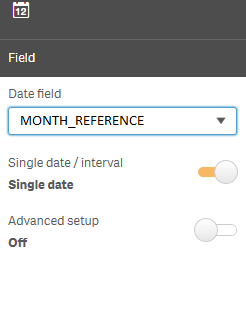
I hope helps.
lanlizgu
- Mark as New
- Bookmark
- Subscribe
- Mute
- Subscribe to RSS Feed
- Permalink
- Report Inappropriate Content
Hi,
Thank you for your answer Exir. However, I already have the date in MM/YYYY format.
As I was mentioning before, I want to have a month range picker and not date range picker. With your suggestion it continues being date range picker and not month range picker.
Thank you.
Ezirraffner
- Mark as New
- Bookmark
- Subscribe
- Mute
- Subscribe to RSS Feed
- Permalink
- Report Inappropriate Content
Hello @lanlizgu !
A suggestion...
1) You can create two variable input (https://help.qlik.com/en-US/sense/June2019/Subsystems/Hub/Content/Sense_Hub/Visualizations/Dashboard...vStart and vEnd
2)If I enter 6 in vStart input box and 12 in vEnd input box... I should get between 6-12
3) You can use a calculated dimension:
if(Month>=$(vStart ) and Month<=$(vEnd), DIMENSION)
lanlizgu
- Mark as New
- Bookmark
- Subscribe
- Mute
- Subscribe to RSS Feed
- Permalink
- Report Inappropriate Content
Hi Ezir,
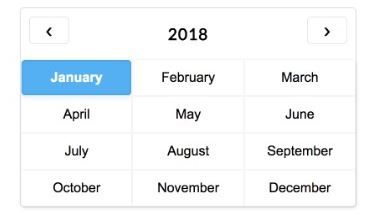
Thanks for your suggestion. However, the solution that I am looking for is something like that: