Unlock a world of possibilities! Login now and discover the exclusive benefits awaiting you.

- Qlik Community
- :
- Forums
- :
- Analytics & AI
- :
- Products & Topics
- :
- Visualization and Usability
- :
- Multiple date filters
- Subscribe to RSS Feed
- Mark Topic as New
- Mark Topic as Read
- Float this Topic for Current User
- Bookmark
- Subscribe
- Mute
- Printer Friendly Page

- Mark as New
- Bookmark
- Subscribe
- Mute
- Subscribe to RSS Feed
- Permalink
- Report Inappropriate Content
Multiple date filters
Hi,
I would like to create a filter that looks like this in QlikSense:
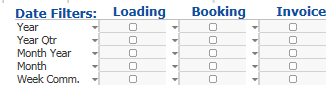
I would like to be able to filter on loading date, booking date and invoice date.
How can I do this in QlikSense? Can I connect all three of my fields (booking, loading and invoice -date) to the calendar?

 Gysbert_Wassena
- Mark as New
- Bookmark
- Subscribe
- Mute
- Subscribe to RSS Feed
- Permalink
- Report Inappropriate Content
Same as in Qlikview, so perhaps this blogs explains what you need to know: The Master Calendar
These discussions may be of interest too:
Tutorial - Using Common Date Dimensions and Shared Calendars
talk is cheap, supply exceeds demand

 its_anandrjs
- Mark as New
- Bookmark
- Subscribe
- Mute
- Subscribe to RSS Feed
- Permalink
- Report Inappropriate Content
Hi,
Multiple box is not available in Qliksense.
But you can add many field object into single object upto 5 objects to get best look and feel.
Or You can try any third party plugins for this visit Qlik Branch site.
Regards
Anand
- Mark as New
- Bookmark
- Subscribe
- Mute
- Subscribe to RSS Feed
- Permalink
- Report Inappropriate Content
I read the blog about the master calendar, but I still don't quite understand how to use it.
I've tried to write the following in my data load:
Year(SupplierInvoiceDueDate) as Year,
Month(SupplierInvoiceDueDate) as Month
The problem is that I have another date which I also want to be considered in the calendar - InvoiceDueDate.
But when I enter the above script with InvoiceDueDate as well I get a synthetic key error.
How can I fix this?