Unlock a world of possibilities! Login now and discover the exclusive benefits awaiting you.

- Qlik Community
- :
- Forums
- :
- Analytics & AI
- :
- Products & Topics
- :
- Visualization and Usability
- :
- Re: New Sequence ID depending on the time sequence
- Subscribe to RSS Feed
- Mark Topic as New
- Mark Topic as Read
- Float this Topic for Current User
- Bookmark
- Subscribe
- Mute
- Printer Friendly Page

 kavieweg
- Mark as New
- Bookmark
- Subscribe
- Mute
- Subscribe to RSS Feed
- Permalink
- Report Inappropriate Content
New Sequence ID depending on the time sequence
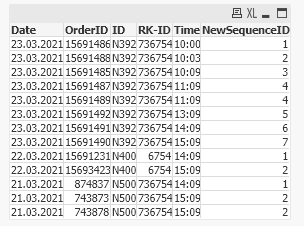
I have a list of orders per Date, ID and RK-ID. Dependig on the Time sequence I would like to add a new column NewSequenceID with the result in the table. Who can help me to solve this in the loadscript or in the table ?
| Date | OrderID | ID | RK-ID | Time | NewSequenceID |
| 23.03.2021 | 15691486 | N392 | 736754 | 10:00 | 1 |
| 23.03.2021 | 15691488 | N392 | 736754 | 10:03 | 2 |
| 23.03.2021 | 15691485 | N392 | 736754 | 10:09 | 3 |
| 23.03.2021 | 15691487 | N392 | 736754 | 11:09 | 4 |
| 23.03.2021 | 15691489 | N392 | 736754 | 11:09 | 4 |
| 23.03.2021 | 15691492 | N392 | 736754 | 13:09 | 5 |
| 23.03.2021 | 15691491 | N392 | 736754 | 14:09 | 6 |
| 23.03.2021 | 15691490 | N392 | 736754 | 15:09 | 7 |
Thanks in advance,
Mathias

- Mark as New
- Bookmark
- Subscribe
- Mute
- Subscribe to RSS Feed
- Permalink
- Report Inappropriate Content
Perhaps this?
LOAD Date,
OrderID,
ID,
[RK-ID],
Time,
AutoNumber(Time) as NewSequenceID
FROM
[https://community.qlik.com/t5/New-to-Qlik-Sense/New-Sequence-ID-depending-on-the-time-sequence/m-p/1...]
(html, utf8, UserAgent is 'Mozilla/5.0', embedded labels, table is @1);

- Mark as New
- Bookmark
- Subscribe
- Mute
- Subscribe to RSS Feed
- Permalink
- Report Inappropriate Content
Try this,
tab1:
LOAD * INLINE [
    Date, OrderID, ID, RK-ID, Time
    23.03.2021, 15691486, N392, 736754, 10:00
    23.03.2021, 15691488, N392, 736754, 10:03
    23.03.2021, 15691485, N392, 736754, 10:09
    23.03.2021, 15691487, N392, 736754, 11:09
    23.03.2021, 15691489, N392, 736754, 11:09
    23.03.2021, 15691492, N392, 736754, 13:09
    23.03.2021, 15691491, N392, 736754, 14:09
    23.03.2021, 15691490, N392, 736754, 15:09
];

tab2:
NoConcatenate
LOAD *, If(Peek(Date)&Peek(Time)=Date&Time,Peek(NewSequenceID),RangeSum(Peek(NewSequenceID),1)) As NewSequenceID
Resident tab1
Order By Date, Time, ID, OrderID;

Drop Table tab1;- Mark as New
- Bookmark
- Subscribe
- Mute
- Subscribe to RSS Feed
- Permalink
- Report Inappropriate Content
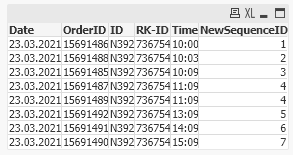
Output:
 kavieweg
- Mark as New
- Bookmark
- Subscribe
- Mute
- Subscribe to RSS Feed
- Permalink
- Report Inappropriate Content
Hey, this is working quite well 🙂 THANKS
But I forgot to tell that i also have other values in the table
if I add another ID, RK ID for the same or other day
22.03.2021 | 15691231 | N400 | 6754 | 14:09 | 1 |
22.03.2021 | 15693423 | N400 | 6754 | 15:09 | 2 |
21.03.2021 | 874837 | N500 | 736754 | 14:09 | 1 |
21.03.2021 | 743878 | N500 | 736754 | 15:09 | 2 |
21.03.2021 | 743873 | N500 | 736754 | 15:09 | 2 |
so i have to do the sorting by time for each Date, ID and RK-ID

 rwunderlich
- Mark as New
- Bookmark
- Subscribe
- Mute
- Subscribe to RSS Feed
- Permalink
- Report Inappropriate Content
If you use @Anil_Babu_Samineni solution with AutoNumber(), you don't have to worry about sorting at all.
-Rob
kavieweg
- Mark as New
- Bookmark
- Subscribe
- Mute
- Subscribe to RSS Feed
- Permalink
- Report Inappropriate Content
I tried this, but AutoNumber doesnt work correctly with my DateTime Format....
kavieweg
- Mark as New
- Bookmark
- Subscribe
- Mute
- Subscribe to RSS Feed
- Permalink
- Report Inappropriate Content
I tried this, but AutoNumber doesnt work correctly with my DateTime Format....
- Mark as New
- Bookmark
- Subscribe
- Mute
- Subscribe to RSS Feed
- Permalink
- Report Inappropriate Content
Try this,
tab1:
LOAD * INLINE [
    Date, OrderID, ID, RK-ID, Time
    23.03.2021, 15691486, N392, 736754, 10:00
    23.03.2021, 15691488, N392, 736754, 10:03
    23.03.2021, 15691485, N392, 736754, 10:09
    23.03.2021, 15691487, N392, 736754, 11:09
    23.03.2021, 15691489, N392, 736754, 11:09
    23.03.2021, 15691492, N392, 736754, 13:09
    23.03.2021, 15691491, N392, 736754, 14:09
    23.03.2021, 15691490, N392, 736754, 15:09
    22.03.2021, 15691231, N400, 6754, 14:09
    22.03.2021, 15693423, N400, 6754, 15:09
    21.03.2021, 874837, N500, 736754, 14:09
    21.03.2021, 743878, N500, 736754, 15:09
    21.03.2021, 743873, N500, 736754, 15:09
];

tab2:
NoConcatenate
LOAD *, If(Peek(Date)<>Date,1,If(Peek(Date)&Peek(Time)=Date&Time,Peek(NewSequenceID),RangeSum(Peek(NewSequenceID),1))) As NewSequenceID
Resident tab1
Order By Date, Time, [RK-ID], OrderID;

Drop Table tab1;- Mark as New
- Bookmark
- Subscribe
- Mute
- Subscribe to RSS Feed
- Permalink
- Report Inappropriate Content
Output: