Unlock a world of possibilities! Login now and discover the exclusive benefits awaiting you.

- Qlik Community
- :
- Forums
- :
- Analytics & AI
- :
- Products & Topics
- :
- Visualization and Usability
- :
- Number format
- Subscribe to RSS Feed
- Mark Topic as New
- Mark Topic as Read
- Float this Topic for Current User
- Bookmark
- Subscribe
- Mute
- Printer Friendly Page

 OmarBenSalem
- Mark as New
- Bookmark
- Subscribe
- Mute
- Subscribe to RSS Feed
- Permalink
- Report Inappropriate Content
Number format
Hi folks,
I'm trying to format my numbers in the SCRIPT.
here's how they're now:

and I want them to be as follow:
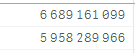
For that, I've done as follow:
num(Current_Notional,'# ##0') as Current_Notional,
and
num(num#(Current_Notional),'# ##0') as Current_Notional,
But, this did not change a thing !
What am I doing wrong?
- « Previous Replies
-
- 1
- 2
- Next Replies »

 Chanty4u
- Mark as New
- Bookmark
- Subscribe
- Mute
- Subscribe to RSS Feed
- Permalink
- Report Inappropriate Content
for time being i tested with one value  it worked
OmarBenSalem
- Mark as New
- Bookmark
- Subscribe
- Mute
- Subscribe to RSS Feed
- Permalink
- Report Inappropriate Content
Ah no ! that also did not work !
It includes all the numbers; I mean the result will be :
like Current_Notional instead of current

to achieve the current value:
here's what I've done :
num(SubField(Current_Notional,',',1),'# ##0','.',' ') as current,
OmarBenSalem
- Mark as New
- Bookmark
- Subscribe
- Mute
- Subscribe to RSS Feed
- Permalink
- Report Inappropriate Content
my bad ! when I tested this another time; this is what really works as I want !
Chanty4u
- Mark as New
- Bookmark
- Subscribe
- Mute
- Subscribe to RSS Feed
- Permalink
- Report Inappropriate Content
Ohh is it !!!! its nice  have a nice day
Chanty4u
- Mark as New
- Bookmark
- Subscribe
- Mute
- Subscribe to RSS Feed
- Permalink
- Report Inappropriate Content
other way i think is that you can remove the separator values in
envvironment variables for thousnd and money like depends on your requriment and check
its not tested,
OmarBenSalem
- Mark as New
- Bookmark
- Subscribe
- Mute
- Subscribe to RSS Feed
- Permalink
- Report Inappropriate Content
what really confuses me is :
when I use :
Num#( Field, '#', ' ', ' ') as Field
or
num(Num#( Field, '#', ' ', ' '),'# ##0') as Field,
It does not work as I want to !
But, if instead I change the Field Name; it does work !!
Num#( Field, '#', ' ', ' ') as Field2
or
num(Num#( Field, '#', ' ', ' '),'# ##0') as Field2

- « Previous Replies
-
- 1
- 2
- Next Replies »