Unlock a world of possibilities! Login now and discover the exclusive benefits awaiting you.

- Qlik Community
- :
- Forums
- :
- Analytics & AI
- :
- Products & Topics
- :
- Visualization and Usability
- :
- Re: Only and Aggr function in Table Chart
- Subscribe to RSS Feed
- Mark Topic as New
- Mark Topic as Read
- Float this Topic for Current User
- Bookmark
- Subscribe
- Mute
- Printer Friendly Page

 vidyas16
- Mark as New
- Bookmark
- Subscribe
- Mute
- Subscribe to RSS Feed
- Permalink
- Report Inappropriate Content
Only and Aggr function in Table Chart
Dear All,
I have an APP with a Date and Status field and other columns. As you can see in below picture, when particular rule (Ex: 3,4) are not run at all then the Date is <NULL>. My requirement is when a user selects any date (Ex: '2021-03-31'), then we need show Rules that are run for that date and rules that did not run at all meaning current selection of date plus Date = <null> in the Table chart.
I tried these possibilities in the date column, but I don't get the desired result when I make a selection on Date. It only shows the result for selected date and NOT Date='<NULL>'
=Aggr(Only({$+1<Date={'<NULL>'}>}Date),Date)
=Aggr(Only({$<Date=Date+({'<NULL>'})>}Date),Date)
=Aggr(Only({1<Date={'2021-03-31','<NULL>'}>}Date),Date) - tried manually by entering actual details.
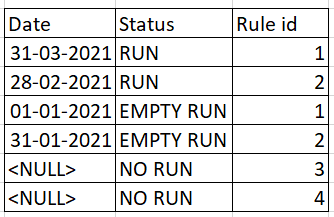
Request you to provide any of the changes/suggestions that can be made to get the desired result.
Thank You
Vidya S
Accepted Solutions

 avinashelite
- Mark as New
- Bookmark
- Subscribe
- Mute
- Subscribe to RSS Feed
- Permalink
- Report Inappropriate Content
Okay so only for date it should not react okay try this
Only({<Date,Date_Flag={N}>}Ruleid)
avinashelite
- Mark as New
- Bookmark
- Subscribe
- Mute
- Subscribe to RSS Feed
- Permalink
- Report Inappropriate Content
Try like this , create a flag int he script for the null date
LOAD *,
if(len(trim(Date))=0,'N','Y') as Date_Flag;
LOAD * Inline
[
Date,Status,Ruleid
31-03-2021,RUN,1
28-02-2021,RUN,2
01-01-2021,EMPTYRUN,1
31-01-2021,RMPTYRUN,2
,NO RUN,3
,NO RUN,4
];
And use
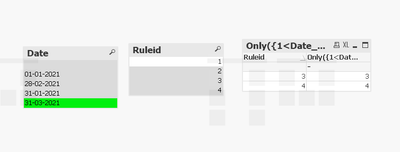
Only({1<Date_Flag={N}>}Ruleid) in the chart you will get the results
avinashelite
- Mark as New
- Bookmark
- Subscribe
- Mute
- Subscribe to RSS Feed
- Permalink
- Report Inappropriate Content
vidyas16
- Mark as New
- Bookmark
- Subscribe
- Mute
- Subscribe to RSS Feed
- Permalink
- Report Inappropriate Content
Thank you @avinashelite , the result works fine. But due to 1 (all selections) in expression, 'NO RUN' will not respond to other column filters which is not desired.
Thank you
Vidya S
avinashelite
- Mark as New
- Bookmark
- Subscribe
- Mute
- Subscribe to RSS Feed
- Permalink
- Report Inappropriate Content
Okay could you please let me know how your excepting the results on each selection
vidyas16
- Mark as New
- Bookmark
- Subscribe
- Mute
- Subscribe to RSS Feed
- Permalink
- Report Inappropriate Content
Hi @avinashelite Thank you for the reply.
I have implemented your expression and got the result. Please see PIC 1
But when I try to filter on another column ex : Layer in picture, I want to see the 'No Run' for selected Layer.
I have selected Layer = LAY1, but I see the results for LAY2 and STG for Status = NO RUN. Please see PIC 2
Hope this explains the requirement.
Thank you,
Vidya S

 avinashelite
- Mark as New
- Bookmark
- Subscribe
- Mute
- Subscribe to RSS Feed
- Permalink
- Report Inappropriate Content
Okay so only for date it should not react okay try this
Only({<Date,Date_Flag={N}>}Ruleid)
vidyas16
- Mark as New
- Bookmark
- Subscribe
- Mute
- Subscribe to RSS Feed
- Permalink
- Report Inappropriate Content
Thank you @avinashelite It worked fine.
Vidya S.
