Unlock a world of possibilities! Login now and discover the exclusive benefits awaiting you.

Announcements
Want to see what's currently in public preview? We've pulled it all together in one place. Check it out here
- Qlik Community
- :
- Forums
- :
- Analytics & AI
- :
- Products & Topics
- :
- Visualization and Usability
- :
- Opacity density layer on map
Options
- Subscribe to RSS Feed
- Mark Topic as New
- Mark Topic as Read
- Float this Topic for Current User
- Bookmark
- Subscribe
- Mute
- Printer Friendly Page
Turn on suggestions
Auto-suggest helps you quickly narrow down your search results by suggesting possible matches as you type.
Showing results for

 LolaCottin
Contributor
2022-05-30
09:30 AM
- Mark as New
- Bookmark
- Subscribe
- Mute
- Subscribe to RSS Feed
- Permalink
- Report Inappropriate Content
Opacity density layer on map
Hello !
I have some uses with the density layer on Qlik Sense. I want the same opacity for all circle but different colors. I set opacity at 1 in the colors tab yet I have this :
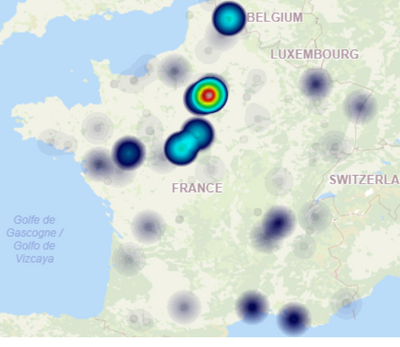
Therefore, my legend doesn't have any opacity parameter.
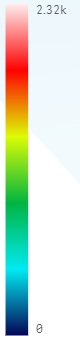
I thinks is the weight of my point that create some opacity... How do I keep my measure without create transparency ?
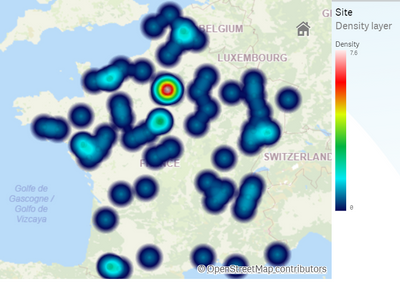
Something like this but with colors according to my measure (going from 0 to 2.37k) and not the count of points.
Thank you in advance.
592 Views
0 Replies
