Unlock a world of possibilities! Login now and discover the exclusive benefits awaiting you.

- Qlik Community
- :
- Forums
- :
- Analytics & AI
- :
- Products & Topics
- :
- Visualization and Usability
- :
- Re: PROBLEM: AND-MODE selection for Qlik Sense
- Subscribe to RSS Feed
- Mark Topic as New
- Mark Topic as Read
- Float this Topic for Current User
- Bookmark
- Subscribe
- Mute
- Printer Friendly Page

 _fl
_fl
- Mark as New
- Bookmark
- Subscribe
- Mute
- Subscribe to RSS Feed
- Permalink
- Report Inappropriate Content
PROBLEM: AND-MODE selection for Qlik Sense
Hi All,
Below an exercise I am trying to solve but I can't find a solution.
Starting with a database with products that may have different configurations:
| Goods | Attributes |
| Product 1 | A,B,C |
| Product 1 | D,E |
| Product 1 | A,C,T |
| Product 2 | E,D,G |
| Product 2 | A,H,C |
| Product 3 | B,C,E |
| Product 3 | A,D,E |
| Product 3 | B,D,F,R |
| Product 3 | A,B,C,D |
1) In the data model, I uploaded the table above and inserted a column "Elementary Attributes"obtained through a Subfield of the column Attributes
2) On a dashboard, I created a table with both the columns above and a filter on the Elementary Attributes(A;B;C;D;E;F;G..).
What I need to do is to filter all the rows that have in the column Attributes all the elements that I have filtered.
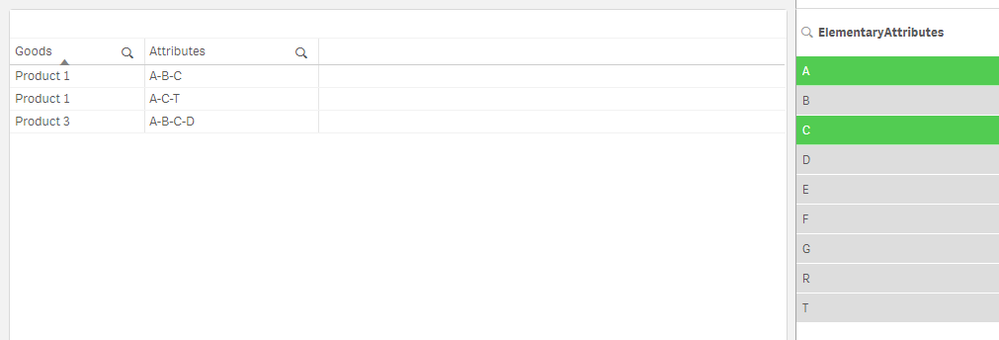
For example, if I select in the filter the elements A and C I need to see the following rows:
| Goods | Attributes |
| Product 1 | A,B,C |
| Product 1 | A,C,T |
| Product 2 | A,H,C |
| Product 3 | A,B,C,D |
And not the result that the basic filter does with OR selection (below):
| Goods | Attributes |
| Product 1 | A,B,C |
| Product 1 | A,C,T |
| Product 2 | A,H,C |
| Product 3 | B,C,E |
| Product 3 | A,D,E |
| Product 3 | A,B,C,D |
I tried a few work-around on it but could not find a solution.
Looking forward to hearing Your opinion, I thank you in advance for your help.
Accepted Solutions

 OmarBenSalem
- Mark as New
- Bookmark
- Subscribe
- Mute
- Subscribe to RSS Feed
- Permalink
- Report Inappropriate Content
Create a table with 2 dimensions:
dim1: Good
dim2 : =aggr(if(GetSelectedCount(ElementaryAttributes)=0,Attributes,
if(len(trim(KeepChar(Attributes,Concat(distinct ElementaryAttributes))))=len(trim(Concat(total distinct ElementaryAttributes))), Attributes)
),Goods,Attributes)
Result:
No selection:
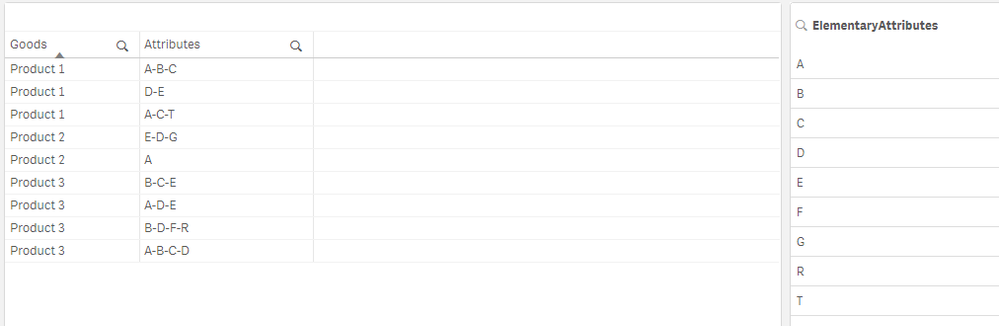
Select A and C:
OmarBenSalem
- Mark as New
- Bookmark
- Subscribe
- Mute
- Subscribe to RSS Feed
- Permalink
- Report Inappropriate Content
Create a table with 2 dimensions:
dim1: Good
dim2 : =aggr(if(GetSelectedCount(ElementaryAttributes)=0,Attributes,
if(len(trim(KeepChar(Attributes,Concat(distinct ElementaryAttributes))))=len(trim(Concat(total distinct ElementaryAttributes))), Attributes)
),Goods,Attributes)
Result:
No selection:
Select A and C:
_fl
- Mark as New
- Bookmark
- Subscribe
- Mute
- Subscribe to RSS Feed
- Permalink
- Report Inappropriate Content
It worked, thank you very much!! 🙂
