Unlock a world of possibilities! Login now and discover the exclusive benefits awaiting you.

- Qlik Community
- :
- Forums
- :
- Analytics & AI
- :
- Products & Topics
- :
- Visualization and Usability
- :
- Pass or Fail Based on Total
- Subscribe to RSS Feed
- Mark Topic as New
- Mark Topic as Read
- Float this Topic for Current User
- Bookmark
- Subscribe
- Mute
- Printer Friendly Page

 hammermill21
- Mark as New
- Bookmark
- Subscribe
- Mute
- Subscribe to RSS Feed
- Permalink
- Report Inappropriate Content
Pass or Fail Based on Total
Hello,
I am calculating a percentage:
=Num([Actual Load Percentage]/100,'0%')
Which gives me 54%, now based on that I want to add a column showing PASS or FAIL. So if the percentage is over 30% it passes and if it's under 30% it Fails. I've tried a few ways and it doesn't seem to be working.
Anyone have any suggestions?
Thank you!
- « Previous Replies
-
- 1
- 2
- Next Replies »
Accepted Solutions

 sunny_talwar
- Mark as New
- Bookmark
- Subscribe
- Mute
- Subscribe to RSS Feed
- Permalink
- Report Inappropriate Content
My bad, I forgot to add the if(
=If([Actual Load Percentage] > 30, 'Pass', 'Fail')

- Mark as New
- Bookmark
- Subscribe
- Mute
- Subscribe to RSS Feed
- Permalink
- Report Inappropriate Content
Can you duplicate the column, and wrap the statement in an IF statement. Basically,
IF(Original Formula >30%, "Pass", "Fail")
sunny_talwar
- Mark as New
- Bookmark
- Subscribe
- Mute
- Subscribe to RSS Feed
- Permalink
- Report Inappropriate Content
should be just this
=[Actual Load Percentage] > 30, 'Pass', 'Fail')
hammermill21
- Mark as New
- Bookmark
- Subscribe
- Mute
- Subscribe to RSS Feed
- Permalink
- Report Inappropriate Content
Hey SUnny,
I tried that but it gives me an error.
hammermill21
- Mark as New
- Bookmark
- Subscribe
- Mute
- Subscribe to RSS Feed
- Permalink
- Report Inappropriate Content
Hi,
Yup tried that and also not working, getting an error.
sunny_talwar
- Mark as New
- Bookmark
- Subscribe
- Mute
- Subscribe to RSS Feed
- Permalink
- Report Inappropriate Content
Is this in a script or expression? Can you share a screenshot?
hammermill21
- Mark as New
- Bookmark
- Subscribe
- Mute
- Subscribe to RSS Feed
- Permalink
- Report Inappropriate Content
I'm doing this as an expression.
sunny_talwar
- Mark as New
- Bookmark
- Subscribe
- Mute
- Subscribe to RSS Feed
- Permalink
- Report Inappropriate Content
screenshot?
hammermill21
- Mark as New
- Bookmark
- Subscribe
- Mute
- Subscribe to RSS Feed
- Permalink
- Report Inappropriate Content
Sorry thought I attached it!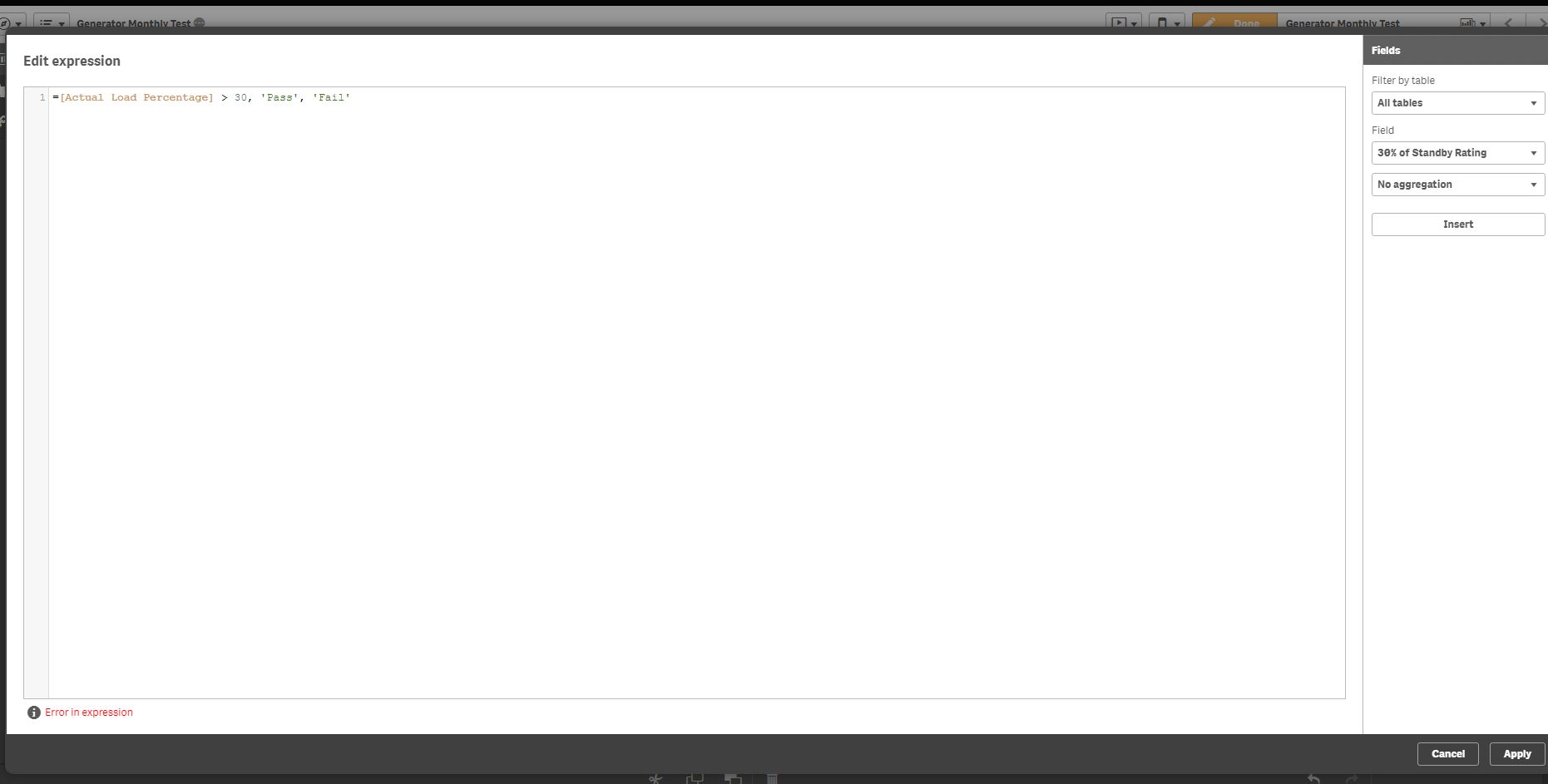
sunny_talwar
- Mark as New
- Bookmark
- Subscribe
- Mute
- Subscribe to RSS Feed
- Permalink
- Report Inappropriate Content
My bad, I forgot to add the if(
=If([Actual Load Percentage] > 30, 'Pass', 'Fail')
- « Previous Replies
-
- 1
- 2
- Next Replies »