Unlock a world of possibilities! Login now and discover the exclusive benefits awaiting you.

- Qlik Community
- :
- Forums
- :
- Analytics & AI
- :
- Products & Topics
- :
- Visualization and Usability
- :
- Percentage on Y axis for a bar chart using Set Ana...
- Subscribe to RSS Feed
- Mark Topic as New
- Mark Topic as Read
- Float this Topic for Current User
- Bookmark
- Subscribe
- Mute
- Printer Friendly Page

 SkitzN27
- Mark as New
- Bookmark
- Subscribe
- Mute
- Subscribe to RSS Feed
- Permalink
- Report Inappropriate Content
Percentage on Y axis for a bar chart using Set Analysis and Total function
load * Inline [
Responsible Person, Phases, Value
Tom, Phase 1, 30
Tom, Phase 2, 20
Tom, Phase 3, 50
Jack, Phase 1, 10
Jack, Phase 2, 20
Jack, Phase 3, 10
Jack, Phase 4, 25
Kate, Phase 1, 10
Kate, Phase 2, 10
Kate, Phase 3, 50
]
Hi guys,
Here's a sample data that I have.
I just want to consider sum(Phase 1 and Phase 2) and present the numbers in percentage (Y- Axis)
I want to create a bar chart like this.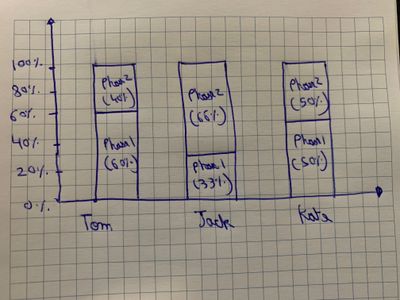
I believe we have to use Total function and Set Analysis.
Also, in the real data set, I have around 100 phases and I just have to display 5 out of it.
Thank you so much,
N
- Tags:
- total
- « Previous Replies
-
- 1
- 2
- Next Replies »
Accepted Solutions

 Kushal_Chawda
- Mark as New
- Bookmark
- Subscribe
- Mute
- Subscribe to RSS Feed
- Permalink
- Report Inappropriate Content
@SkitzN27 if you want it in qlikview do below. No need to create additional measure. single measure is enough
Dimensions:
1) Responsible Person
2) Phases

Expression:
=sum({<Phases={'Phase 1','Phase 2'}>}Value)/sum(TOTAL <[Responsible Person]>{<Phases={'Phase 1','Phase 2'}>}Value)
Go to chart properties->Style-> select "stacked" option
 tm_burgers
- Mark as New
- Bookmark
- Subscribe
- Mute
- Subscribe to RSS Feed
- Permalink
- Report Inappropriate Content
Bar Chart; Dimension : [Responsible Person]
Measures :
Measure 1 = sum({< Phases={'Phase 1'}>} Value) / sum({< Phases={'Phase 1','Phase 2','Phase 3','Phase 4','Phase 5'}>} Value)
Measure 2 = sum({< Phases={'Phase 2'}>} Value) / sum({< Phases={'Phase 1','Phase 2','Phase 3','Phase 4','Phase 5'}>} Value)
Measure 3 = sum({< Phases={'Phase 3'}>} Value) / sum({< Phases={'Phase 1','Phase 2','Phase 3','Phase 4','Phase 5'}>} Value)
etc...
measure display in %
add measure to Master Measure to add custom colors.
 Taoufiq_Zarra
- Mark as New
- Bookmark
- Subscribe
- Mute
- Subscribe to RSS Feed
- Permalink
- Report Inappropriate Content
@SkitzN27 for example in dimension Responsible Person
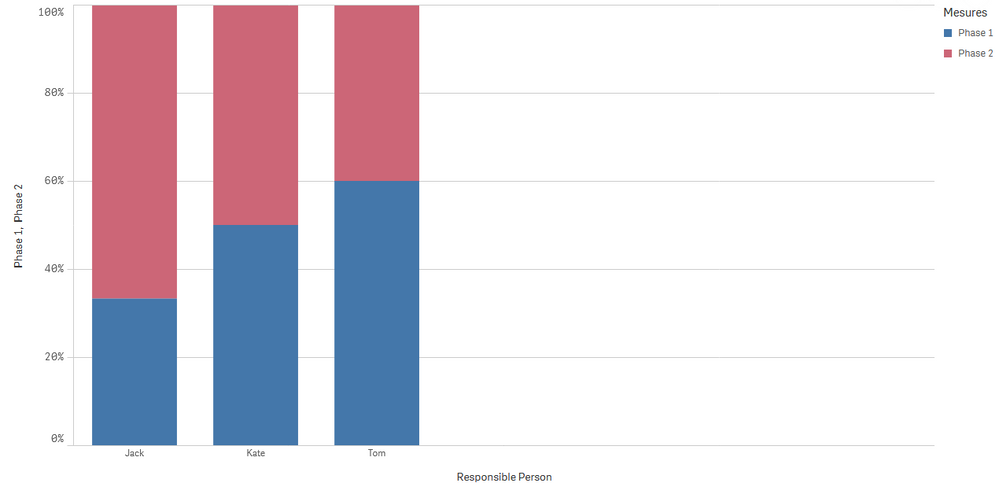
and measure 1:Phase1 :
=sum({<Phases={'Phase 1'}>}Value)/(sum({<Phases={'Phase 2'}>}Value)+sum({<Phases={'Phase 1'}>}Value))
measure 2: phase 2
=sum({<Phases={'Phase 2'}>}Value)/(sum({<Phases={'Phase 2'}>}Value)+sum({<Phases={'Phase 1'}>}Value))
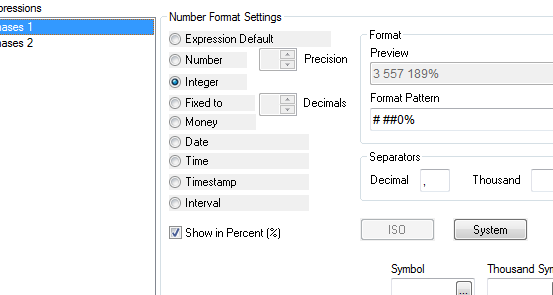
change formating number to Number->pourcentage
and change bar chart style to :
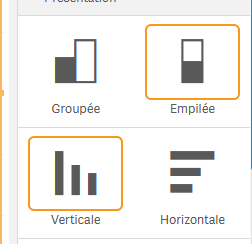
outpout:
or
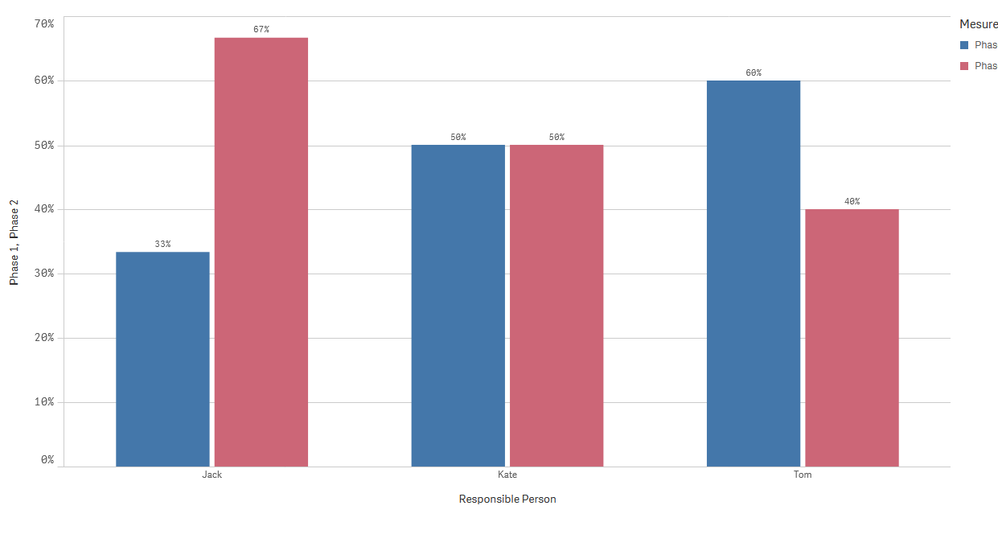
Taoufiq ZARRA
"Please LIKE posts and "Accept as Solution" if the provided solution is helpful "
(you can mark up to 3 "solutions") 😉
Kushal_Chawda
- Mark as New
- Bookmark
- Subscribe
- Mute
- Subscribe to RSS Feed
- Permalink
- Report Inappropriate Content
@SkitzN27 Create a bar chart like below
Dimensions:
1) Responsible Person
2) Phases

Expression:
=sum({<Phases={'Phase 1','Phase 2'}>}Value)/sum(TOTAL <[Responsible Person]>{<Phases={'Phase 1','Phase 2'}>}Value)
Go to Appearance->Presentation and select "Stacked" option
SkitzN27
- Mark as New
- Bookmark
- Subscribe
- Mute
- Subscribe to RSS Feed
- Permalink
- Report Inappropriate Content
Hi Taoufiq,
Thanks so much.
I have to do it in Qlikview, how can I change it to percentage there?
Also, is there any other way to write the denominator rather than having to write sum statement two times in denominator. ( (sum({<Phases={'Phase 2'}>}Value)+sum({<Phases={'Phase 1'}>}Value)))
Taoufiq_Zarra
- Mark as New
- Bookmark
- Subscribe
- Mute
- Subscribe to RSS Feed
- Permalink
- Report Inappropriate Content
@SkitzN27 attached Qlikview file
=sum({<Phases={'Phase 1'}>}Value)/(sum({<Phases={'Phase 2','Phase 1'}>}Value))
for pourc.
Taoufiq ZARRA
"Please LIKE posts and "Accept as Solution" if the provided solution is helpful "
(you can mark up to 3 "solutions") 😉
Kushal_Chawda
- Mark as New
- Bookmark
- Subscribe
- Mute
- Subscribe to RSS Feed
- Permalink
- Report Inappropriate Content
@SkitzN27 if you want it in qlikview do below. No need to create additional measure. single measure is enough
Dimensions:
1) Responsible Person
2) Phases

Expression:
=sum({<Phases={'Phase 1','Phase 2'}>}Value)/sum(TOTAL <[Responsible Person]>{<Phases={'Phase 1','Phase 2'}>}Value)
Go to chart properties->Style-> select "stacked" option
SkitzN27
- Mark as New
- Bookmark
- Subscribe
- Mute
- Subscribe to RSS Feed
- Permalink
- Report Inappropriate Content
Thanks Kush,
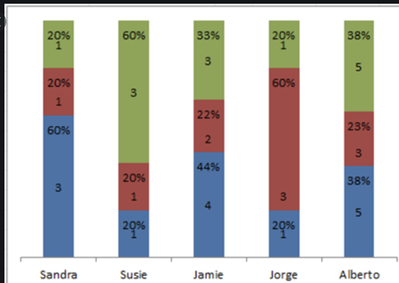
this looks great and is very optimized but in this case, how do I present the numbers and percentage on the bar chart like this in Qlikview?
It seems like Qlikview doesn't have that option.
SkitzN27
- Mark as New
- Bookmark
- Subscribe
- Mute
- Subscribe to RSS Feed
- Permalink
- Report Inappropriate Content
Thanks so much, it does work.
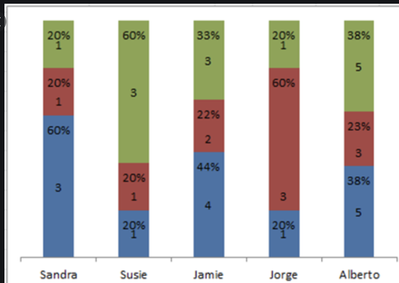
Although, I'd like to display numbers on the bar ( not the percentage).
You think that's possible?
Something like this maybe
-N
Kushal_Chawda
- Mark as New
- Bookmark
- Subscribe
- Mute
- Subscribe to RSS Feed
- Permalink
- Report Inappropriate Content
@SkitzN27 see the attached

- « Previous Replies
-
- 1
- 2
- Next Replies »