Unlock a world of possibilities! Login now and discover the exclusive benefits awaiting you.

- Qlik Community
- :
- Forums
- :
- Analytics & AI
- :
- Products & Topics
- :
- Visualization and Usability
- :
- Pivot Table - Column Totals
- Subscribe to RSS Feed
- Mark Topic as New
- Mark Topic as Read
- Float this Topic for Current User
- Bookmark
- Subscribe
- Mute
- Printer Friendly Page

 timpoismans
- Mark as New
- Bookmark
- Subscribe
- Mute
- Subscribe to RSS Feed
- Permalink
- Report Inappropriate Content
Pivot Table - Column Totals
In a pivot table,
is there a way to create a single column that shows me the total value of all columns, without splitting them by measures?
For clarification:
this is my current situation:
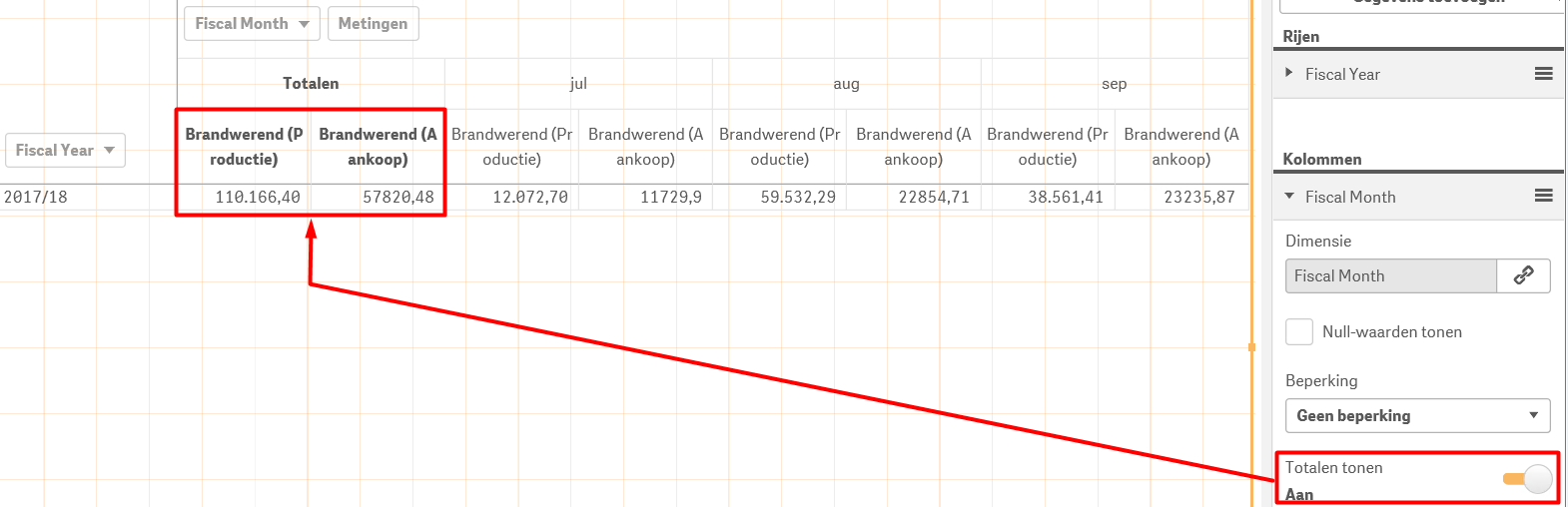
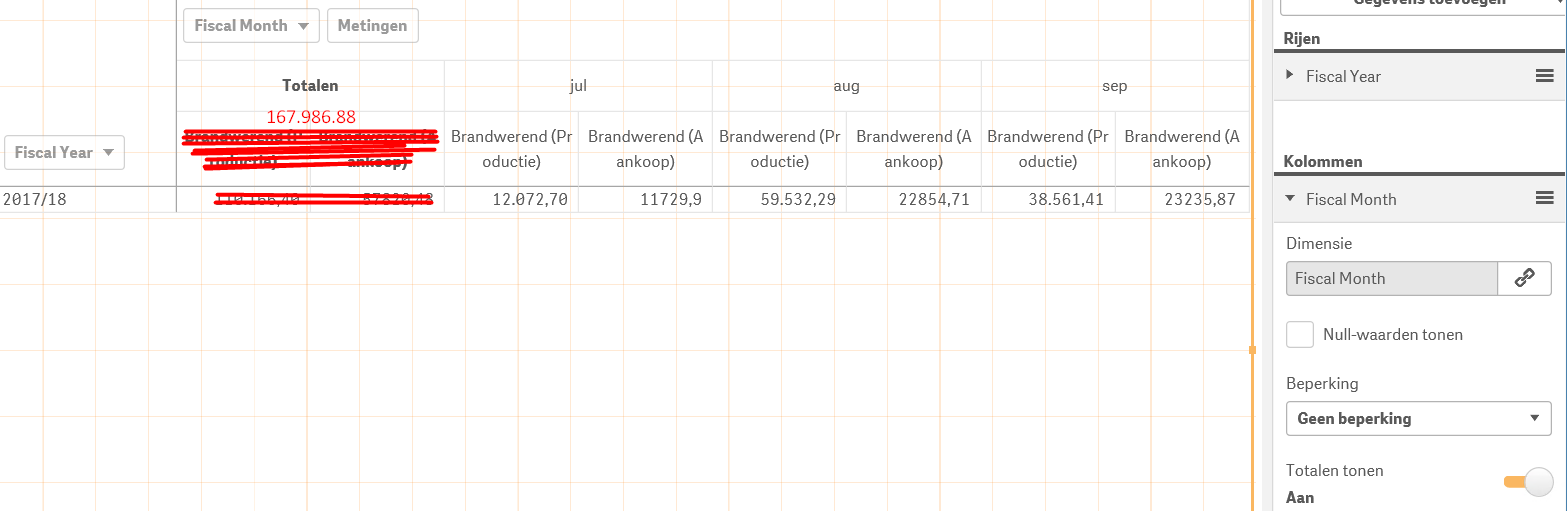
This is the situation I want to achieve (Pardon the aweful drawing skills):
Thanks in advance.
Kind regards,
Tim
- « Previous Replies
-
- 1
- 2
- Next Replies »
 prat1507
- Mark as New
- Bookmark
- Subscribe
- Mute
- Subscribe to RSS Feed
- Permalink
- Report Inappropriate Content
Use rangesum()
Regards
Pratyush
timpoismans
- Mark as New
- Bookmark
- Subscribe
- Mute
- Subscribe to RSS Feed
- Permalink
- Report Inappropriate Content
How does this exactly work in a pivot table?
As you can see, the total should be outside of the month column.
What I want to achieve is a Total of all the columns, for that specific row.

 agigliotti
- Mark as New
- Bookmark
- Subscribe
- Mute
- Subscribe to RSS Feed
- Permalink
- Report Inappropriate Content
turn on "Show totals" under dimension.
Follow me on my LinkedIn | Know Gamma Informatica at gammainformatica.it
timpoismans
- Mark as New
- Bookmark
- Subscribe
- Mute
- Subscribe to RSS Feed
- Permalink
- Report Inappropriate Content
That gives me a Total of all the rows, for that specific column, the opposite of what I need.
agigliotti
- Mark as New
- Bookmark
- Subscribe
- Mute
- Subscribe to RSS Feed
- Permalink
- Report Inappropriate Content
what you need is not possible because you get totals for all your measures.
Follow me on my LinkedIn | Know Gamma Informatica at gammainformatica.it
timpoismans
- Mark as New
- Bookmark
- Subscribe
- Mute
- Subscribe to RSS Feed
- Permalink
- Report Inappropriate Content
Yeah, thought so.
Any other way I could achieve this outside of a Pivot Table?
agigliotti
- Mark as New
- Bookmark
- Subscribe
- Mute
- Subscribe to RSS Feed
- Permalink
- Report Inappropriate Content
yes of course you can use a text box and type there your sum aggregation ex. Sum(measure1) + Sum(measure2)
Follow me on my LinkedIn | Know Gamma Informatica at gammainformatica.it
timpoismans
- Mark as New
- Bookmark
- Subscribe
- Mute
- Subscribe to RSS Feed
- Permalink
- Report Inappropriate Content
Yeah, of course that works xD
But I should be able to use a straight table as well if I keep the month out of the table and make the users select the month(s) they want to see, right?
agigliotti
- Mark as New
- Bookmark
- Subscribe
- Mute
- Subscribe to RSS Feed
- Permalink
- Report Inappropriate Content
yes maybe but i think you have to use only one measure in your table object.
Follow me on my LinkedIn | Know Gamma Informatica at gammainformatica.it

- « Previous Replies
-
- 1
- 2
- Next Replies »