Unlock a world of possibilities! Login now and discover the exclusive benefits awaiting you.

- Qlik Community
- :
- Forums
- :
- Analytics & AI
- :
- Products & Topics
- :
- Visualization and Usability
- :
- Problem with load
- Subscribe to RSS Feed
- Mark Topic as New
- Mark Topic as Read
- Float this Topic for Current User
- Bookmark
- Subscribe
- Mute
- Printer Friendly Page

- Mark as New
- Bookmark
- Subscribe
- Mute
- Subscribe to RSS Feed
- Permalink
- Report Inappropriate Content
Problem with load
Hi,
I have a problem with load of html file.
When I try to load html file, I have this error:

There is part of html code:
| <HTML> | |
| <HEAD> | |
| <META HTTP-EQUIV="Content-Type" CONTENT="text/html;charset=windows-1252"> | |
| <TITLE>title</TITLE> | |
| </HEAD> | |
| <BODY> | |
| <TABLE BORDER=1 BGCOLOR=#ffffff CELLSPACING=0><FONT FACE="Calibri" COLOR=#000000><CAPTION><B>title</B></CAPTION></FONT> | |
| <THEAD> | |
| <TR> | |
| <TH BGCOLOR=#c0c0c0 BORDERCOLOR=#000000 ><FONT style=FONT-SIZE:11pt FACE="Calibri" COLOR=#000000>DateTime</FONT></TH> | |
| <TH BGCOLOR=#c0c0c0 BORDERCOLOR=#000000 ><FONT style=FONT-SIZE:11pt FACE="Calibri" COLOR=#000000>Operator</FONT></TH> | |
| <TH BGCOLOR=#c0c0c0 BORDERCOLOR=#000000 ><FONT style=FONT-SIZE:11pt FACE="Calibri" COLOR=#000000>Result</FONT></TH> | |
| <TH BGCOLOR=#c0c0c0 BORDERCOLOR=#000000 ><FONT style=FONT-SIZE:11pt FACE="Calibri" COLOR=#000000>Result2</FONT></TH> | |
| </TR> | |
| </THEAD> | |
| <TBODY> | |
| <TR VALIGN=TOP> | |
| <TD BORDERCOLOR=#d0d7e5 ALIGN=RIGHT><FONT style=FONT-SIZE:11pt FACE="Calibri" COLOR=#000000>1/22/2018 8:29:31 AM</FONT></TD> | |
| <TD BORDERCOLOR=#d0d7e5 ><FONT style=FONT-SIZE:11pt FACE="Calibri" COLOR=#000000>00001</FONT></TD> | |
| <TD BORDERCOLOR=#d0d7e5 ><FONT style=FONT-SIZE:11pt FACE="Calibri" COLOR=#000000>OK_S</FONT></TD> | |
| <TD BORDERCOLOR=#d0d7e5 ><FONT style=FONT-SIZE:11pt FACE="Calibri" COLOR=#000000>OK_S</FONT></TD> | |
| </TR> |
etc...
Do you know, where is problem?
Thanks for your answers 
Accepted Solutions

 petter
- Mark as New
- Bookmark
- Subscribe
- Mute
- Subscribe to RSS Feed
- Permalink
- Report Inappropriate Content
If I copy your HTML and add the missing end tags to make the table and html complete it works very well for me:
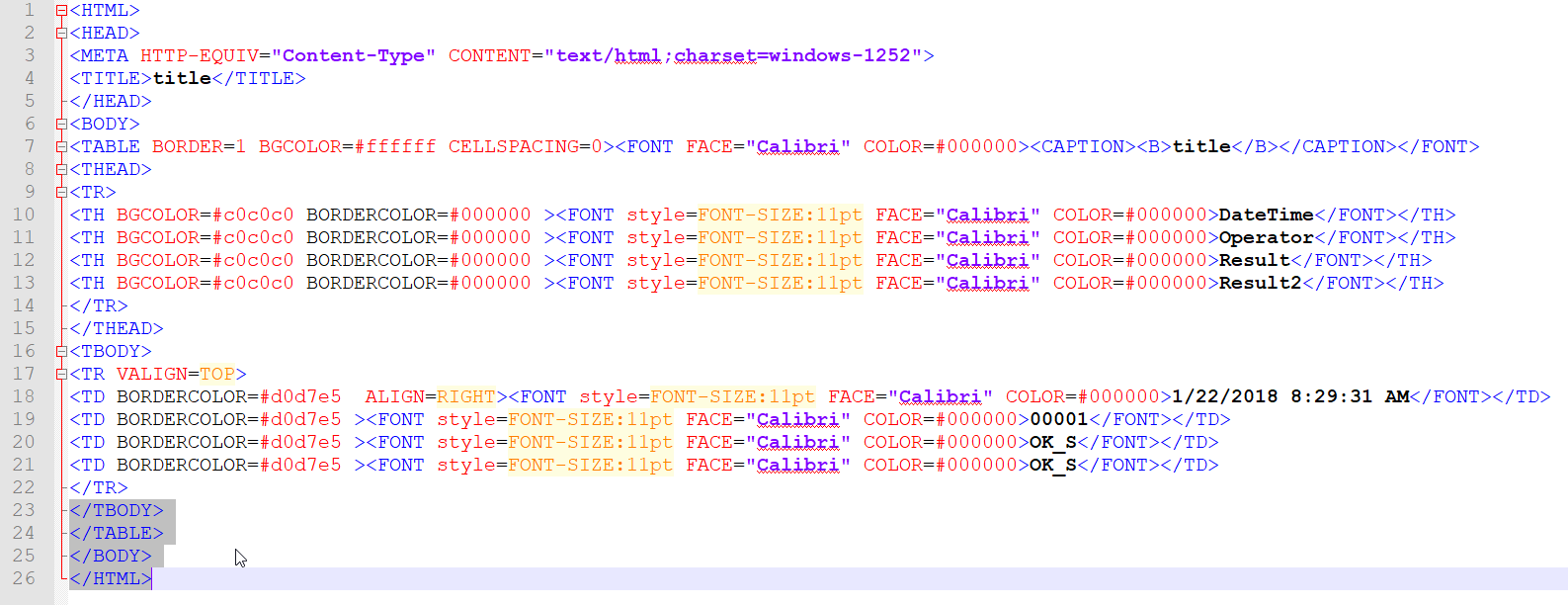
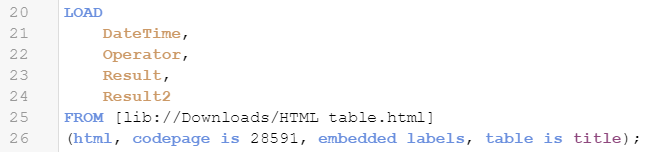
Have you checked the HTML whether it has the correct number of end tags so the table is valid?
</TBODY> and </TABLE>
and then of course to end the HTML page in a valid form:
</BODY> and </HTML>
petter
- Mark as New
- Bookmark
- Subscribe
- Mute
- Subscribe to RSS Feed
- Permalink
- Report Inappropriate Content
If I copy your HTML and add the missing end tags to make the table and html complete it works very well for me:
Have you checked the HTML whether it has the correct number of end tags so the table is valid?
</TBODY> and </TABLE>
and then of course to end the HTML page in a valid form:
</BODY> and </HTML>