Unlock a world of possibilities! Login now and discover the exclusive benefits awaiting you.

- Qlik Community
- :
- Forums
- :
- Analytics & AI
- :
- Products & Topics
- :
- Visualization and Usability
- :
- Qlik Sense Desktop Doesn't Start
- Subscribe to RSS Feed
- Mark Topic as New
- Mark Topic as Read
- Float this Topic for Current User
- Bookmark
- Subscribe
- Mute
- Printer Friendly Page

- Mark as New
- Bookmark
- Subscribe
- Mute
- Subscribe to RSS Feed
- Permalink
- Report Inappropriate Content
Qlik Sense Desktop Doesn't Start
Greetings 
I am very new to Qlik Sense. Just installed Qlik Sense Desktop.
1) I have an User account in my Laptop. Also have Admin Account. Initially installed in User Account with Administrative privileges. (Right click on executable and Install as Admin ). Qlik Sense successfully installed but did not have qlik Sense icon or folder.
2) So install again. This time use repair and tried. Did not work. Uninstalled
3) Install without admin privileges from user account. Successfully installed. When I start Qlik Sense. application appear in Task manager but did not show up in Desktop. Reboot clear temp files etc.
4) Qlik Sense started.
5) After two days, today i want to start again. Qlik Sense is in Task manager but did not appear in Desktop.
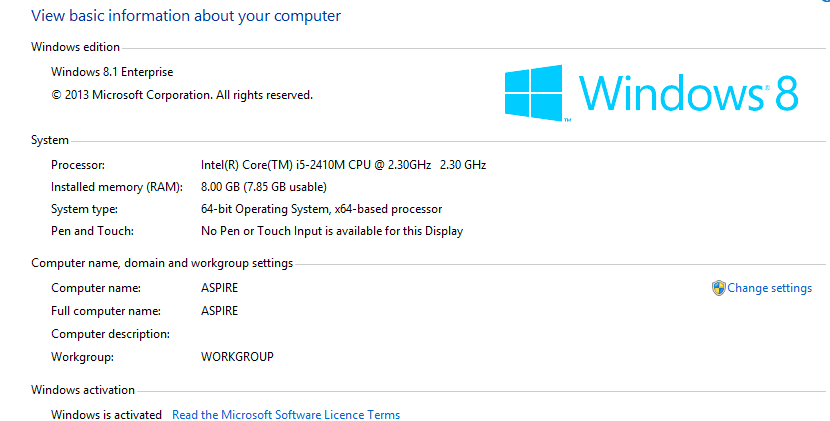
I am running Windows 8.1 Enterprise Edition with all SP uptodate.
How do I fix?
Attached the screen short and log files.
Thank you in advance.