Unlock a world of possibilities! Login now and discover the exclusive benefits awaiting you.

- Qlik Community
- :
- Forums
- :
- Analytics & AI
- :
- Products & Topics
- :
- Visualization and Usability
- :
- Re: Qlik Sense Filter Criteria
- Subscribe to RSS Feed
- Mark Topic as New
- Mark Topic as Read
- Float this Topic for Current User
- Bookmark
- Subscribe
- Mute
- Printer Friendly Page

 piyush_s11
- Mark as New
- Bookmark
- Subscribe
- Mute
- Subscribe to RSS Feed
- Permalink
- Report Inappropriate Content
Qlik Sense Filter Criteria
I need a filter in Qlik Sense to be applied where filter would have 3 values 1 Million, 2 Million, 3 Million.
Now if user selects 1 Million then a table should filter the values above 1 Million & below 2 Million
if user selects 2 Million then table should filter the values above 2 Million & below 3 Million
if user selects 3 Million then it should show values above 3 million.
Please Note : Filter values i.e 1 Million, 2 Million, 3 Million are not present in the database from which I am facing the data.
How to apply the filter ? Please find below snapshot of the table.

Thanks
- Tags:
- qlik sense app
- sense

 _armoco_
- Mark as New
- Bookmark
- Subscribe
- Mute
- Subscribe to RSS Feed
- Permalink
- Report Inappropriate Content
Hi Piyush,
Try like below:
1. Create an inline load to create the filter

2. Assuming your measure as 'Amt', create a table with the following in the expression:
if(len(GetCurrentSelections(Filter))=0, Amt,
Pick(WildMatch(Filter,'1M', '2M', '3M'),
if(Amt>10 and Amt<=20, Amt,Null()),
if(Amt>20 and Amt<=30, Amt,Null()),
if(Amt>30, Amt,Null())
)) //Change the upper limit and ;lower limit as required
3. Pull the created inline field as filter and in data handling uncheck 0 values option if necessary
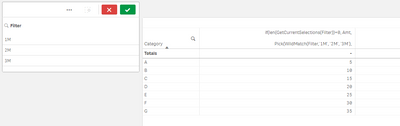
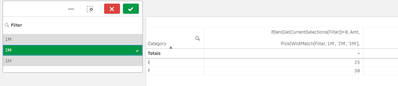
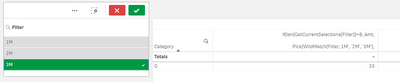
Output:
Without any selection:
With selections:

Regards,
Arjun
