Unlock a world of possibilities! Login now and discover the exclusive benefits awaiting you.

- Qlik Community
- :
- Forums
- :
- Analytics & AI
- :
- Products & Topics
- :
- Visualization and Usability
- :
- Qlik Sense Performance Logging-Warning Level
- Subscribe to RSS Feed
- Mark Topic as New
- Mark Topic as Read
- Float this Topic for Current User
- Bookmark
- Subscribe
- Mute
- Printer Friendly Page

 iamsalman
- Mark as New
- Bookmark
- Subscribe
- Mute
- Subscribe to RSS Feed
- Permalink
- Report Inappropriate Content
Qlik Sense Performance Logging-Warning Level
I want to automate Qlik Sense Engine Logging to Warning Level by using a script. I found some related documentations here:
https://community.qlik.com/t5/Knowledge/How-to-enable-QlikView-QIX-performance-logging/ta-p/1716038
Following the above guides, I put the following lines in C:\ProgramData\Qlik\Sense\Engine\Settings.ini
[Settings 7]
SystemLogVerbosity=2
WarningProcessTimeMs=30000
ErrorProcessTimeMs=60000
WarningPeakMemory= 1073741824
ErrorPeakMemory= 2147483648
But it does not work even after I restart Proxy service and/or engine service. Is there some way I can automate this configuration? Doing manually using GUI is not an option!
Accepted Solutions
iamsalman
- Mark as New
- Bookmark
- Subscribe
- Mute
- Subscribe to RSS Feed
- Permalink
- Report Inappropriate Content
For anyone trying to automate this step in future, here is how I did it in the end (Powershell script):
$currentTime = $(Get-Date -Format "yyyy-MM-ddTHH:mm")
$engineSettings = '"settings":{"auditActivityLogVerbosity":1, "serviceLogVerbosity":3, "systemLogVerbosity":3, "performanceLogVerbosity":3, "qixPerformanceLogVerbosity":0, "auditLogVerbosity":0, "sessionLogVerbosity":3, "trafficLogVerbosity":0, "sseLogVerbosity":3}'
$engineLogsBody = '{' + $engineSettings + ',"modifiedDate":"' + $currentTime + '"}'
$qlikEngine = Get-QlikEngine
Invoke-QlikPut -path "/qrs/engineservice/$($qlikEngine.id)" -body $engineLogsBody -ContentType 'application/json'

 Levi_Turner
- Mark as New
- Bookmark
- Subscribe
- Mute
- Subscribe to RSS Feed
- Permalink
- Report Inappropriate Content
I'd want to first ask, why don't you believe it is working? Things to confirm:
- QMC > Engines > QIX Performance Logging has been to set to WARN?
- If you change this, you will need to restart the Engine
- There is a blank line at the end of the Settings.ini file?
- If you change this, you will need to restart the Engine
- You have an app which makes a request which either takes more than 30 seconds / 1GB to process?
- The 30 second criteria should be able to simulate easily with dummy data.
- Nothing is written to C:\ProgramData\Qlik\Sense\Log\Engine\Trace\<serverName>_QixPerformance_Engine.txt ?
iamsalman
- Mark as New
- Bookmark
- Subscribe
- Mute
- Subscribe to RSS Feed
- Permalink
- Report Inappropriate Content
As I mentioned in my question, using the GUI, traversing to QMC > Engines > Logging and changing the log level by UI interaction is not what I am looking for. I want to just update the settings.ini file and I expect those configuration changes to reflect in the GUI.
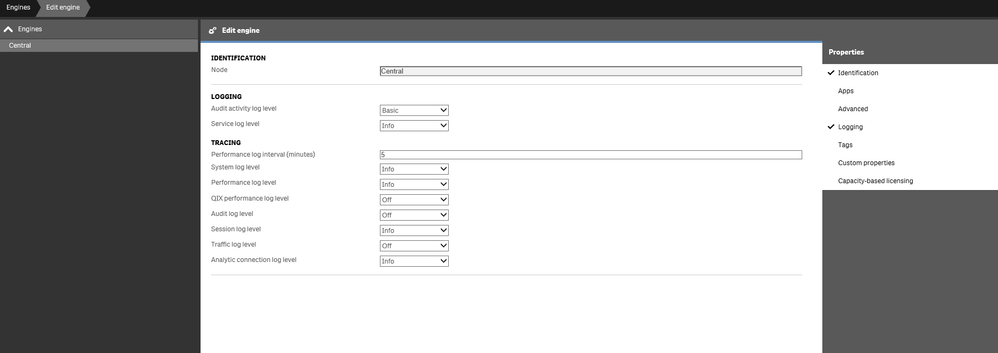
After updating the ini file (and confirming there is a new line character in the end), restart engine service, I reopen the QMC > Engines > Logging but I see no change there. It is still set to default "Info" level logging. Attached screenshot:
 iamsalman
- Mark as New
- Bookmark
- Subscribe
- Mute
- Subscribe to RSS Feed
- Permalink
- Report Inappropriate Content
For anyone trying to automate this step in future, here is how I did it in the end (Powershell script):
$currentTime = $(Get-Date -Format "yyyy-MM-ddTHH:mm")
$engineSettings = '"settings":{"auditActivityLogVerbosity":1, "serviceLogVerbosity":3, "systemLogVerbosity":3, "performanceLogVerbosity":3, "qixPerformanceLogVerbosity":0, "auditLogVerbosity":0, "sessionLogVerbosity":3, "trafficLogVerbosity":0, "sseLogVerbosity":3}'
$engineLogsBody = '{' + $engineSettings + ',"modifiedDate":"' + $currentTime + '"}'
$qlikEngine = Get-QlikEngine
Invoke-QlikPut -path "/qrs/engineservice/$($qlikEngine.id)" -body $engineLogsBody -ContentType 'application/json'
