Unlock a world of possibilities! Login now and discover the exclusive benefits awaiting you.

- Qlik Community
- :
- Forums
- :
- Analytics & AI
- :
- Products & Topics
- :
- Visualization and Usability
- :
- Re: Qlik Sense Set Analysis Expression Previous Pe...
- Subscribe to RSS Feed
- Mark Topic as New
- Mark Topic as Read
- Float this Topic for Current User
- Bookmark
- Subscribe
- Mute
- Printer Friendly Page

 rnguyen2
- Mark as New
- Bookmark
- Subscribe
- Mute
- Subscribe to RSS Feed
- Permalink
- Report Inappropriate Content
Qlik Sense Set Analysis Expression Previous Period Sum
Hello,
I need some help with my set analysis expression.
I am trying to populate the beginning AR Balance for the month with the ending AR Balance for the prior month.
Below is my set expression.
Sum({$<[posting_date.autoCalendar.Date]={"$=addmonths([posting_date.autoCalendar.Date],-1)"}, BALANCE_TYPE={"DEBIT_BALANCE"}>} [AR BALANCE])

- « Previous Replies
-
- 1
- 2
- Next Replies »

 rogerpegler
- Mark as New
- Bookmark
- Subscribe
- Mute
- Subscribe to RSS Feed
- Permalink
- Report Inappropriate Content
Assuming everything else is OK, you may be missing brackets:
Sum({$<[posting_date.autoCalendar.Date]={"$(=addmonths([posting_date.autoCalendar.Date],-1))"}, BALANCE_TYPE={"DEBIT_BALANCE"}>} [AR BALANCE])
rnguyen2
- Mark as New
- Bookmark
- Subscribe
- Mute
- Subscribe to RSS Feed
- Permalink
- Report Inappropriate Content
rnguyen2
- Mark as New
- Bookmark
- Subscribe
- Mute
- Subscribe to RSS Feed
- Permalink
- Report Inappropriate Content
Here a mock up I put together and attached
rogerpegler
- Mark as New
- Bookmark
- Subscribe
- Mute
- Subscribe to RSS Feed
- Permalink
- Report Inappropriate Content
Having seen the app - @sunny_talwar 's solution of using the Before function should work. Note it only works in Pivot tables.

 sunny_talwar
- Mark as New
- Bookmark
- Subscribe
- Mute
- Subscribe to RSS Feed
- Permalink
- Report Inappropriate Content
I used this
Alt(Before(Sum({<BALANCE_TYPE={"DEBIT_BALANCE"}>} [AR BALANCE])), 0)to get this
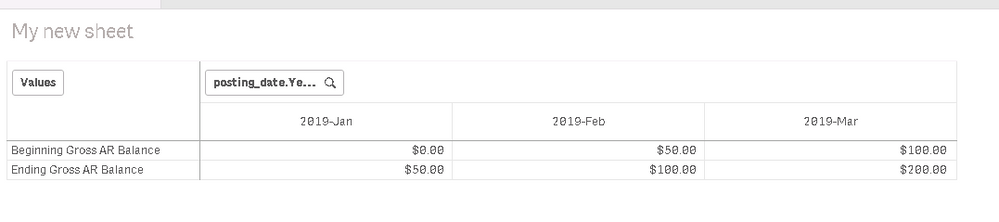
Is this not right?
rnguyen2
- Mark as New
- Bookmark
- Subscribe
- Mute
- Subscribe to RSS Feed
- Permalink
- Report Inappropriate Content
I could use that function but it shows the incorrect value if I filter certain YearMonths.
In the example attached. I need it to keep 2019-Feb Ending Gross AR Balance for 2019-Mar Beginning Gross AR Balance.
 sunny_talwar
- Mark as New
- Bookmark
- Subscribe
- Mute
- Subscribe to RSS Feed
- Permalink
- Report Inappropriate Content
For that you can try this
Alt(Before(Sum({<BALANCE_TYPE = {"DEBIT_BALANCE"}, [posting_date.autoCalendar.YearMonth]>} [AR BALANCE])), 0) * Avg(1)

- « Previous Replies
-
- 1
- 2
- Next Replies »