Unlock a world of possibilities! Login now and discover the exclusive benefits awaiting you.

- Qlik Community
- :
- Forums
- :
- Analytics & AI
- :
- Products & Topics
- :
- Visualization and Usability
- :
- Qlik Sense Theme - Text color
- Subscribe to RSS Feed
- Mark Topic as New
- Mark Topic as Read
- Float this Topic for Current User
- Bookmark
- Subscribe
- Mute
- Printer Friendly Page

 simondachstr
- Mark as New
- Bookmark
- Subscribe
- Mute
- Subscribe to RSS Feed
- Permalink
- Report Inappropriate Content
Qlik Sense Theme - Text color
Hi,
I am currently in the process of developing my own bespoke theme for my Qlik Sense apps using the theme.css & theme.json templates in C:\Program Files\Qlik\Sense\Client\themes\. While I manage change color, fonts, sizes etc. of almost everything I fail to successfully modify the text color palette.
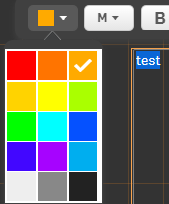
While the color palette is reflecting the defined colors in my theme.json file, as you can see in the above screenshot, the colors can not be applied to the underlying text. It always reverts back to a default grey. This type of behavior seems buggy to me - everywhere else the colors work fine.
Any help is greatly appreciated.
PS: This is just a sample screenshot created solely for demonstration purposes, I use a different color palette for my project.
