Unlock a world of possibilities! Login now and discover the exclusive benefits awaiting you.

- Qlik Community
- :
- Forums
- :
- Analytics & AI
- :
- Products & Topics
- :
- Visualization and Usability
- :
- Qlik automation store to database
- Subscribe to RSS Feed
- Mark Topic as New
- Mark Topic as Read
- Float this Topic for Current User
- Bookmark
- Subscribe
- Mute
- Printer Friendly Page

 AmirMoha
- Mark as New
- Bookmark
- Subscribe
- Mute
- Subscribe to RSS Feed
- Permalink
- Report Inappropriate Content
Qlik automation store to database
Hi all,
I have created a Qlik automation with Zendesk connect, I have select the data that I want to get from Zendesk, when I run the automation with Output, the data shows me exactly what I want, but I want to store this data into a mysql database or store it into a csv or qvd in Qlik Saas, so I can pull the data and use it in a dashboard
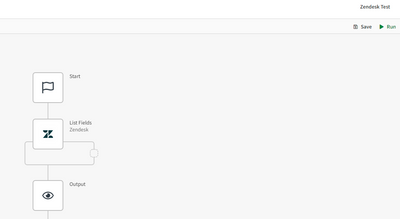
Would you please be able to help with this?

 Ray_Strother
- Mark as New
- Bookmark
- Subscribe
- Mute
- Subscribe to RSS Feed
- Permalink
- Report Inappropriate Content
https://help.qlik.com/en-US/cloud-services/Subsystems/Hub/Content/Sense_Hub/Scripting/ScriptRegularS...
https://help.qlik.com/en-US/sense/February2023/Subsystems/Hub/Content/Sense_Hub/Scripting/ScriptRegu....
AmirMoha
- Mark as New
- Bookmark
- Subscribe
- Mute
- Subscribe to RSS Feed
- Permalink
- Report Inappropriate Content
Hi Ray,
Thanks for your reply, but this is through the script and I need to store the data from an Automation into a qvd/excel

 AustinSpivey
- Mark as New
- Bookmark
- Subscribe
- Mute
- Subscribe to RSS Feed
- Permalink
- Report Inappropriate Content
If you wanted to insert records into a MySQL database, you could use blocks like this (just copy the code below and then right-click into the Qlik Automation canvas and select the Paste Block(s) option):
{"blocks":[{"id":"C1EDEDE7-E7C2-4E7D-A92C-D8850ADF21BA","type":"EndpointBlock","disabled":false,"name":"listFields","displayName":"Zendesk - List Fields","comment":"","childId":null,"inputs":[{"id":"ee79b770-b123-11ea-8c23-efc30e14aa41","value":"058755b0-b124-11ea-b1c8-bd0d53a3de6e","type":"select","displayValue":"ticket_fields","structure":{}}],"settings":[{"id":"datasource","value":null,"type":"select","structure":{}},{"id":"maxitemcount","value":"","type":"string","structure":{}},{"id":"blendr_on_error","value":"stop","type":"select","structure":{}},{"id":"cache","value":"0","type":"select","structure":{}}],"collapsed":[{"name":"loop","isCollapsed":false}],"x":960.00048828125,"y":1378.0001220703125,"loopBlockId":"821DAD28-DBF4-4E40-A9F8-FB1206010979","datasourcetype_guid":"0d86e56c-27c0-11ea-921c-022e6b5ea1e2","endpoint_guid":"c702f160-b123-11ea-812e-79752b2b0930","endpoint_role":"list"},{"id":"821DAD28-DBF4-4E40-A9F8-FB1206010979","type":"EndpointBlock","disabled":false,"name":"UpsertRecord2","displayName":"Mysql - Upsert Record 2","comment":"","childId":null,"inputs":[{"id":"8eb62b20-8f7a-11ea-a483-99259b9a2034","value":"myTable","type":"string","structure":{}},{"id":"8ed80af0-8f7a-11ea-ab8d-9352753cae4d","value":[{"key":"sysId","value":"{$.listFields.item.id}"}],"type":"object","mode":"keyValue","structure":{}},{"id":"8ef7dab0-8f7a-11ea-b6ac-71c5d2ede674","value":"{json: {$.listFields.item}}","type":"object","mode":"raw","structure":{}}],"settings":[{"id":"datasource","value":null,"type":"select","structure":{}},{"id":"blendr_on_error","value":"stop","type":"select","structure":{}}],"collapsed":[{"name":"loop","isCollapsed":false}],"x":960.00048828125,"y":1538.0001220703125,"datasourcetype_guid":"0d86fae2-27c0-11ea-921c-022e6b5ea1e2","endpoint_guid":"8e6ffd70-8f7a-11ea-b6a0-89fc328ccf2e","endpoint_role":"update"}],"variables":[]}
You should get something like this:
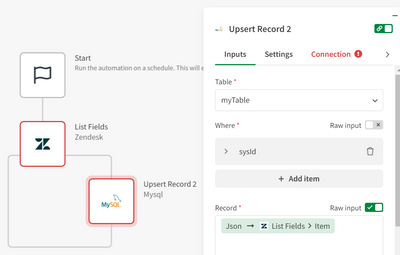
As far as I know, it's much harder to mess with QVDs and other datasets from App Automations. I suspect this is because Qlik wants you to use Data Integration processes for moving files programmatically rather than using the /api/v1/qix-datafiles and /api/v1/temp-contents endpoints directly.
AustinSpivey
- Mark as New
- Bookmark
- Subscribe
- Mute
- Subscribe to RSS Feed
- Permalink
- Report Inappropriate Content
What you could do is create a temporary app, set the script to load the current QVD and then concatenate with an inline load of the latest data (using the Replace App Automation function), kick off a reload, wait for it to finish, and then delete the app after that.
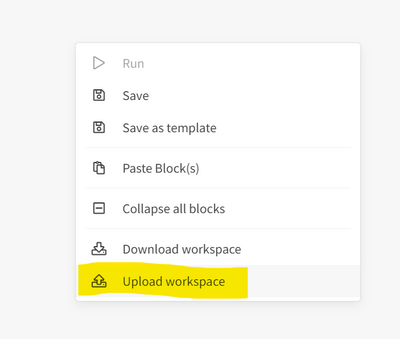
I've attached an App Automation workspace you can try. Just open a new automation, right-click anywhere in the canvas, and then select the Upload workspace button and choose that JSON file:
AmirMoha
- Mark as New
- Bookmark
- Subscribe
- Mute
- Subscribe to RSS Feed
- Permalink
- Report Inappropriate Content
Hi Austin,
Thank you for your help
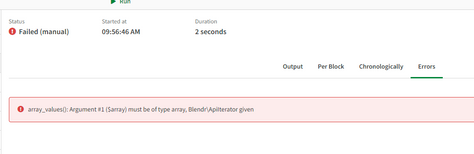
I have uploaded this workspace and changed the Space id in the Create App, when I run the automation
I see the error below, the temp_update_qvd_and_delete app gets generated but not the qvd
AustinSpivey
- Mark as New
- Bookmark
- Subscribe
- Mute
- Subscribe to RSS Feed
- Permalink
- Report Inappropriate Content
It's hard to say for sure what's going on here, but my guess is that it's happening here:
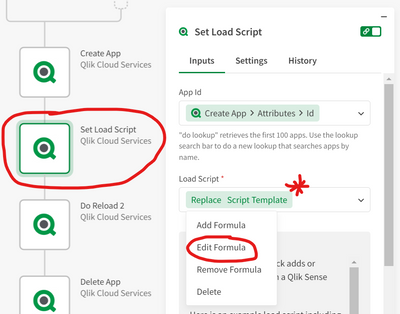
1. Find the Set Load Script step, select the expression in the Load Script box, and then choose the Edit Formula option:
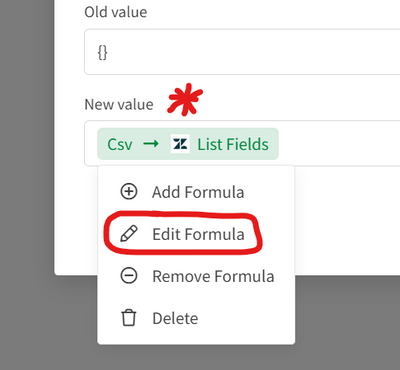
2. Find the New Value box, select the expression, and then choose the Edit formula option:
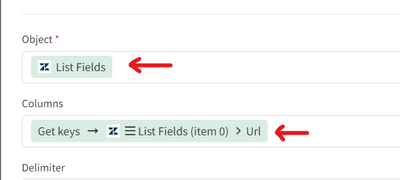
3. My guess is that the issue is with either the Object or Columns options here:
You may need to change the Columns option to this:
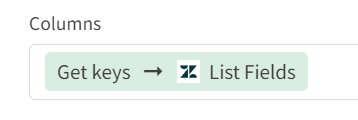
...I think I mistakenly pointed to the URL key in my initial example.
AmirMoha
- Mark as New
- Bookmark
- Subscribe
- Mute
- Subscribe to RSS Feed
- Permalink
- Report Inappropriate Content
I have finally managed to get the data from Zendesk to a MySQL database, but again I'm coming across another issue which is
Conversion from collation utf8_unicode_ci into utf8mb4_unicode_ci impossible for parameter
The columns in my sql are utf8mb4_unicode_ci but I think the issue is the emojis that are in the description
Can anybody help with this please
