Unlock a world of possibilities! Login now and discover the exclusive benefits awaiting you.

- Qlik Community
- :
- Forums
- :
- Analytics & AI
- :
- Products & Topics
- :
- Visualization and Usability
- :
- Qlik mashup filter confirmation
- Subscribe to RSS Feed
- Mark Topic as New
- Mark Topic as Read
- Float this Topic for Current User
- Bookmark
- Subscribe
- Mute
- Printer Friendly Page

- Mark as New
- Bookmark
- Subscribe
- Mute
- Subscribe to RSS Feed
- Permalink
- Report Inappropriate Content
Qlik mashup filter confirmation
Hi
I'm making a Qlik Sense mashup. At the moment when i select a filter or other object ik need to confirm the selection. How can I remove this step? So when I select something I don't want to get confirmation. Does anyone know how I can solve this problem?
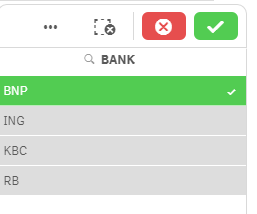
Thanks

 reddy-s
- Mark as New
- Bookmark
- Subscribe
- Mute
- Subscribe to RSS Feed
- Permalink
- Report Inappropriate Content
Hi Matei,
You will have to request for values in a list object and build your own list to achieve this. As you have just embedded a filter in qliksense , the tick mark will surely appear.
this is the code to I used to build a filter, with buttons for each list item with images in them:
app5.createList({
"qDef": {
//specify the field
"qFieldDefs": ["[Selling Department.Franchise Director]"]
},
//specify max number of rows you want to pull back
"qInitialDataFetch": [{
qTop: 0,
qLeft: 0,
qHeight: 21,
qWidth: 1
}]
}, function(reply) {
//console.info(reply);
//empty out the Div you've created to hold the list
// $("#fieldList").empty();
//get the Object
var qObject = reply.qListObject;
//Loop through the data returned
$.each(qObject.qDataPages[0].qMatrix, function() {
//get the current item
var item = this[0];
var selT = "";
var divClass = "";
var fdSrc= "";
var fdClass="";
var fdDummy="";
var divId = "";
divClass = " class=\"col-xs-8 col-sm-4 iconx\"";
// fdSrc = "src=\"images/FD/Andrew Hall.png\"";
// fdDummy = "src=\"images/FD/Default.png\"";
fdClass = " class=\"img-circle icony\"";
divId = "";
divId = "id="+"\""+item.qText+"\" ";
if(item.qText == 'Andrew Hall'){
fdSrc = "src=\"images/FD/Andrew Hall.png\"";
}else{
fdSrc = "src=\"images/FD/Default.png\"";
}
//Check to see if it's selected, if so, set the list item to bold
if (item.qState == "S") {
currentReg = item.qText;
selT = " style=\"font-weight:bold;\"";
}
//append the item to the list
if (count < 20){
if (item.qText!= '<NULL>'){
// $("#QV08").append("<li" + selT + ">" + item.qText + "</li>");
// $("#QV08").append("<div " + divClass + " >" + item.qText + "</div>");
if(item.qText == 'Andrew Hall' || item.qText == 'Bob Grant' ||
item.qText == 'Steve Dean' || item.qText == 'Paul Wilkinson' ||
item.qText == 'Colin McNab' || item.qText == 'Gordon Haining' ||
item.qText == 'Duncan McPhee' || item.qText == 'Iain Macmahon' ){
$("#QV08").append("<div " + divId + divClass + " >" +"<img "+ fdSrc + " " + fdClass + " >" + item.qText + "</img>" + "</div>");
}
// $("#QV08").append("<img "+ fdSrc + " " + fdClass + " >" + item.qText + "</img>");
count++;
}}
});
//add the ability for the item to be clicked and selected in QlikView
$(".iconx,.icony,.iconz").click(function() {
app5.field("[Selling Department.Franchise Director]").selectMatch($(this).text(), false);
updateFD(this.id);
});
// $(".icony").click(function() {
// app5.field("[Selling Department.Franchise Director]").selectMatch($(this).text(), false);
// });
$("#clear").click(function() {
app5.field("[Selling Department.Franchise Director]").selectMatch($(this).text(), false);
updateFD(this.id);
});
});
Hope this helps!
Thanks,
Sangram.