Unlock a world of possibilities! Login now and discover the exclusive benefits awaiting you.

- Qlik Community
- :
- Forums
- :
- Analytics & AI
- :
- Products & Topics
- :
- Visualization and Usability
- :
- QlikSense Desktop (Credentials are missing)
- Subscribe to RSS Feed
- Mark Topic as New
- Mark Topic as Read
- Float this Topic for Current User
- Bookmark
- Subscribe
- Mute
- Printer Friendly Page

- Mark as New
- Bookmark
- Subscribe
- Mute
- Subscribe to RSS Feed
- Permalink
- Report Inappropriate Content
QlikSense Desktop (Credentials are missing)
All,
After installing the Qliksense Desktop on Windows 7 Enterprise, I get the following message:
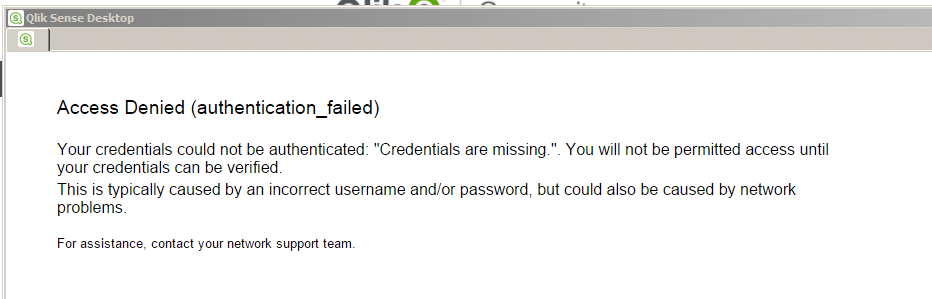
What I have identified so far:
. We don't use proxy on Localhost connection
. QlikSense will work fine on the same computer if I run the program as an administrator
I would appreciate any hints about what to look next in order to get his working. The ambition here is to deploy the QlikSense Desktop on a dozen of target Qlikview users to ask for their feedback and agreement to move to QlikSense before starting an evaluation on a QlikSense server based environement.
Many thanks in advance for any help / suggestions,
Thierry
Accepted Solutions
- Mark as New
- Bookmark
- Subscribe
- Mute
- Subscribe to RSS Feed
- Permalink
- Report Inappropriate Content
All,
Like always, after posting the question, I found the answer myself 🙂
The workaround is:
1. Start the QlikSense Desktop and get the "Credentials are missing" error
2. Don't close the QlikSense Desktop application
3. Open Internet Explorer
4. Enter the following URL: http://localhost:4848/hub
5. Enjoy Qliksense (which is the easy part)
This works with the following configuration:
. Windows 7
. No proxy for localhost address
. QlikSense Desktop 2.2.4
. Internet Explorer
Hope this can save anyone else some time...
Thierry
- Mark as New
- Bookmark
- Subscribe
- Mute
- Subscribe to RSS Feed
- Permalink
- Report Inappropriate Content
All,
Like always, after posting the question, I found the answer myself 🙂
The workaround is:
1. Start the QlikSense Desktop and get the "Credentials are missing" error
2. Don't close the QlikSense Desktop application
3. Open Internet Explorer
4. Enter the following URL: http://localhost:4848/hub
5. Enjoy Qliksense (which is the easy part)
This works with the following configuration:
. Windows 7
. No proxy for localhost address
. QlikSense Desktop 2.2.4
. Internet Explorer
Hope this can save anyone else some time...
Thierry