Unlock a world of possibilities! Login now and discover the exclusive benefits awaiting you.

- Qlik Community
- :
- Forums
- :
- Analytics & AI
- :
- Products & Topics
- :
- Visualization and Usability
- :
- Qliksense Filter Show/Hide
- Subscribe to RSS Feed
- Mark Topic as New
- Mark Topic as Read
- Float this Topic for Current User
- Bookmark
- Subscribe
- Mute
- Printer Friendly Page

 mohan2391
- Mark as New
- Bookmark
- Subscribe
- Mute
- Subscribe to RSS Feed
- Permalink
- Report Inappropriate Content
Qliksense Filter Show/Hide
Hi,
I'm trying to hide the filters by pressing a button is it possible to do it by using any extensions or is there any other way?
Please help me whether it is possible in Qliksense or not?
When I click on the button it should show filters and if I click on the button second time then it should hide the filter.
I have attached the screen print please refer it and help me.
Thanks..


 Ivan_Bozov
- Mark as New
- Bookmark
- Subscribe
- Mute
- Subscribe to RSS Feed
- Permalink
- Report Inappropriate Content
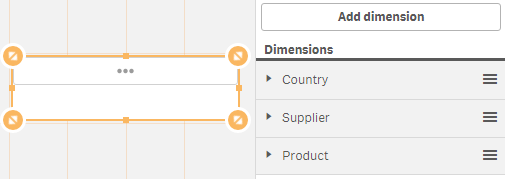
What you could do without an extension is to put several dimensions in one filter pane. Then it would kind of look like a button containing all your filters.

 agigliotti
- Mark as New
- Bookmark
- Subscribe
- Mute
- Subscribe to RSS Feed
- Permalink
- Report Inappropriate Content
there is no option to hide/show an object.
Follow me on my LinkedIn | Know Gamma Informatica at gammainformatica.it

 beck_bakytbek
- Mark as New
- Bookmark
- Subscribe
- Mute
- Subscribe to RSS Feed
- Permalink
- Report Inappropriate Content
Hi Mohan,
unfortunately is this option not available, but you can use maybe in your case: Extension: SheetEvent. this extension works like a preselectd filter.
look at this: http://branch.qlik.com/#!/project/56728f52d1e497241ae698a0 and
https://github.com/stefanwalther/sense-navigation
i hope that helps
Beck
