Unlock a world of possibilities! Login now and discover the exclusive benefits awaiting you.

- Qlik Community
- :
- Forums
- :
- Analytics & AI
- :
- Products & Topics
- :
- Visualization and Usability
- :
- Qliksense KPI number Format
- Subscribe to RSS Feed
- Mark Topic as New
- Mark Topic as Read
- Float this Topic for Current User
- Bookmark
- Subscribe
- Mute
- Printer Friendly Page

 davyqliks
- Mark as New
- Bookmark
- Subscribe
- Mute
- Subscribe to RSS Feed
- Permalink
- Report Inappropriate Content
Qliksense KPI number Format
Hi There,
Is it possible to show the following as 17k in the KPI box?
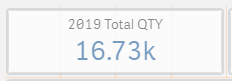
tried obvious number formatting but no joy. Any help would be great, thanks so much
DavyQliks
Accepted Solutions

 Vegar
Vegar
- Mark as New
- Bookmark
- Subscribe
- Mute
- Subscribe to RSS Feed
- Permalink
- Report Inappropriate Content

 PradeepK
- Mark as New
- Bookmark
- Subscribe
- Mute
- Subscribe to RSS Feed
- Permalink
- Report Inappropriate Content
Not sure if you should do this type of data formatting..
Also think about case like : 16.12K -> should this be considered as 16K .. or Still 17K ?
For 1000 multiples .. Reference Purpose Only
Round(Num(<Measure>/1000))*1000You can build on the same logic to handle different multiple cases
Vegar
- Mark as New
- Bookmark
- Subscribe
- Mute
- Subscribe to RSS Feed
- Permalink
- Report Inappropriate Content
PradeepK
- Mark as New
- Bookmark
- Subscribe
- Mute
- Subscribe to RSS Feed
- Permalink
- Report Inappropriate Content
Not sure if you should do this type of data formatting..
Also think about case like : 16.12K -> should this be considered as 16K .. or Still 17K ?
For 1000 multiples .. Reference Purpose Only
Round(Num(<Measure>/1000))*1000You can build on the same logic to handle different multiple cases
davyqliks
- Mark as New
- Bookmark
- Subscribe
- Mute
- Subscribe to RSS Feed
- Permalink
- Report Inappropriate Content
thanks for the replies,
Thats great, worked perfectly thanks

PradeepK
- Mark as New
- Bookmark
- Subscribe
- Mute
- Subscribe to RSS Feed
- Permalink
- Report Inappropriate Content
MMM.. not sure about this. 🤔
Don't you think this will just show 0 if sum(Qty) returns 100 multiples or low .. example 444.
