Unlock a world of possibilities! Login now and discover the exclusive benefits awaiting you.

- Qlik Community
- :
- Forums
- :
- Analytics & AI
- :
- Products & Topics
- :
- Visualization and Usability
- :
- Qliksense Object level Access
- Subscribe to RSS Feed
- Mark Topic as New
- Mark Topic as Read
- Float this Topic for Current User
- Bookmark
- Subscribe
- Mute
- Printer Friendly Page

 sumanta12
- Mark as New
- Bookmark
- Subscribe
- Mute
- Subscribe to RSS Feed
- Permalink
- Report Inappropriate Content
Qliksense Object level Access
Hi All,
I am new to Qliksense.
Please guide me to set object level access to user in qliksense.
- « Previous Replies
-
- 1
- 2
- Next Replies »

 micheledenardi
- Mark as New
- Bookmark
- Subscribe
- Mute
- Subscribe to RSS Feed
- Permalink
- Report Inappropriate Content
To implement sheet level access step by step or more deep level App objects level access please refer this document:
Sheet or App Object Level Security Qlik Sense
If a post helps to resolve your issue, please accept it as a Solution.
sumanta12
- Mark as New
- Bookmark
- Subscribe
- Mute
- Subscribe to RSS Feed
- Permalink
- Report Inappropriate Content
I checked but not working.
I have a user who has access to an application and he can see all the sheets.How to restrict all the sheets.
Only one sheet can be visible and under that sheet one object can be visible to user.
micheledenardi
- Mark as New
- Bookmark
- Subscribe
- Mute
- Subscribe to RSS Feed
- Permalink
- Report Inappropriate Content
I'm currently using that procedure on my site and it's working fine.
If a post helps to resolve your issue, please accept it as a Solution.

 agigliotti
- Mark as New
- Bookmark
- Subscribe
- Mute
- Subscribe to RSS Feed
- Permalink
- Report Inappropriate Content
I suggest you to use Audit on QMC to know which security rule is granting access to all sheets for that user.
Keep in mind that you can't hide a single chart object but you can show it with no data.
Follow me on my LinkedIn | Know Gamma Informatica at gammainformatica.it
sumanta12
- Mark as New
- Bookmark
- Subscribe
- Mute
- Subscribe to RSS Feed
- Permalink
- Report Inappropriate Content
Upto sheet level access I have provided to user but I am facing issue in providing object level access.
sumanta12
- Mark as New
- Bookmark
- Subscribe
- Mute
- Subscribe to RSS Feed
- Permalink
- Report Inappropriate Content
Hi,
Upto sheet level access I have provided to user but I am facing issue in providing object level access.
agigliotti
- Mark as New
- Bookmark
- Subscribe
- Mute
- Subscribe to RSS Feed
- Permalink
- Report Inappropriate Content
As I said before you can't restrict user access to object level but you can create a security rule to deny your user to access your chart dimensions and measures.
Doing this you'll get the message "no data" within the chart object.
Hope this helps.
Follow me on my LinkedIn | Know Gamma Informatica at gammainformatica.it
sumanta12
- Mark as New
- Bookmark
- Subscribe
- Mute
- Subscribe to RSS Feed
- Permalink
- Report Inappropriate Content
Hi Andrea,
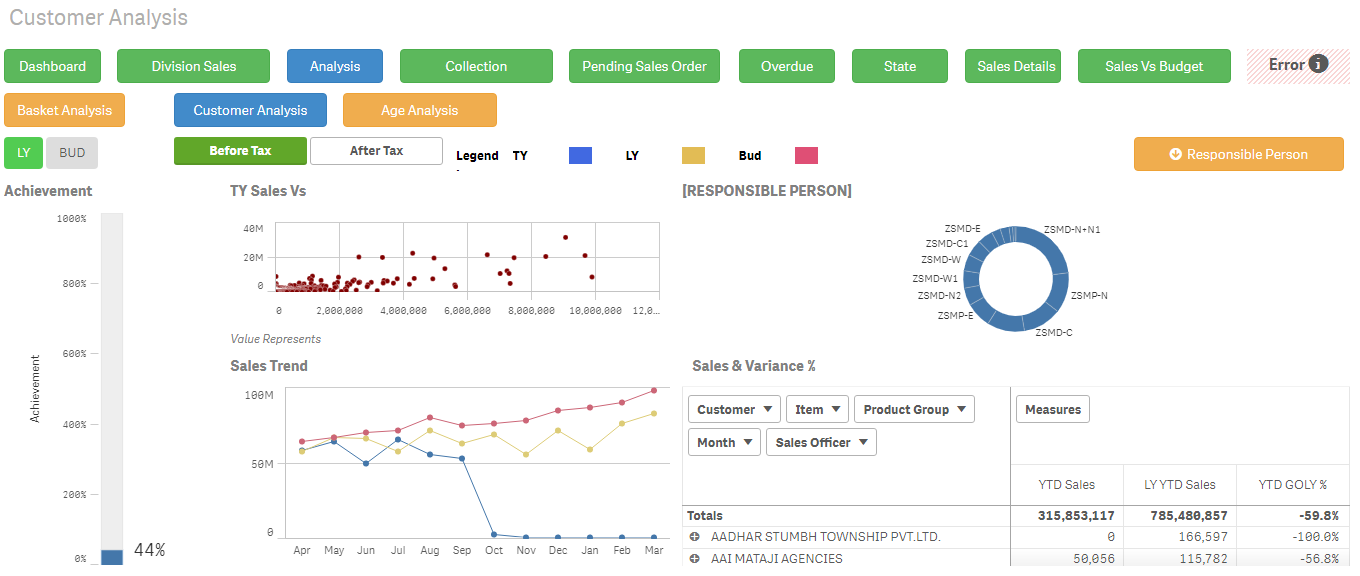
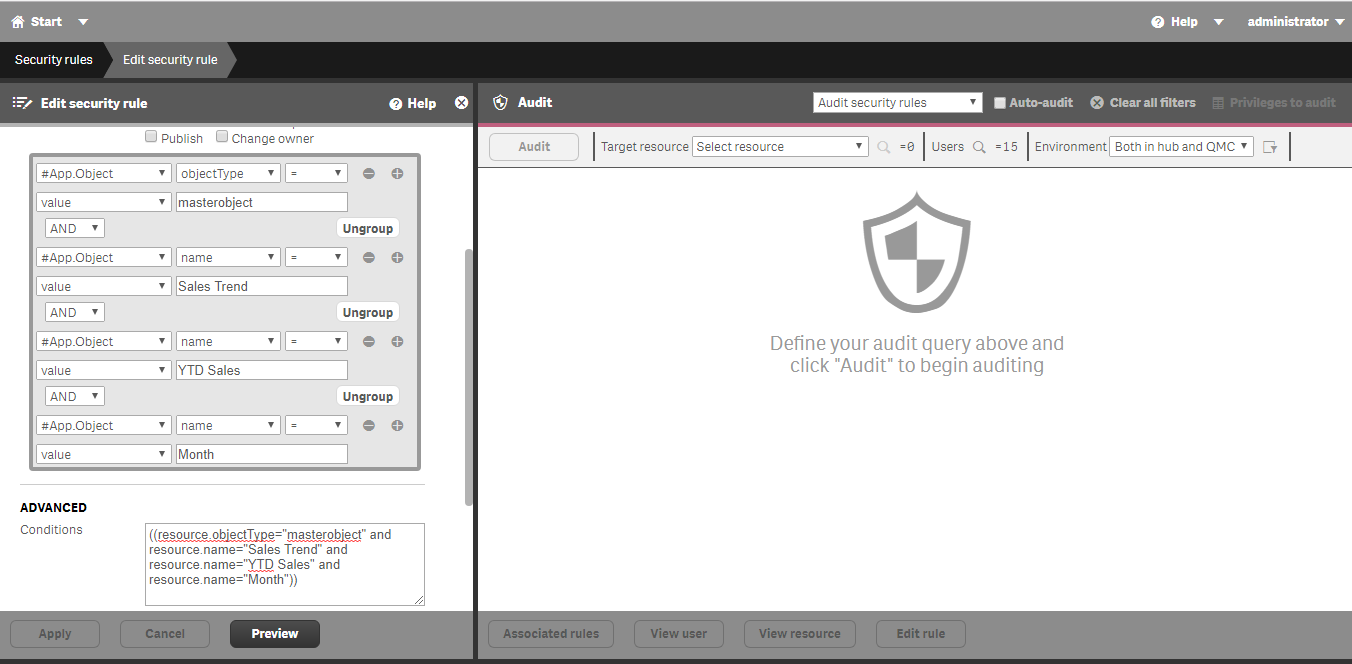
I have created a security rule to deny user to access chart dimension,measure but still all the charts are visible.
agigliotti
- Mark as New
- Bookmark
- Subscribe
- Mute
- Subscribe to RSS Feed
- Permalink
- Report Inappropriate Content
you should use something as below in your security rule:
( (resource.objectType="measure" and resource.name like "*") or (resource.objectType="dimension" and resource.name like "*") )
Hope it helps.
Follow me on my LinkedIn | Know Gamma Informatica at gammainformatica.it

- « Previous Replies
-
- 1
- 2
- Next Replies »