Unlock a world of possibilities! Login now and discover the exclusive benefits awaiting you.

- Qlik Community
- :
- Forums
- :
- Analytics & AI
- :
- Products & Topics
- :
- Visualization and Usability
- :
- Re: Qliksense Show Column if setting
- Subscribe to RSS Feed
- Mark Topic as New
- Mark Topic as Read
- Float this Topic for Current User
- Bookmark
- Subscribe
- Mute
- Printer Friendly Page

 davyqliks
- Mark as New
- Bookmark
- Subscribe
- Mute
- Subscribe to RSS Feed
- Permalink
- Report Inappropriate Content
Qliksense Show Column if setting
Hi,
I am trying to show a dimension in a table if any filter is made from that dimension.
EG.
City will only show in the table if a city is selected in a map or from a list.
I have created a variable
V.Show.City with a value of 1 and have tried in the show coulmn if FX box to add the following:
=if(v.Show.City=0,1,0)
this hides the city but it does not show when a city is selected.
Any advixe on this would be very helpful.
Accepted Solutions

 jneppl
- Mark as New
- Bookmark
- Subscribe
- Mute
- Subscribe to RSS Feed
- Permalink
- Report Inappropriate Content
Hi @davyqliks
you can try to use a function like "GetSelectedCount" that checks if you selected values in a specific field.
Try something like if(GetSelectedCount("Fieldname") > 0, 1, 0) as show condition.
Regards

 AdiPai
- Mark as New
- Bookmark
- Subscribe
- Mute
- Subscribe to RSS Feed
- Permalink
- Report Inappropriate Content
is the v.Show.City working ? did you test it seperatly ?
davyqliks
- Mark as New
- Bookmark
- Subscribe
- Mute
- Subscribe to RSS Feed
- Permalink
- Report Inappropriate Content
HI,
I didnt, this is new to me and following instruction right now..., what's the best way to test please?
I am getting this in the settings
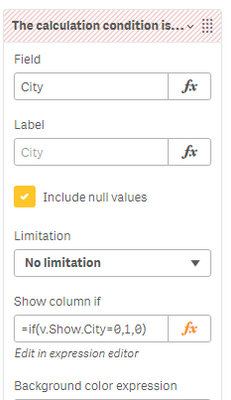
Thanks so much

 QFabian
- Mark as New
- Bookmark
- Subscribe
- Mute
- Subscribe to RSS Feed
- Permalink
- Report Inappropriate Content
Hi @davyqliks , i think you dont need to put the if , just use the evaluation, like this :
$(v.Show.City)=0
or
v.Show.City=0
did it work for you? give like and mark the solution as accepted.
davyqliks
- Mark as New
- Bookmark
- Subscribe
- Mute
- Subscribe to RSS Feed
- Permalink
- Report Inappropriate Content
hi @QFabian
I really appreciate the help, thanks.
I have this variable:
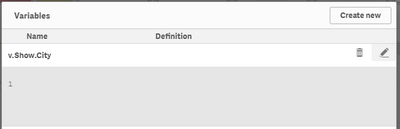
and have added the suggested to the show column if setting in the dimension for City:
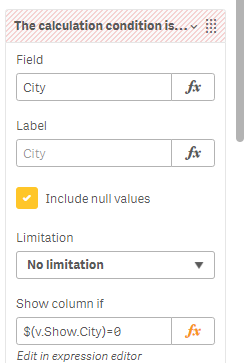
and
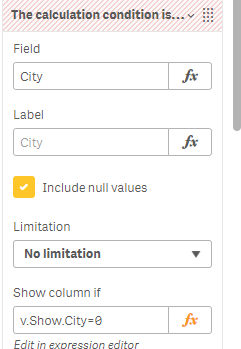
but when i select a city from the map
the citry column does not show in the table..
I think maybe i am missing something.
Thanks in advance again
DQ
jneppl
- Mark as New
- Bookmark
- Subscribe
- Mute
- Subscribe to RSS Feed
- Permalink
- Report Inappropriate Content
Hi @davyqliks
you can try to use a function like "GetSelectedCount" that checks if you selected values in a specific field.
Try something like if(GetSelectedCount("Fieldname") > 0, 1, 0) as show condition.
Regards
davyqliks
- Mark as New
- Bookmark
- Subscribe
- Mute
- Subscribe to RSS Feed
- Permalink
- Report Inappropriate Content
Thank you so much, this is exactly what i was looking for.
DQ
