Unlock a world of possibilities! Login now and discover the exclusive benefits awaiting you.

- Qlik Community
- :
- Forums
- :
- Analytics & AI
- :
- Products & Topics
- :
- Visualization and Usability
- :
- Quarter in line graph
- Subscribe to RSS Feed
- Mark Topic as New
- Mark Topic as Read
- Float this Topic for Current User
- Bookmark
- Subscribe
- Mute
- Printer Friendly Page

- Mark as New
- Bookmark
- Subscribe
- Mute
- Subscribe to RSS Feed
- Permalink
- Report Inappropriate Content
Quarter in line graph
hi all,
I need to display the line graph for quarterly. Last 4 quarters.
quarter name should be 3/31, 6/30, 9/30 and 12/31 of every year.
Now presently running last quarter so it should show from last quarter of last year and 3 quarters of this year.
How can i achieve this.
Thanks,
Kumar
- Tags:
- last quarter
- « Previous Replies
-
- 1
- 2
- Next Replies »

 karthikeyan1504
- Mark as New
- Bookmark
- Subscribe
- Mute
- Subscribe to RSS Feed
- Permalink
- Report Inappropriate Content
Hi,
We can achieve this in two simple ways.
We can create a calendar or month/3 as dimension and have a if condition to restrict latest 4 quarters.
- Mark as New
- Bookmark
- Subscribe
- Mute
- Subscribe to RSS Feed
- Permalink
- Report Inappropriate Content
I will get the quarter if i use the below script:
'Q' & Ceil(Month(CanonicalDate) / 3) AS Quarter,
I will get as Q1,Q2,Q3,Q4. how can i get it as 3/31, 6/30, 9/30 and 12/31, last day of last month with last month in the quarter.

 jagan
jagan
- Mark as New
- Bookmark
- Subscribe
- Mute
- Subscribe to RSS Feed
- Permalink
- Report Inappropriate Content
Hi,
Try like this
Month(QuarterEnd(DateFieldName)) & '/' & Day(QuarterEnd(DateFieldName)) AS Quarter_End_Date
Regards,
jagan.

 brunobertels
- Mark as New
- Bookmark
- Subscribe
- Mute
- Subscribe to RSS Feed
- Permalink
- Report Inappropriate Content
Hi
Have a look with quarterend function in Qlik help
try this expression :
date(quarterend(CanonicalDate),'MM/DD')
give this in e textbox
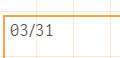
Bruno
- Mark as New
- Bookmark
- Subscribe
- Mute
- Subscribe to RSS Feed
- Permalink
- Report Inappropriate Content
I am using below dimension and measure
Dimension: date(quarterend(CanonicalDate),'MM/DD')
Measure:
Count({$<DateType = {invitation},
CanonicalDate = {">$(date(Quarterend(Max(CanonicalDate),-3),'MM/DD'))<=$(date(Quarterend(Max(CanonicalDate)),'MM/DD'))"}>}invitation_id)
It's not showing all quarters instead of last 4 quarters
brunobertels
- Mark as New
- Bookmark
- Subscribe
- Mute
- Subscribe to RSS Feed
- Permalink
- Report Inappropriate Content
May be like this : ( Note the single quote around '>' and '<=' )
Count({$<DateType = {invitation},
CanonicalDate = {"'>'$(date(Quarterend(Max(CanonicalDate),-3),'MM/DD'))'<='$(date(Quarterend(Max(CanonicalDate)),'MM/DD'))"}>}invitation_id)
Not sure it will work , I'am newbee in set analysis .
Bruno
- Mark as New
- Bookmark
- Subscribe
- Mute
- Subscribe to RSS Feed
- Permalink
- Report Inappropriate Content
No, That's wrong we should not use single quote like that
 reddy-s
- Mark as New
- Bookmark
- Subscribe
- Mute
- Subscribe to RSS Feed
- Permalink
- Report Inappropriate Content
Hi Pramodgc3
As per your code it would only return 4 dimmension values for each year. Instead as Jagan guggested use :
Dimmension as "Month(QuarterEnd(DateFieldName)) & '/' & Day(QuarterEnd(DateFieldName))" and you respective measure.
This should solve your issue.
- Mark as New
- Bookmark
- Subscribe
- Mute
- Subscribe to RSS Feed
- Permalink
- Report Inappropriate Content
If i use like above i'm getting all the quarters value, means for dec/31 it's showing from all the year,
what i need is last 4 quarters, means dec/31/2014, mar/31/2015, jun/30/2015, sep/30/2015
- « Previous Replies
-
- 1
- 2
- Next Replies »